Dell Ultrasharp U2414H

Never available again
View alternatives in the sidebar
View alternatives in the sidebar
Product number | 499000 | |
|---|---|---|
Manufacturer code | 210-ADUL | |
Brand | Dell | |
Processing of your defect | Carry-in warranty | |
Old product returned for free |
Screen size | 24 inches | |
|---|---|---|
Recommended display resolution | 1920x1080 | |
Sharpness | Full HD (1080p) | |
Aspect ratio | Standard (16:9) | |
Refresh rate | 60 Hz | |
Response time | 8 ms | |
Panel type | IPS panel | |
Brightness | 250 cd/m2 | |
Local dimming | ||
HDR support | ||
Contrast ratio | 1000 | |
Touchscreen | ||
Screen reflection | Anti-glare | |
Blue light filter | ||
Flicker-free technology | ||
Color space | sRGB | |
sRGB color coverage percentage | 96 % | |
Color depth | Less than 17 million colors (less than 8-bit) | |
Adaptive Sync | ||
Resolution width | 1920 pixels | |
Resolution height | 1080 pixels | |
Anti-reflection type | Anti glare | |
Horizontal viewing angle | 178 ° |
Height | 48,58 cm | |
|---|---|---|
Width | 53,91 cm | |
Depth | 18,5 cm | |
Weight | 5,76 kg | |
Color | Black | |
Including stand | ||
Material | Plastic | |
Cable management | ||
Curved |
Number of HDMI connectors | 2 | |
|---|---|---|
Number of Female HDMI type A 1.4 ports | 2 | |
Number of Female Standard DisplayPort 1.2 ports | 2 | |
Number of female standard USB-A ports | 3 | |
Female standard USB-A port version | 3.0 | |
Number of female 3.5mm TS Audio Jack ports | 1 | |
Number of USB ports | 4 |
Adjustable in height | ||
|---|---|---|
Tiltable | ||
Pivotable stand | ||
Pivot function | ||
VESA mount option | ||
VESA mount | 100x100mm |
Energy consumption standby | 0,5 W | |
|---|---|---|
Energy consumption active | 16 W |
Built-in speakers | ||
|---|---|---|
Split screen | ||
Kensington lock | ||
Best tested |
Image quality according to customers | Good | |
|---|---|---|
Design according to customers | Very nice |
Sharpness | Full HD (1080p) | |
|---|---|---|
Curved | ||
Aspect ratio | Standard (16:9) | |
Refresh rate | 60 Hz | |
Response time | 8 ms | |
Panel type | IPS panel | |
Color depth | Less than 17 million colors (less than 8-bit) | |
Built-in speakers |
According to our monitor expert
The IPS panel displays true-to-life colors from all angles.
Tilt the screen for good posture.
This monitor is adjustable in height for comfortable posture.
An HDMI cable isn't included with this monitor.
This monitor doesn't have integrated speakers to play music.
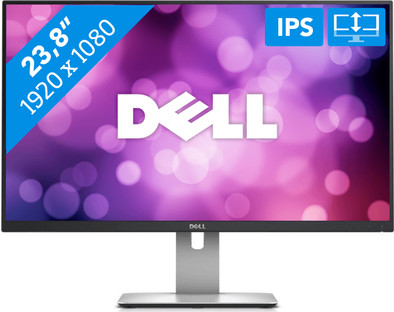
The Dell U2414H is a 23.8-inch Full HD monitor for at the office. Thanks to the IPS technology, you'll enjoy true-to-life color representation and sharp images from all angles. Text, for example, is easy to read, even if you're sitting at your monitor with several people. Because the Dell U2414H is adjustable in height, pivotable, tiltable, and rotates 90 degrees, you'll always work in the most optimal setup. This monitor can be connected via HDMI or DisplayPort. In addition, it's equipped with an MHL port. Connect your Android phone and check out apps, documents and images that you've worked on while on the go. In addition, the Dell U2414H has an integrated USB hub, so you can easily connect peripherals.
5 stars
97
4 stars
51
3 stars
4
2 stars
0
1 star
0
I bought this monitor a few weeks ago, despite a lack of a good review. Because that's what I do before I make a purchase on the internet. It took several weeks of research and comparison, after which I contacted Coolblue, because I wanted to make sure that if I was not satisfied with my purchase, I could return it. And that was possible. During the blue days of Coolblue I bought my monitors, and the next morning I had them in my possession. Good job!
Briefly outline my profile: I'm a Graphic Media student and an amateur photographer in my spare time. So it's important to me that I have a lot of workspace, but above all, that the colors I want to see on my screen are actually the colors when I go to print. I use these monitors in combination with a 15" Macbook Pro Retina.
I need a lot of workspace. That is why I bought two monitors. Because this monitor has an edge of only a few millimeters, the edge certainly does not disturb when you place these two next to each other. However, this was not my original idea. First I went looking for a 27" monitor for some time, but unfortunately most of the 27" monitors have a resolution of 1920 x 1080. Or you have to pay a lot more. And I just didn't care for that. I looked for affordable alternatives, and couldn't find them right away. I am very fond of the 'looks' of my device. After all, I easily have to sit and watch it for 8 hours a day.
It is certainly a plus that I can adjust this screen in height. Also that I have the ability to rotate my screen both left and right, as well as rotate it 90 degrees.
Because this device has good looks, a good IPS screen that faithfully reproduces the colors, and also gives me the option to connect two screens to my Macbook (via DisplayPort, which is included!) this is the ideal screen for me.
Ideal, but not yet perfect. I am therefore a critical user. What I find a pity, or at least detracts from the device, is the fact that they have used touch buttons. At first I didn't seem to be immediately annoyed by it, nor did it cause any problems. Now, a big two weeks later, it sometimes happens that I can't turn off my monitor because the touchscreen button is not doing its job. Simply unplug and plug in again to 'reset' the button, allowing you to turn the monitor off again.
To conclude, I would like to mention that despite the use of touch buttons, I am a satisfied customer.
Jonas Leupe
9 October 2014
Automatically translated from Nederlands
I bought two of these monitors to daisy chain them to a surface pro 3 tablet via the mini display port. Upon receipt, one of the monitors turned out not to work, which was replaced without further questions by coolblue (tribute). After a few days of experimenting I gave up daisy chaining. That just doesn't work, there are also many forums reports about it. In addition, the monitor sometimes does not come out of its sleep mode and you have to pull the plug in and out. In terms of design, it is a beautiful monitor with a very thin edge, you have to take into account that part of the screen is also used as a bezel. The edge is therefore somewhat thicker than just the 'cabinet'. The monitor has many connection options and many setting options. the lack of a few small internal boxes is made up for by an audio out or an optional soundbar from dell, the setting options and display are perfect for this type of monitor.
Pieter van Andel
23 October 2014
Automatically translated from Nederlands
An important reason for purchasing this screen was the ability to adjust the height. I hate that you have to put something under your screen to make it higher. Other important things were matte screen, price, connectivity and stability.
Especially stability is sometimes difficult to determine without being able to see the screen. Everything can be found in the specifications, but not the stability. Because I had experience with Dell and similar screens, I assumed it to be very stable. And yes, it certainly is. Although it is the 24 inch screen, the screen remains very stable.
It may not be the sexiest screen but I still think it looks nice on its own. It certainly gives a professional and decent look.
The screen also has many connectivity options. I didn't need this per se, but it made it easy for me to hang my screen on my Macbook. I didn't have to buy an adapter or extra cable myself. Just plug in the Mini Displayport and you're done. And because such cables or adapters quickly cost some money, I thought this was a plus. You just have to make sure you are connecting a Mini Displayport input and not the output I had done. Then of course your screen can't work :-)
I'm not an expert on image quality, so I'm not going to comment. For my purpose (office screen) it is perfect.
The screen is packed extremely well in the box (it wasn't even easy to get it out).
The delivery from Coolblue was also great. Ordered around 9:30 pm, delivered the next day at 10:30 am. Yes, that's crazy!!!!
Tom De Ryck
18 September 2014
Automatically translated from Nederlands
