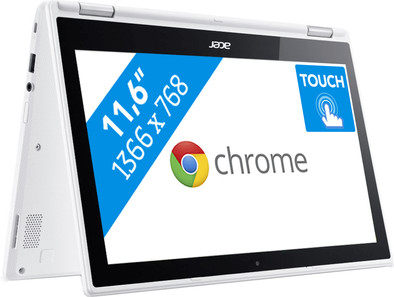
Acer Chromebook R11 CB5-132T-C11U
Never available again
View alternatives in the sidebar
View alternatives in the sidebar
According to our laptop expert
You can use the Acer Chromebook R11 CB5-132T-C11U as both a tablet and a laptop. That's useful for when you're on the go for school or work. Use the Chromebook as a tablet by folding the keyboard back 360 degrees behind the screen, and swipe easily through all your files and apps on the touchscreen. Thanks to the Chrome OS operating system, your laptop boots within a few seconds. By logging in to your Google account, you'll gain instant access to your files in the cloud. Here, you can also store new files you've been working on. With the integrated virus protection and online backup for all your files, you'll always work safely with a Chromebook.
Note: Windows programs don't run on a Chromebook. Do you want to use Microsoft Office? If so, simply buy Office 365 or download the Office app from the Google Play Store.
Screen size | 11,6 inches | |
|---|---|---|
Processor | Intel Celeron | |
Internal RAM | 4 GB | |
Total storage capacity | 64 GB | |
Video card | Intel HD Graphics 400 | |
Panel type | IPS panel | |
Touchscreen |
5 stars
42
4 stars
33
3 stars
3
2 stars
1
1 star
0
A great device for browsing and word processing. If you don't need heavy programs and are looking for portability at the same time, an 11-inch chromebook is the ideal solution. With a good long battery life (just count on +8 hours), bright screen and excellent sound, it is certainly also quite suitable for consuming all kinds of media. The keyboard is surprisingly adequate for an 11-inch notebook and the trackpad is certainly not inferior to the average Windows laptop. Compared to the glass trackpads from Apple, for example, there is unfortunately a bit more friction during use, which does not have to be terribly disturbing.
And for the enthusiast, running a Linux distro alongside Chrome OS is no problem at all (and the 64 GB storage is no superfluous luxury for this). For example, this opens doors to more extensive programs such as GIMP (image editing) or Libre Office.
Although the fully tiltable screen is pleasant to use, especially in combination with the touchscreen, Acer does not do much with the design and the plastic housing still feels somewhat vulnerable. A good sleeve or case therefore seems to be advisable when transporting this chromebook.
Given that the quadcore variant is difficult to get in the Netherlands, this is still a consideration that can be made. The model I bought here, with the Intel Celeron N3060 (dualcore) scores better on most single core benchmarks, but with an N3160 (quadcore) multitasking could potentially be done more efficiently. Personally, I find the single core performance more important, because it is more noticeable when it is insufficient - which is certainly not the case with this R11.
Finally, the availability of the Google playstore with Android apps is an unmissable advantage of this chromebook. These apps fill an important gap between the windows/apple laptops and chromebooks. Actually, due to its touchscreen and app capabilities, this Chromebook is a better tablet than most Android tablets currently available.
All in all, a great product, without too many bells and whistles, which you can basically use right away. The touchscreen and the Android apps make this chromebook surpass other models, especially in this price range.
Christopher
15 September 2017
Automatically translated from Dutch
Been busy comparing models on the internet in advance. This one was good value for money. So after much comparison I chose this one. If you go for a Chromebook, you know that you usually need an internet connection and that it doesn't have Windows installed on it. So the bad criticism below is not fair. The chromebook meets my expectations perfectly. The 11-inch screen is sharp and clear, the keyboard is easy to use, the housing is strong enough (I bought a sleeve for it right away), the battery lasts a long time, and startup is lightning fast. Now just looking for the best apps.
Petra
15 January 2017
Automatically translated from Dutch
After much hesitation, I went for a chromebook instead of a notebook. Work mainly through Gmail/Google account and save files to a flash drive if necessary. Don't regret the choice! The chromebook is wonderfully fast, configuration is easy to set up and it is light, solid and easy to carry. Size is fine to work on, was initially afraid that an 11.6 inch would be a bit too small. But in practice it is workable, the keyboard is large enough to type on for some time. The battery lasts a long time and other apps are also easy to install. I think it is recommended!
Renée
18 April 2017
Automatically translated from Dutch
Product number | 736466 | |
|---|---|---|
Manufacturer code | NX.G54EH.012 | |
Brand | Acer | |
Warranty | 2 years | |
Processing of your defect | Carry-in warranty | |
Old product returned for free |
Operating system | Google ChromeOS | |
|---|---|---|
Screen size | 11,6 inches | |
Processor | Intel Celeron | |
Internal RAM | 4 GB | |
Total storage capacity | 64 GB | |
Video card | Intel HD Graphics 400 | |
Touchscreen |
Panel type | IPS panel | |
|---|---|---|
Sharpness | WXGA | |
Resolution width | 1366 pixels | |
Resolution height | 768 pixels | |
Screen reflection | Glossy | |
Adaptive Sync |
Processor cores | Dual-Core (2) | |
|---|---|---|
Processor code name | Braswell | |
Clock speed | 1,6 GHz | |
Turbo speed | 2,48 GHz | |
Cache memory | 2 MB |
Maximum internal memory | 4 GB | |
|---|---|---|
Memory composition | 1x 4GB | |
Memory slot 1 | 4 GB | |
Total number of RAM slots | 1 |
Storage type | Flash | |
|---|---|---|
Hard drive type | SATA |
Type of video card | Shared |
|---|
Operating system language | Dutch, English, Multiple languages can be configured |
|---|
Laptop model | 2-in-1 | |
|---|---|---|
Color | White | |
Material | Plastic | |
Height | 19,2 mm | |
Width | 294 mm | |
Depth | 204 mm | |
Weight | 1,4 kg |
Mobile data connection | No | |
|---|---|---|
WiFi standards | Wireless AC | |
Bluetooth | ||
Bluetooth version | 4.0 |
USB port | ||
|---|---|---|
Number of USB ports | 2 | |
Number of female standard USB-A ports | 2 | |
Female standard USB-A port version | 2.0, 3.0 | |
HDMI connector | ||
Number of HDMI connectors | 1 | |
Female HDMI Type A port version | 1.4 | |
DisplayPort connector | ||
VGA connector | ||
Thunderbolt connector | ||
Headphone jack | ||
Memory card reader |
Keyboard layout | QWERTY | |
|---|---|---|
Physical keyboard layout | ANSI | |
Numeric keypad | ||
Spill-resistant | ||
Backlit keyboard | ||
Mechanical keyboard | ||
Programmable keys |
Built-in microphone | ||
|---|---|---|
Number of speakers | 2 | |
Sound reproduction | Stereo | |
Integrated computer speakers brand | Standard speakers |
Built-in camera | ||
|---|---|---|
Image definition webcams | HD Ready (720p) |
Battery technology | Lithium-ion | |
|---|---|---|
Maximum battery life | 9 hours | |
Power connector input type (female) | Other brand/product specific |
Manufacturer's warranty |
|---|
TPM (Trusted platform module) | ||
|---|---|---|
Kensington lock | ||
Windows Hello | ||
Fingerprint identity sensor |
Extra installed software |
|---|