Never available again
View alternatives in the sidebar
View alternatives in the sidebar
Product number | 745349 | |
|---|---|---|
Manufacturer code | 90MP00A1-B0UA00 | |
Brand | ASUS | |
Processing of your defect | Carry-in warranty | |
Old product returned for free |
Mouse model | Full-size | |
|---|---|---|
Input | Laser | |
Number of buttons | 12 | |
Ergonomic design | ||
Left or right-handed | Right-handed | |
Adjustable DPI | ||
Mouse controls | Buttons, Scroll wheel | |
Suitable for gaming | ||
Recommended for game genre | MOBA, RPG, [FPS] | |
Mouse grip technique | Claw, Palm | |
Mouse weights | ||
Programmable buttons | ||
Number of programmable buttons | 12 | |
Lighting peripherals | ||
Number of colors lighting | 16.8 million | |
Zone lighting | Logo, Scroll wheel, Side(s) | |
Zones separately lit | ||
Silent mouse | ||
Horizontal scrolling | ||
Mouse surface | Any surface | |
Product family | ROG |
Connection type | Wireless | |
|---|---|---|
Braided cable | ||
Cable length | 1,5 m |
Plug and Play | ||
|---|---|---|
Compatible with operating system | Windows |
Power supply type | USB port PC/laptop | |
|---|---|---|
Battery level indicator |
Color | Black | |
|---|---|---|
Width | 89 mm | |
Height | 45 mm | |
Depth | 137 mm | |
Material | Plastic | |
Finish | Matte and glossy | |
Weight | 178,5 g |
Connection type | Wireless | |
|---|---|---|
Mouse model | Full-size | |
Ergonomic design | ||
Left or right-handed | Right-handed | |
Suitable for gaming | ||
Silent mouse | ||
Depth | 137 mm | |
Mouse controls | Buttons, Scroll wheel |
According to our mouse expert
The mouse is made of a magnesium alloy, among others, so the mouse is lighter and quite sturdy.
You can replace or improve some components of this mouse. That's handy, if you want to swap the switches of the left and right mouse button (see the manual).
With a total of 12 buttons, you'll have a full arsenal of <em>skills</em> and functions in the palm of your hand to control any MMO and MOBA game.
This gaming mouse is only suitable for right-handed gamers.
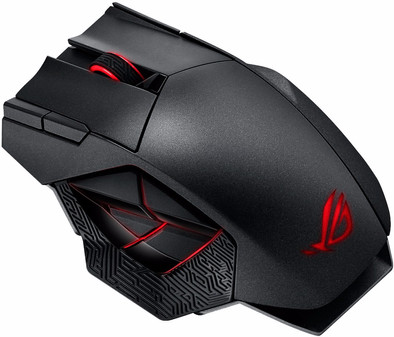
The Asus ROG Spatha is a durable MMO gaming mouse with options for upgrades. You can swap the mouse switches with the included screwdriver (see the manual). The mouse is made of a special magnesium alloy, making the mouse light, sturdy, and durable. The charging dock is magnetic, so the mouse sticks to the charging dock. It's handy and makes your battle station look stylish. With 12 different programmable buttons and 4 different profiles, you can assign the most important functions to each of the buttons. Are you playing a shooter and precision is essential? Use the wired mode in the mouse to boost accuracy.
Called Sanne from Coolblue this week (weird last name, had a nice conversation), and she did have some alternatives regarding the price of this mouse (including an awesome pink Razer Lancehead TE), but they didn't turn out anyway.
I had been looking for a new mouse that I liked for a while, because the last one that did (the R.A.T. 5 and 7 mice) is the factory of bankruptcy. I have fairly large hands, and need a "grab" mouse (not a claw grip). The fit is good, the pinky rest is not too small and the mouse is quite a bit lighter than the RAT7 I had (170 grams now, compared to 208 grams before), so I had to get used to it.
Especially because I often make a 3d drawing and game, I have a mouse in my hand a lot and it was very important to me that my wrist/fingers did not suffer from ailments and fortunately that is not the case.
Basically the mouse works straight out of the box. Connect, "pair" on the dock, turn on the mouse and "pair" on the mouse. However, it is recommended to download the software. You can adjust the LEDs to your heart's content, and give the buttons a different destination if you find that fun or useful.
The buttons on the side are easily accessible and need a total of 20 clicks to no longer have to think about where they are.
I watched a number of reviews on YouTube beforehand, but that didn't make me very happy. "too big" "too heavy to lift" and "troublesome buttons"..... "Too big" might be right for a lot of people, but for me (span 25cm from thumb to little finger, palm 11cm from wrist to middle finger) the mouse was very comfortable. "Too heavy to lift" yes I don't know, maybe I'm not "pro" enough for gaming, but I can easily pick it up between thumb and little finger without pressing a button. I couldn't find any difficult buttons; there is a bit of slack on everything, but no more than, say, a button on a laptop keyboard.
There are 2 extra switches for the primary mouse buttons (L/R), and after a lot of searching it turns out that the original buttons (D2FC-F-7N) give 60gf and the supplied buttons (D2F-01F) 75gf. That is 25% more resistance that the supplied buttons give compared to the original. I'm going to give it a try first, but based on my gut feeling I think I'll want the heavier clicks within a week.
The mouse works perfectly wirelessly and doesn't give me the impression that there is any lag anywhere. The dock indicates the battery status (0-14% red, 15-39% orange, 40%+ full) by means of the LED on the front. I haven't tried the mouse wired yet, but the cable looks pretty nice with sturdy connectors and a black braided jacket.
The carry case initially contains the dock with foot (foot is made of blasted anodized aluminum and the dock itself has one/several magnets in it). When they have been removed, there are still cables and some stickers in it. If you want to go out a lot, you will want to put the mouse in the carry case, but then the dock with foot (as I tried) no longer fits. That's a shame, but the cable (for wired mouse use) does fit. So I'm going to adjust that. Because when traveling and not being able to use the mouse wirelessly is... special.
TL;DR I do want to say: -that the mouse is preferably suitable for a right hand. -if you have small(er) hands, you might try the mouse first (shop/friend) before purchasing. -I'm very pleased with it.
Minus point. There is (to my knowledge) no small dongle for it. The large dock is not always handy. However, if you use the mouse with one desktop and not in combination with a laptop/notebook, then there is little to worry about.
One more thing that might not help you: The box smells like new car on the inside. Well, I liked it.
Pieter Ouborg
6 May 2018
Automatically translated from Nederlands
It's a great gaming mouse. It sits very well in the hands and all 12 buttons are easy to use. And the leds are also welcome; )
DIRK VAN DE GINSTE
3 September 2018
Automatically translated from Nederlands
I am very happy with this purchase. it's not a cheap mouse, but it's ideal for gamers, and it looks great too!
Renske Verniers
23 October 2017
Automatically translated from Nederlands
