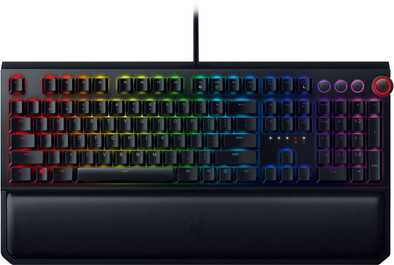
Razer BlackWidow Elite Mechanical Gaming Keyboard Green Switch QWERTY
Never available again
View alternatives in the sidebar
View alternatives in the sidebar
Product number | 821219 | |
|---|---|---|
Manufacturer code | RZ03-02620100-R3M1 | |
Brand | Razer | |
Processing of your defect | Via Coolblue | |
Old product returned for free |
Keyboard layout | QWERTY | |
|---|---|---|
Geographic keyboard layout | US layout | |
Physical keyboard layout | ANSI | |
Typing comfort | High-end | |
Backlit keyboard | ||
Spill-resistant | ||
Number of colors lighting | 16.8 million | |
Brightness of backlight adjustable | ||
Programmable keys | ||
Multimedia shortcuts | ||
Flat keys | ||
Suitable for gaming | ||
Recommended for game genre | MOBA, RPG, [FPS] | |
Mechanical keyboard | ||
Mechanical key type | Razer Green (clicky) | |
Type of keycaps | High |
Connection type | Wired | |
|---|---|---|
Type of USB port | Standard USB-A | |
Cable length | 1,8 m |
Keyboard composition | Keyboard, Numpad | |
|---|---|---|
Ergonomic design | ||
Height | 4,3 cm | |
Width | 44,8 cm | |
Depth | 16,5 cm | |
Wrist rest | ||
Color | Black | |
Weight | 1,69 kg |
Power supply type | USB port PC/laptop |
|---|
Connection type | Wired | |
|---|---|---|
Backlit keyboard | ||
Keyboard composition | Keyboard, Numpad | |
Ergonomic design | ||
Mechanical keyboard | ||
Physical keyboard layout | ANSI | |
Geographic keyboard layout | US layout | |
Suitable for gaming |
According to our keyboard expert
Thanks to the multimedia shortcuts you can easily operate different Windows functions, like adapting the volume while playing.
Thanks to the integrated wrist rest you can play comfortably and reduce your chance of wrist strain.
This keyboard is suitable for gaming and intensive text processing, thanks to its responsive Razer Green mechanical switches.
In order to optimally use the lighting and macro setting, the external Razer Synapse software is required.
The Razer BlackWidow Elite Mechanical Gaming Keyboard combines comfortable typing with a minimalist design and excellent mechanical switches. Thanks to the integrated wrist rest, you can rest your wrists in a stable position during gaming and typing long texts. Add a sensitive mechanical Razer Switch, and you're sure to start your game with relaxed reflexes. The useful integrated media switches and the volume slider allow you to easily access your music and in-game audio while gaming. You can also connect on-the-fly macros and program an entire Chroma light show. You can all store all of this on the internal memory of the BlackWidow Elite.
Installation ease
Ergonomics
my first mechanical keyboard and so far this is the best keyboard i have ever typed with.
Björn
26 September 2019
Automatically translated from Nederlands
I am writing this review after +-2 months after purchasing a Yellow switch keyboard. I have previously used a wireless mouse/membrane keyboard. Grab a cup of tea and sit down for a while.
First of all I would like to give my ovation to Razer for coming up with a very stable build of the switch (also valid for the Orange and Green) with a trunk and two brackets to the left and right of the trunk: [( + )]. As a result, keys have very little "wobble".
My personal experience with the Yellow switch is that I still have trouble with it when I'm typing, that I accidentally rest my pinkie or ring finger on another key and it is accidentally pressed or that I am typing between two keys. pressed and this actually activates two keys. (Yes, also during this review). If I could buy this keyboard again, I would have gone for the Orange switch, because then you still have a bump before you activate a key. This allows you to rest your fingers on the keyboard.
After unboxing, I looked at the keyboard and supplied palm rest. The wrist rest is solid and magnetically built. The keyboard has a long, fairly thick cable with 2x USB and 1x 4-pin aux cable (headphones + microphone). It is mandatory to connect one USB cable to the computer. You can connect the other USB + AUX if you want to use the ports on the side of the keyboard. The keyboard weighs 1.7 kg (compared to my membrane keyboard). This is not necessarily a negative point. It is also no bigger than a normal keyboard and has its media keys + rotating volume dial. I like this! The keyboard is aesthetic. (never thought to use this word in a review).
In this review I will also explain what the keyboard can do without synapse software, because the text is also not quite right: "You can also easily connect on-the-fly macros and program an entire Chroma light show, which you save all on the internal memory of the BlackWidow Elite." The keyboard itself (without synapse) can perform one kind of lighting, namely cycling through all colors. So all keys rotate equally through all colors 16 million colors .. It is therefore not possible to save a chroma light show on the internal memory. The brightness is adjustable. It is, however, possible to record macros on-the-fly and assign them to all(!) keys. These can later be read in by chroma for editing or reassignment to a key. You can delete macros by recording a macro with one key press and then saving it to the same key. (not in the manual). I hardly ever use the game mode, but it is useful if you don't want to accidentally press the Windows key or ALT+F4.
With synapse software you can have each key do something different in terms of light. Automatically call up a light theme for every game: no problem. Using your keyboard as Ambilight in games? no problem it's all there! (Doesn't work with netflix, unfortunately) No combination is too crazy. There is even a snapping Pacman animation made with the lighting ;). If you want it, remapping keys is a breeze. Using the FN key on the keyboard use "hypershift". This is a virtual layer on your keyboard with which you can remap all(!) keys or bind a macro to it, without being bothered by it when you are typing normally. eg: A = A. FN+A = a macro. These remap macros can be saved on the internal memory of the keyboard. There are 4 slots that you can provide with saved or assembled programs/remaps/macros. You can then cycle through the 4 slots with a simple shortcut. You can then use this without synapse. Super handy feature, but not yet used. in Synapse you can store a library of programs!
Have you ever eaten at your desk? no problem. All keys are removable for easy cleaning.
Conclusion: If you are looking for a keyboard with office/game functions, the Razer BlackWidow Elite with Orange switches is a very good choice. The Yellow switch is very good for gaming alone and can cause some frustration during office use. In terms of design, it is an eye-catcher. In terms of functions, you will not be short of anything for your games. With the expectation that you will use synapse software, this is a highly recommended keyboard!
Mesut Baysan
1 August 2019
Automatically translated from Nederlands
Highly recommended keyboard for gaming.
Maarten Boersma
24 December 2018
Automatically translated from Nederlands