LG 34GK950F UltraGear
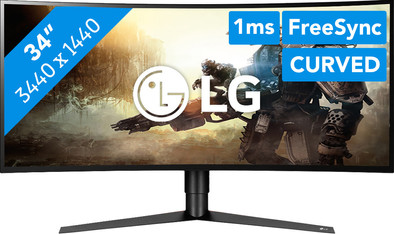
Never available again
View alternatives in the sidebar
View alternatives in the sidebar
Product number | 823838 | |
|---|---|---|
Manufacturer code | 34GK950F-B.AEU | |
Brand | LG | |
Processing of your defect | Via Coolblue | |
Old product returned for free |
Screen size | 34 inches | |
|---|---|---|
Recommended display resolution | 3440x1440 | |
Sharpness | Quad HD (1440p) | |
Brand-specific image technology | [LG Nano IPS] | |
Aspect ratio | Ultrawide (21:9) | |
Refresh rate | 144 Hz | |
Response time | 1 ms | |
Panel type | IPS panel | |
Brightness | 400 cd/m2 | |
Local dimming | ||
HDR support | ||
Contrast ratio | 1000 | |
Touchscreen | ||
Screen reflection | Anti-glare | |
Blue light filter | ||
Flicker-free technology | ||
Color space | DCI-P3 | |
Color depth | 1 billion colors (10-bit) | |
Adaptive Sync | ||
Type of adaptive sync | FreeSync | |
Resolution width | 3440 pixels | |
Resolution height | 1440 pixels | |
Anti-reflection type | Anti glare | |
Horizontal viewing angle | 178 ° |
Height | 36,32 cm | |
|---|---|---|
Width | 81,69 cm | |
Depth | 2,86 cm | |
Weight | 7,9 kg | |
Color | Black | |
Including stand | ||
Material | Plastic | |
Cable management | ||
Appearance | Neutral | |
Curved |
Number of HDMI connectors | 2 | |
|---|---|---|
Number of headphone jacks | 1 | |
Type of headphone connection | 3.5mm (TRRS) | |
Number of female standard USB-A ports | 2 | |
Female standard USB-A port version | 3.0 | |
Number of female 3.5mm TS Audio Jack ports | 1 | |
Number of female 3.5mm TRRS Audio Jack ports | 1 | |
Type of USB port | Standard USB-A | |
Number of USB ports | 3 |
Included by default | DisplayPort cable, HDMI cable |
|---|
Adjustable in height | ||
|---|---|---|
Tiltable | ||
Pivotable stand | ||
Pivot function | ||
VESA mount option | ||
VESA mount | 100x100mm |
Energy consumption standby | 0,3 W | |
|---|---|---|
Energy consumption active | 70 W |
Built-in speakers | ||
|---|---|---|
Split screen | ||
Kensington lock | ||
Best tested |
Recommended for use | Gaming, Image editing and graphic design, Internet, email, and text processing, Photo editing, Video editing, Watching movies in Full HD |
|---|
Sharpness | Quad HD (1440p) | |
|---|---|---|
Curved | ||
Aspect ratio | Ultrawide (21:9) | |
Refresh rate | 144 Hz | |
Response time | 1 ms | |
Panel type | IPS panel | |
Color depth | 1 billion colors (10-bit) | |
Built-in speakers |
According to our monitor expert
The ultrawide aspect ratio shows you more of your game.
The combination of 144Hz refresh rate and FreeSync provides fluently moving images without glitches.
The mood lighting completes your gaming setup.
At the highest resolution, the screen supports a refresh rate of 85Hz.
This monitor doesn't have integrated speakers to play music and hear the sound of your games.
Complete your gaming setup with the LG 34GK950F. This 34-inch curved ultrawide gaming monitor gives extra depth to your favorite games for an extra intense gaming session, thanks to the curved screen and the high Ultrawide QHD resolution. The extra wide screen shows you more of your game. If you have an AMD video card, you can benefit from the FreeSync 2 technology, which lets your video card cooperate with the screen to prevent any stutter during gameplay. You can overclock the refresh rate up to 144Hz, allowing you to game smoothly with a high amount of FPS. Motion Blur Reduction makes the image even more smooth, and reduces the response time. The integrated red mood lighting on the back of the monitor lets you complete the look of your gaming setup.
Note: For QHD gaming, you need a powerful video card, such as an NVIDIA GeForce RTX GPU or AMD Radeon RX 5000 series GPU, or an Xbox One X or S.
Installation ease
User friendliness
Image quality
Price-quality ratio
Design
Wonderful product, although tastes differ of course. Had another monitor of the same size before; It weighed almost 4 kilos more, had unclear controls and reset to basic when switching inputs. This monitor is a joy to use. Image quality is superb and already very well calibrated ex-factory. (Just turn the brightness down a bit.)
The comment about 85hz is not correct, everything works fine at 144hz if your video card and cable is suitable for Displayport 1.4.
It's also nice that this monitor is G-sync compatible, so the Freesync also works on nvidia cards (no idea if it's officially compatible, but it works fine)
Via the Onscreen software you can adjust your image settings, create split-screens or update the firmware from Windows with a few mouse clicks. You can even have the screen settings adjusted per application.
Unfortunately, the supplied cables are a bit short. But with a longer (displayport 1.4 compatible) cable that is solved in no time. There are also no speakers, but with headphones that is solved in no time (There is a 3.5mm headphone jack on the back)
Great product if you do both games and photo editing; most monitors are suitable for either games OR photo editing.
According to reviews the best settings: Game mode: Gamer 1 Brightness:
Bas
11 February 2019
Automatically translated from Nederlands
I am very happy with it myself. There are plenty of professional reviews online if you want to know more about the content. G-SYNC works fine on it, so no tearing. Little motion blur and ghosting. Downsides for me are the price, which is on the high side. Was waiting for the 200Hz VA panels myself (ACER X35 & ASUS PG35VQ), but they will be much more expensive if they ever come. So yeah, that kind of justifies it. The second downside is the IPS glow, but that is standard on every IPS screen, especially of this size. Mainly in the bottom left corner (I also see that complaint in several reviews). It is especially noticeable in dark scenes. Positioning the screen differently does help. But mine is on the wall so am restricted in movement. Backlight bleed is actually almost non-existent. I think it has an HDR certification, but this is nothing + it often doesn't work, so for a real HDR screen you have to look further. All in all, really recommended.
Berry
4 May 2019
Automatically translated from Nederlands
I use it for school work and gaming. So far it has been very useful. I really recommend it. It's perfect for gaming, especially now that the monitor's freesync works in tandem with g-sync.
Errin Olmer
8 June 2019
Automatically translated from Nederlands
