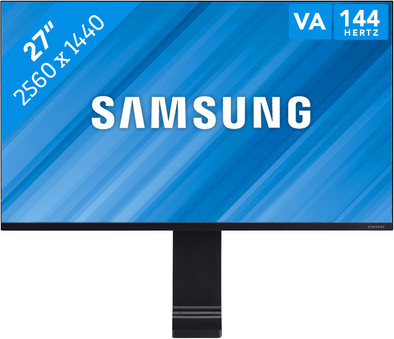
Samsung Space LS27R750QEUXEN
Never available again
View alternatives in the sidebar
View alternatives in the sidebar
Product number | 826890 | |
|---|---|---|
Manufacturer code | LS27R750QEUXEN | |
Brand | Samsung | |
Processing of your defect | Via Coolblue | |
Old product returned for free |
Screen size | 27 inches | |
|---|---|---|
Recommended display resolution | 2560x1440 | |
Sharpness | Quad HD (1440p) | |
Aspect ratio | Standard (16:9) | |
Refresh rate | 144 Hz | |
Response time | 4 ms | |
Panel type | VA panel | |
Brightness | 250 cd/m2 | |
Local dimming | ||
HDR support | ||
Contrast ratio | 3000 | |
Touchscreen | ||
Screen reflection | Anti-glare | |
Blue light filter | ||
Flicker-free technology | ||
Color space | sRGB | |
sRGB color coverage percentage | 100 % | |
Color depth | 1 billion colors (10-bit) | |
Adaptive Sync | ||
Resolution width | 2560 pixels | |
Resolution height | 1440 pixels | |
Anti-reflection type | Anti glare | |
Horizontal viewing angle | 178 ° |
Height | 73,03 cm | |
|---|---|---|
Width | 61,48 cm | |
Depth | 11,55 cm | |
Weight | 5,8 kg | |
Color | Black | |
Including stand | ||
Material | Metal | |
Cable management | ||
Appearance | Neutral | |
Curved |
Number of HDMI connectors | 1 | |
|---|---|---|
Number of Female HDMI type A 2.0 ports | 1 |
Included by default | HDMI cable |
|---|
Adjustable in height | ||
|---|---|---|
Tiltable | ||
Pivotable stand | ||
Pivot function | ||
VESA mount option |
Energy consumption standby | 0,5 W | |
|---|---|---|
Energy consumption active | 48 W |
Built-in speakers | ||
|---|---|---|
Webcam | ||
Split screen | ||
Kensington lock |
Image quality according to customers | Excellent | |
|---|---|---|
Design according to customers | Very nice | |
Recommended for use | Image editing and graphic design, Internet, email, and text processing, Watching movies in Full HD |
Sharpness | Quad HD (1440p) | |
|---|---|---|
Curved | ||
Aspect ratio | Standard (16:9) | |
Refresh rate | 144 Hz | |
Response time | 4 ms | |
Panel type | VA panel | |
Color depth | 1 billion colors (10-bit) | |
Built-in speakers |
According to our monitor expert
Thanks to the smart design, this monitor takes up a lot less space than a regular screen.
Easily mounted to the back of your desk.
The monitor has a virtually bezel-less design.
Due to the mounting bracket, your desk has to be placed a couple of millimeters from the wall.
This monitor doesn't have integrated speakers to play music and hear the sound of your games.
The Samsung Space LS27R750QEUXEN is a monitor that hardly takes up any space on your desk. Attach the monitor to the back of your desk or table with the integrated clamp. If you need the monitor, you simply pull it forward. Once you're done working, you push the screen backward again. On top of that, you won't be bothered by any cables, since these are neatly concealed by default. The 27-inch screen has a high WQHD resolution of 2560x1440 pixels, which means you have 1.5 times more space left for your windows compared to a Full HD screen.
5 stars
18
4 stars
7
3 stars
1
2 stars
0
1 star
0
Installation ease
User friendliness
Image quality
Price-quality ratio
Design
No MacOS drivers are provided and are not downloadable. On a Macbook Pro 15 mid 2015 the supplied HDMI cable works at 60hz, but not at 144hz. With a mini displayport 1.2 cable, the monitor works in Windows 10 at 144hz, but does not exceed 120hz in macOS Mojave 10.14.6 (on the same laptop of course). Also, macOS keeps resetting the refresh rate to 60hz after a reboot. MacOS recognizes the screen as 30.5-inch with a resolution of 1920 x 1080, while System Report recognizes the correct resolution of 2560 x 1440. The default color profile (LS27R75.icc) with which the monitor is detected is really to cry. The Windows color profile of the S27R75 can also be used in MacOS if you change the extension from icm to icc. However, this color profile is also desolate. Strangely enough, the windows color profile of the 32" variant, the S32R75, is actually quite fine and you can use it in macOS. Interesting to know is that after a firmware update the monitor indicates that it supports Freesync. By the way, I have this haven't been able to test yet. All in all, Samsung and Apple are making a mess of the drivers. It's a shame because it's a nice simple design with 144hz support. Hopefully the drivers will be adjusted, but until then I don't recommend this monitor on macOS.
Niels
21 September 2019
Automatically translated from Nederlands
This is certainly a monitor to get excited about. So enthusiastic that I immediately bought a second one for my partner. It's a real space saver. We have a narrow desk (60 CM) and the thick 20 CM that an average monitor occupies with a stand will cost you way too much space. That's where the handy foot of this monitor comes into play. It mounts on the desktop. It is therefore important that there is sufficient space between the wall and the desk. With us this is present through the wall supports. The foot fits right in there. Assembly was simple and fast. It takes a little effort to keep the weight in place as you tighten the foot, but it's not more than that.
The image quality is 4K, you have a lot of workspace on your desktop. I did find out that my MacBook Pro's HDMI dongle only did 4K at 30Hz and you notice that. Replaced with one with 4K at 60Hz and that's a huge improvement on your experience. The image quality is superior. VIEWING ANGLE This is something that disappoints me. As long as you're sitting right in front of it, it's great, but if you look to the side from something or tilt the screen itself, you quickly notice that the quality deteriorates. That is something that I think could be improved a bit.
A big but is that the standard that comes with it is the only one. Mounting must therefore be on a desktop. You can't take it with you to a Lan-Party, for example, because you don't put it down on a table. No other base or option is included. I do miss that. Also because I sometimes take a screen with me for a presentation.
Highly recommended for anyone looking for a screen that stays where it is mounted.
Niels van Renselaar
18 July 2019
Automatically translated from Nederlands
The screen is very easy to install. your efficiency increases because you can work with multiple screens at the same time.
Sofie
22 August 2019
Automatically translated from Nederlands
