Never available again
View alternatives in the sidebar
Choose your monitor
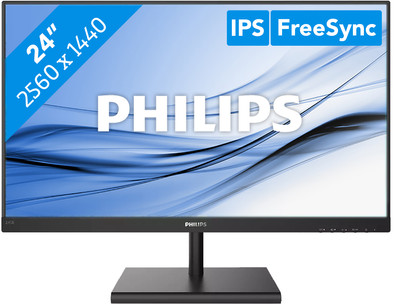
24 inches - Quad HD - IPS
Choose your monitor
View alternatives in the sidebar
24 inches - Quad HD - IPS
Choose your monitor
Product number | 835357 | |
|---|---|---|
Manufacturer code | 245E1S/00 | |
Brand | Philips | |
Processing of your defect | Via Coolblue | |
Old product returned for free |
Screen size | 23,8 inches | |
|---|---|---|
Recommended display resolution | 2560x1440 | |
Sharpness | Quad HD (1440p) | |
Aspect ratio | Standard (16:9) | |
Refresh rate | 75 Hz | |
Response time | 4 ms | |
Panel type | IPS panel | |
Brightness | 250 cd/m2 | |
Local dimming | ||
HDR support | ||
Contrast ratio | 1000 | |
Touchscreen | ||
Screen reflection | Anti-glare | |
Blue light filter | ||
Flicker-free technology | ||
Color space | sRGB | |
Color depth | Less than 17 million colors (less than 8-bit) | |
Adaptive Sync | ||
Resolution width | 2560 pixels | |
Resolution height | 1440 pixels | |
Anti-reflection type | Matte | |
Horizontal viewing angle | 178 ° |
Height | 41 cm | |
|---|---|---|
Width | 54 cm | |
Depth | 19,5 cm | |
Weight | 3,24 kg | |
Color | Black | |
Including stand | ||
Material | Plastic | |
Cable management | ||
Appearance | Neutral | |
Curved |
Number of HDMI connectors | 1 | |
|---|---|---|
Number of Female HDMI type A 1.4 ports | 1 | |
Number of Female Standard DisplayPort 1.2 ports | 1 | |
Number of female standard VGA ports | 1 |
Included by default | HDMI cable | |
|---|---|---|
Not included by default | USB-C cable |
Adjustable in height | ||
|---|---|---|
Tiltable | ||
Pivotable stand | ||
Pivot function | ||
VESA mount option | ||
VESA mount | 100x100mm |
Energy label | E | |
|---|---|---|
Energy consumption standby | 0,5 W | |
Energy consumption active | 17,94 W | |
Energy consumption per 1000h | 18 kWh | |
Annual energy consumption | 26,28 kWh | |
Annual energy costs | 10,51 euros |
Built-in speakers | ||
|---|---|---|
Webcam | ||
Split screen | ||
Kensington lock | ||
Best tested |
Recommended for use | Internet, email, and text processing, Watching movies in Full HD |
|---|
Sharpness | Quad HD (1440p) | |
|---|---|---|
Curved | ||
Aspect ratio | Standard (16:9) | |
Refresh rate | 75 Hz | |
Response time | 4 ms | |
Panel type | IPS panel | |
Color depth | Less than 17 million colors (less than 8-bit) | |
Built-in speakers |
According to our monitor expert
Enjoy sharp images thanks to the Quad HD resolution.
You can work comfortably with the tiltable display.
The medium-sized screen lets you open multiple windows and programs at the same time.
You can’t connect a second monitor or any peripherals to the monitor, because it doesn’t have a USB-C port.
This monitor doesn’t have built-in speakers for your music or other audio.
Installation ease
User friendliness
Image quality
Price-quality ratio
Design
This is my first 1440p display and I gotta say I lucked out on buying this particular monitor.
You could very well spend 50 dollars more on a different brand but you'd get an inferior display with the same feature set.
This monitor is borderline perfect for small time production work and mid to high end gaming. Set it to SRGB mode, make sure you use full RGB mode in your display settings and set the color to 8bit.
Make sure you set the Windows Display Settings to 75hz as it defaults to 60hz to be safe. Also go to the monitor settings and make sure the smart response is on Fast and nothing else.
This monitor took everything I threw at it with near perfection and the only real negatives I can say are the UI and the Brightness. When placed right next to my GW2270 VA panel, it is noticeably dimmer but at least you're getting 1.75 times the screen real estate to work with as well as nearly pure whites and crystal sharp imagery .
Just make sure you have a GPU that can handle this resolution when gaming as the demands are significantly higher than 1080p. Use an 8GB 570 or better.
Zaid Ashley
12 August 2019
Automatically translated from Nederlands
Does what it's supposed to do out of the box. It took some time to figure out why the USB power delivery did not deliver 65W as promised, but only 45. To deliver 65W, the brightness must be set to < 70%, and “smart contrast” must be turned off. That should be stated more clearly. So pay attention if that 65W is important.
Camiel
22 May 2024
Automatically translated from Nederlands
Was connected quickly and gives a good picture in combination with a MacBook Pro.
Marco D
28 August 2019
Automatically translated from Nederlands