Never available again
View alternatives in the sidebar
View alternatives in the sidebar
Product number | 839740 | |
|---|---|---|
Manufacturer code | 275E1S/00 | |
Brand | Philips | |
Processing of your defect | Via Coolblue | |
Old product returned for free |
Screen size | 27 inches | |
|---|---|---|
Recommended display resolution | 2560x1080 | |
Sharpness | Quad HD (1440p) | |
Aspect ratio | Standard (16:9) | |
Refresh rate | 75 Hz | |
Response time | 4 ms | |
Panel type | IPS panel | |
Brightness | 250 cd/m2 | |
Local dimming | ||
HDR support | ||
Contrast ratio | 1000 | |
Touchscreen | ||
Screen reflection | Anti-glare | |
Blue light filter | ||
Flicker-free technology | ||
Color space | sRGB | |
Color depth | 17 million colors (8-bit) | |
Adaptive Sync | ||
Type of adaptive sync | FreeSync | |
Resolution width | 2560 pixels | |
Resolution height | 1440 pixels | |
Anti-reflection type | Anti glare | |
Horizontal viewing angle | 178 ° |
Height | 46,1 cm | |
|---|---|---|
Width | 61,3 cm | |
Depth | 19,5 cm | |
Weight | 3,99 kg | |
Color | Black | |
Including stand | ||
Material | Plastic | |
Cable management | ||
Appearance | Neutral | |
Curved |
Number of HDMI connectors | 1 | |
|---|---|---|
Number of Female HDMI type A 1.4 ports | 1 | |
Number of headphone jacks | 1 | |
Type of headphone connection | 3.5mm (TRRRS) | |
Number of Female Standard DisplayPort 1.2 ports | 1 | |
Number of female standard VGA ports | 1 | |
Number of female 3.5mm TRRRS Audio Jack port | 1 |
Included by default | HDMI cable | |
|---|---|---|
Not included by default | USB-C cable |
Adjustable in height | ||
|---|---|---|
Tiltable | ||
Pivotable stand | ||
Pivot function | ||
VESA mount option | ||
VESA mount | 100x100mm |
Energy label | E | |
|---|---|---|
Energy consumption standby | 0,5 W | |
Energy consumption active | 23,11 W | |
Energy consumption per 1000h | 21 kWh | |
Annual energy consumption | 30,66 kWh | |
Annual energy costs | 12,26 euros |
Built-in speakers | ||
|---|---|---|
Webcam | ||
Split screen | ||
Kensington lock | ||
Best tested |
Recommended for use | Internet, email, and text processing, Watching movies in Full HD |
|---|
Sharpness | Quad HD (1440p) | |
|---|---|---|
Curved | ||
Aspect ratio | Standard (16:9) | |
Refresh rate | 75 Hz | |
Response time | 4 ms | |
Panel type | IPS panel | |
Color depth | 17 million colors (8-bit) | |
Built-in speakers |
According to our monitor expert
With a resolution of 2560x1440, this monitor has a higher resolution than comparable monitors.
Thanks to the 104% coverage of the sRGB color space, this monitor produces realistic colors.
Thanks to the IPS panel, you'll see true-to-life colors from every angle.
This monitor doesn't have integrated speakers to play music and hear movie sounds.
This monitor isn't height-adjustable.
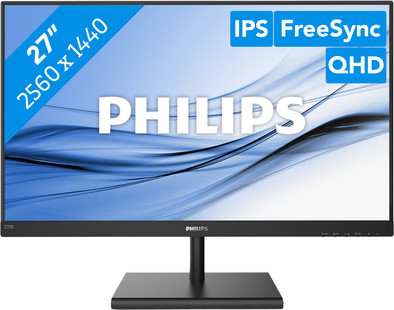
You can edit photos and videos in razor-sharp QHD on the Philips 275E1S/00 monitor. The monitor features AMD's FreeSync technology. As a result, the monitor works more efficiently with your AMD video card, which ensures that moving images are displayed without any stutter. Work on all your graphic design projects on this 27-inch screen. You can do this for longer periods of time thanks to the Low Blue Modus by Philips, which prevents your eyes from getting tired quickly. On top of that, the IPS Panel ensures that colors are displayed accurately from all viewing angles. This way, your colleagues and friends can see everything clearly if they're watching along. This screen also has an anti-glare coating, so you won't be bothered as much by reflecting (sun)light.
General Excellent monitor, for me to replace an old Philips 1280x1024 extra monitor next to the laptop. Now use the new Philips as the main screen.
QHD resolution and screen Thanks to the QHD resolution, you can edit content without any problems and you have room for the necessary tools. Didn't adjust too much to the color settings, although they could probably be better. Now use the sRGB mode. The brightness is not that bad, I expected this less. The 75 Hz option makes the screen just a bit nicer to look at than 60 Hz, although not everyone will see or notice that.
Connect I use a Dell laptop from 2012 (with ditto HDMI port) and got no more than Full-HD (1920x1080) on the monitor with the supplied HDMI cable. This may be due to the laptop, with a DisplayPort cable I still had, QHD on the screen went effortlessly. The screen itself indicates that there is an HDMI 1.4 connection.
Ergonomics There is a fixed stand on the monitor, so old-fashioned books or other raisers are needed to get the screen at a good eye level. Not a show stopper, but would have been nice. The controls (buttons) are located at the bottom of the screen. This causes the screen to wobble quite a bit, if you want to set it up. In principle, not often needed, but it can be annoying if you want to do this more often.
Martijn
22 March 2020
Automatically translated from Nederlands
I bought this external monitor to connect to my Macbook Air (2015) as an extra display. After connecting via the MiniDisplay Port on my mac via an HDMI adapter to the HDMI input on the monitor, I reached a maximum resolution of 1920x1080 at max 60Hz. It is therefore a shame not to use the full QHD capacity. Then tried to connect the monitor via a Mini Displayport to DisplayPort cable (brand: StarTech) and that worked like a charm! The QHD resolution of 2560x1440 and 75Hz looks great! Very happy with this purchase.
Kees Hendriks
22 May 2020
Automatically translated from Nederlands
Matches well with image quality of a macbook pro retina
Marinke
9 September 2020
Automatically translated from Nederlands