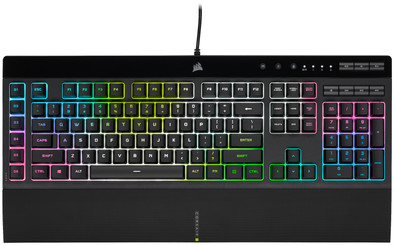
Corsair K55 RGB Pro XT Gaming Keyboard
Never available again
View alternatives in the sidebar
View alternatives in the sidebar
Product number | 880920 | |
|---|---|---|
Manufacturer code | CH-9226715-NA | |
Brand | Corsair | |
Processing of your defect | Via Coolblue | |
Old product returned for free |
Keyboard layout | QWERTY | |
|---|---|---|
Geographic keyboard layout | US international layout | |
Physical keyboard layout | ANSI | |
Backlit keyboard | ||
Spill-resistant | ||
Brightness of backlight adjustable | ||
Programmable keys | ||
Multimedia shortcuts | ||
Flat keys | ||
Suitable for gaming | ||
Recommended for game genre | First Person Shooter, MOBA, RPG | |
Mechanical keyboard | ||
Type of keys | Membrane |
Connection type | Wired | |
|---|---|---|
Type of USB port | Standard USB-A | |
Cable length | 1,82 m |
Keyboard size | 100% (Complete) | |
|---|---|---|
Keyboard composition | Keyboard, Numpad, Standard | |
Ergonomic design | ||
Height | 3,6 cm | |
Width | 48,1 cm | |
Depth | 16,7 cm | |
Wrist rest | ||
Color | Black | |
Weight | 810 g |
Power supply type | USB port PC/laptop |
|---|
Connection type | Wired | |
|---|---|---|
Backlit keyboard | ||
Keyboard composition | Keyboard, Numpad, Standard | |
Ergonomic design | ||
Mechanical keyboard | ||
Physical keyboard layout | ANSI | |
Geographic keyboard layout | US international layout | |
Suitable for gaming |
According to our keyboard expert
With the macro keys, you can program your new shortcuts while you game.
A membrane keyboard doesn't make sound when you type, so you can game in peace.
This complete keyboard with the numeric keypad is also suitable for work or school.
This keyboard doesn't have sensitive mechanical keys, so you can't perform in-game actions faster.
You can only set up the RGB lighting via the accompanying software.
Installation ease
Ergonomics
I was looking for a nice keyboard for a nice price. Paid a super price for this keyboard through a second chance.
Most people give as a minus point that the lighting can only be set via the keyboard. This is also correct. But after purchasing a new mouse, the Corsair M65 Pro RGB, I discovered something.
The Corsair Utility Engine (CUE) Software v2.12.66 also saw my keyboard. It also indicated that there was a firmware update for the keyboard. After downloading and installing this update (click, wait and ready) the K55 will be able to set the lighting and RGB via the software.
Big plus for Corsair for doing this. It is strange that when you go to the website, the software cannot be found under the tab of the keyboard. So you will have to download the software for the mouse.
Bjorn Scholten
4 May 2017
Automatically translated from Nederlands
Best keyboard in this price range (and with macro and media keys plus RGB lighting!). No mechanical keys, but that's okay. Keys work smoothly. It takes some getting used to that the shift characters are below the normal characters, but you get used to it quickly. Also good wrist rest (rubber but does not attract dirt).
FamBlok
3 March 2017
Automatically translated from Nederlands
This keyboard is ideal for the novice gamer. The keys are nice to press and the light options work well and no software is needed to access them. The 6 macro keys work perfectly as they are in the manual and is another good thing about this keyboard. The keys are quieter than most keyboards (although this one isn't mechanical but uses corsiar membrane switches) but not incredibly quiet or anything. The multimedia buttons work well and also works with spotify. All functions of this keyboard work with Windows and Mac.
Declan Kerger
17 December 2017
Automatically translated from Nederlands