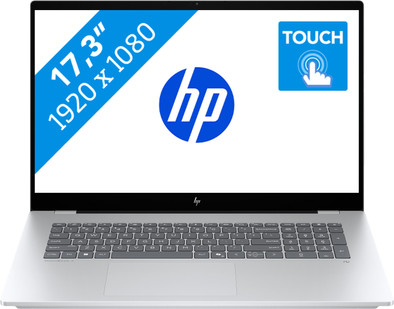
HP OmniBook 7 Copilot+ PC 17-dc0970nd
Never available again
View alternatives in the sidebar
Insure your laptop
Coolblue takes care of everything, from taking out an insurance to repairs
For almost all accidents (such as a spilled glass of water)
More coverage in case of damage than your standard warranty
No deductible
How do I insure my laptop?
First, add your laptop to your shopping cart. On the next page, choose one of the Protection Plans below. You always have a 30-day return window and pay no deductible in case of damage or theft.
2-year Protection Plan
168,-
one-time2-year Protection Plan with theft cover
185,-
one-timeProtection Plan - Monthly cancelable
13,85
per monthProtection Plan with theft cover - Monthly cancelable
14,77
per month
Everything on Microsoft Copilot+ PCs

Receive 1 year of Norton for free with a laptop or desktop
If you purchase of a laptop or desktop, you receive 1 year of Norton 360 Deluxe for free. One day after purchase, you'll receive an email with a personal voucher code. Go to the promotional Terms and Conditions for more information.

Specifications
Product
Product number | 962464 | |
|---|---|---|
Manufacturer code | BN0W3EA#ABH | |
Brand | HP | |
Processing of your defect | Via Coolblue | |
Old product returned for free |
Screen
Screen size | 17,3 inches | |
|---|---|---|
Screen quality: laptops | Mid-range | |
Touchscreen | ||
Panel type | IPS panel | |
Sharpness | Full HD (1080p) | |
Resolution width | 1920 pixels | |
Resolution height | 1080 pixels | |
Refresh rate | 60 Hz | |
Aspect ratio | 16:9 | |
Screen reflection | Glossy | |
Color space | sRGB | |
sRGB color coverage percentage | 100 % | |
Adaptive Sync | ||
Brightness | 400 cd/m2 | |
HDR support |
Processor
Processor | Intel Core Ultra 7 | |
|---|---|---|
Processor number | 256V | |
Processor generation | Ultra Series 2 | |
Processor code name | Lunar Lake | |
Processor cores | Octa-Core (8) | |
Clock speed | 2,2 GHz | |
Turbo speed | 4,8 GHz | |
Cache memory | 12 MB | |
Speed class laptops | Very good | |
Intel Evo laptop |
Neural Processing Unit (NPU)
Neural Processing Unit (NPU) | Intel AI Boost | |
|---|---|---|
TOPs | 47 | |
Microsoft Copilot+ PC | Yes |
RAM
Internal RAM | 16 GB | |
|---|---|---|
Memory composition | 1x 16GB | |
Memory slot 1 | 16 GB | |
Total number of RAM slots | 1 | |
RAM type (DDR type) | DDR5 | |
Memory speed | 8533 MHz | |
Number of replaceable RAM slots | 0 | |
Number of free RAM slots | 0 |
Storage
Total storage capacity | 1 TB | |
|---|---|---|
Storage type | SSD | |
SSD storage capacity | 1 TB | |
Hard drive type | M.2 | |
Number of free storage slots | 0 |
Video card
Video card | Intel Arc 140V | |
|---|---|---|
Video card brand | Intel |
Operating system
Operating system | Windows | |
|---|---|---|
Windows OS version | Windows 11 Home |
Usage
Recommended for use | Music production and DJing, Photo editing, Spreadsheets and presentations, Video editing |
|---|
Physical properties
Build quality laptops | Mid-range | |
|---|---|---|
Laptop model | Laptop | |
Color | Gray | |
Material | Metal, Plastic | |
Metal type | Aluminum | |
Material top of laptop | Metal | |
Material keyboard casing laptop | Metal | |
Material bottom of laptop | Plastic | |
Height | 1,5 cm | |
Width | 39,6 cm | |
Depth | 25,8 cm | |
Weight | 2,3 kg | |
Operating system language | Multiple languages can be configured |
Wireless connections
Mobile data connection | No | |
|---|---|---|
WiFi standards | Wireless A (WiFi 2), Wireless AC (WiFi 5), Wireless AX (WiFi 6), Wireless AXE (WiFi 6E), Wireless B (WiFi 1), Wireless G (WiFi 3), Wireless N (WiFi 4) | |
Bluetooth | ||
Bluetooth version | 5.3 |
Wired connections
USB port | ||
|---|---|---|
Number of USB ports | 5 | |
Type of USB port | Standard USB-A, USB-C | |
Protocol Female USB-C port | DisplayPort Alternative Mode, Thunderbolt Alternative Mode, USB, USB electricity | |
USB version Female USB-C port | 3.1, 4.0 | |
Video output via USB-C possible | Yes | |
Number of female standard USB-A ports | 3 | |
Female standard USB-A port version | 3.1 | |
Number of USB 3.1 Female USB-C port | 1 | |
HDMI connector | ||
Number of HDMI connectors | 1 | |
Female HDMI Type A port version | 2.1 | |
DisplayPort connector | ||
VGA connector | ||
Network connector | ||
Thunderbolt connector | ||
Headphone jack | ||
Memory card reader |
Keyboard and touchpad
Keyboard layout | QWERTY | |
|---|---|---|
Physical keyboard layout | ANSI | |
Numeric keypad | ||
Spill-resistant | ||
Backlit keyboard | ||
Color keyboard lighting | White | |
Mechanical keyboard | ||
Programmable keys | ||
Copilot test |
Audio
Built-in microphone | ||
|---|---|---|
Number of speakers | 2 | |
Sound reproduction | Stereo | |
Integrated computer speakers brand | Poly Studio |
Webcam
Built-in camera | ||
|---|---|---|
Image definition webcams | 5MP (1920p) | |
Camera slider |
Battery
Battery capacity laptop | 83 Wh | |
|---|---|---|
Battery technology | Lithium polymer | |
Power connector input type (female) | USB Type C | |
Laptop wattage | 65 W | |
Charger included | ||
Charging cable included | ||
Power charger | 65 W |
Extra manufacturer's warranty
Manufacturer's warranty | ||
|---|---|---|
Pickup and return warranty from the manufacturer | 2 years |
Security
TPM (Trusted platform module) | ||
|---|---|---|
TPM type | Firmware TPM | |
Kensington lock | ||
Windows Hello | ||
Fingerprint identity sensor | ||
Security class laptops | Basic | |
Built-in privacy screen |
Software
Extra installed software | ||
|---|---|---|
ISV certification |