Welcome to your environment! You can order everything from your assortment with your personal budget here.

You can always return to the normal Coolblue website by clicking here.

Your outstanding budget (incl. VAT) is always visible here, so you know exactly how much you can spend.

Coolblue home

Help with your product

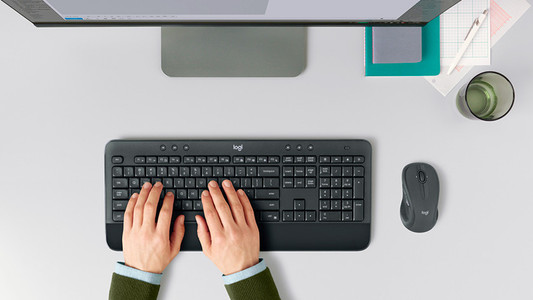
Logitech MK710 Wireless Keyboard and Mouse QWERTY 5-Pack

With the Logitech MK710 Wireless Keyboard and Mouse QWERTY 5-Pack, you can provide 5 computers with a wireless keyboard and wireless mouse. Both the keyboard and the mouse have an ergonomic design, so you can sit at your computer for hours. It's easy to type on the keyboard, because the keys are adjusted for long use. They are made with the Incurve technique. That means that they're round and easy to type on. In addition, the keyboard has an LCD screen. This will show the status of the connection and the battery life, and also if you have Caps Lock and Num Lock enabled.

Read all tips here

How do I solve problems with my wireless keyboard and mouse?

Is the connection of your wireless keyboard or mouse poor? Or does your peripheral not have any connection at all? Then you can try out a couple of things. You can switch USB ports or put in new batteries, for example. In this article, you can read what you can do to solve problems with your wireless peripherals yourself.

How do I solve problems with my wireless keyboard and mouse?

Is the connection of your wireless keyboard or mouse poor? Or does your peripheral not have any connection at all? Then you can try out a couple of things. You can switch USB ports or put in new batteries, for example. In this article, you can read what you can do to solve problems with your wireless peripherals yourself.

How do I solve problems with my wireless keyboard and mouse?

Is the connection of your wireless keyboard or mouse poor? Or does your peripheral not have any connection at all? Then you can try out a couple of things. You can switch USB ports or put in new batteries, for example. In this article, you can read what you can do to solve problems with your wireless peripherals yourself.

How do I solve problems with my wireless keyboard and mouse?

Is the connection of your wireless keyboard or mouse poor? Or does your peripheral not have any connection at all? Then you can try out a couple of things. You can switch USB ports or put in new batteries, for example. In this article, you can read what you can do to solve problems with your wireless peripherals yourself.

How do I solve problems with my wireless keyboard and mouse?

Is the connection of your wireless keyboard or mouse poor? Or does your peripheral not have any connection at all? Then you can try out a couple of things. You can switch USB ports or put in new batteries, for example. In this article, you can read what you can do to solve problems with your wireless peripherals yourself.

How do I solve problems with my wireless keyboard and mouse?

Is the connection of your wireless keyboard or mouse poor? Or does your peripheral not have any connection at all? Then you can try out a couple of things. You can switch USB ports or put in new batteries, for example. In this article, you can read what you can do to solve problems with your wireless peripherals yourself.

Didn't find your answer?

Find an answer to your question quickly and easily via our customer service.

Coolblue specialist
Personal chat Digitalk.
You're now chatting with Coolblue customer service
This chat is closed
foo
Oeps File size is larger than 5MB. Upload a smaller file.