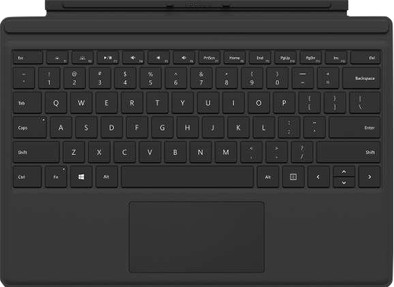
Microsoft Surface Pro Type Cover QWERTY Black
Never available again
View alternatives in the sidebar
View alternatives in the sidebar
Product number | 661215 | |
|---|---|---|
Manufacturer code | FMM-00007 | |
Brand | Microsoft | |
Processing of your defect | Via Coolblue | |
Old product returned for free |
Universal application | ||
|---|---|---|
Suitable for model | Microsoft Surface Pro, Microsoft Surface Pro 3, Microsoft Surface Pro 4, Microsoft Surface Pro 5, Microsoft Surface Pro 6, Microsoft Surface Pro 7 | |
Made for brand | Microsoft | |
Suitable for screen size | 12,3 inches |
Model case | Keyboard cover | |
|---|---|---|
Material | Plastic | |
Color | Black |
Level of protection | Mediocre | |
|---|---|---|
Level of protection | Front | |
Fall protection | ||
Shockproof |
Auto-wake function | ||
|---|---|---|
Magnet closure | ||
Standard | ||
Handle available | ||
Built-in pen holder |
Physical keyboard | ||
|---|---|---|
Backlit keyboard | ||
Brightness of backlight adjustable | ||
Number of colors lighting | 1 | |
Keyboard layout | QWERTY | |
Geographic keyboard layout | US layout | |
Removable keyboard |
Suitable for model | Microsoft Surface Pro, Microsoft Surface Pro 3, Microsoft Surface Pro 4, Microsoft Surface Pro 5, Microsoft Surface Pro 6, Microsoft Surface Pro 7 | |
|---|---|---|
Suitable for screen size | 12,3 inches | |
Model case | Keyboard cover | |
Material | Plastic | |
Fall protection |
According to our tablet cover expert
Thanks to the backlit keyboard, you can also work in the dark.
Automatically switch the screen of your tablet on and off by opening and closing the cover.
Thanks to the magnetic attachment, you can easily click the Type Cover into place.
The Type Cover doesn't have a numpad which allows you to enter numbers quickly.
You can complete your Microsoft Surface Pro with the Microsoft Type Cover. Simply click the keyboard onto the tablet via a magnetic click clasp. Now you have a full-fledged laptop on your lap. In the dark, the keys of the Type Cover light up, so you can continue working. When you cover the screen with the cover, it also switches off automatically.
User friendliness
Finish
Price-quality ratio
Design
Options
In combination with the Surface 4 Pro, this works like a laptop. If you want to use the Surface 4 Pro optimally, you can't do without it
Rieks Moleman
19 January 2016
Automatically translated from Nederlands
I am very satisfied with the addition of my microsoft surface. It's a nice keyboard and doesn't feel like a separate keyboard. It is super easy to click on your surface and then works immediately. It is also very easy to remove if you want to use it as a tablet. You can also fold it back so that you can also use your Surface as a tablet without removing the keyboard.
Eva Vuckovic
30 June 2017
Automatically translated from Nederlands
I bought this keyboard for my Surface Tablet because it didn't come with it and I still wanted to create some sort of laptop idea.
The keyboard is very easy to connect to the Tablet. That's how it is Plug and Play. You just have to hold the Tablet above it and it will be clicked to it using magnets. Very innovative. Wait a moment and within a few seconds you'll get a pop-up that will turn off the tablet mode (ideal!).
Each keyboard makes natural sound while typing. Because this keyboard floats (so that it is tilted), you get an open space underneath, so that more sound comes out than when you just have it flat on your desk. It's not disturbing, but be aware!
The lighting is excellently processed and very cleverly conceived, despite that the keyboard is still very thin and light. The trackpad also makes it very easy to operate the tablet and scroll through menus.
Despite the relatively high price for a keyboard, I definitely recommend this product! Not only because you would otherwise have a large, unused slot under your tablet, but also because it actually adds something to your device.
Laurens
23 February 2018
Automatically translated from Nederlands


