HP Pavilion X360 14-ba191nd

Never available again
View alternatives in the sidebar
View alternatives in the sidebar
Product number | 794502 | |
|---|---|---|
Manufacturer code | 2WA83EA#ABH | |
Brand | HP | |
Processing of your defect | Carry-in warranty | |
Old product returned for free |
Screen size | 14 inches | |
|---|---|---|
Touchscreen | ||
Panel type | IPS panel | |
Sharpness | Full HD (1080p) | |
Resolution width | 1920 pixels | |
Resolution height | 1080 pixels | |
Refresh rate | 50 Hz | |
Screen reflection | Glossy | |
Adaptive Sync |
Processor | Intel Core i5 | |
|---|---|---|
Processor code name | Kaby Lake R | |
Processor cores | Quad-Core (4) | |
Clock speed | 1,6 GHz | |
Turbo speed | 3,4 GHz | |
Cache memory | 6 MB |
Internal RAM | 8 GB | |
|---|---|---|
Memory composition | 1x 8GB | |
Memory slot 1 | 8 GB | |
Memory slot 2 | 0 GB | |
Total number of RAM slots | 2 | |
Maximum internal memory | 8 GB |
Total storage capacity | 128 GB | |
|---|---|---|
Storage type | SSD | |
SSD storage capacity | 128 GB | |
Hard drive type | M.2 |
Video card | Intel UHD Graphics 620 | |
|---|---|---|
Type of video card | Shared |
Operating system | Windows | |
|---|---|---|
Windows OS version | Windows 10 Home | |
Operating system language | Dutch, English, Multiple languages can be configured |
Laptop model | 2-in-1 | |
|---|---|---|
Color | Silver | |
Material | Metal | |
Metal type | Aluminum | |
Height | 1,99 cm | |
Width | 33,48 cm | |
Depth | 22,69 cm | |
Weight | 1,63 kg |
Mobile data connection | No | |
|---|---|---|
WiFi standards | Wireless AC | |
Bluetooth | ||
Bluetooth version | 4.2 |
USB port | ||
|---|---|---|
Number of USB ports | 3 | |
Type of USB port | Standard USB-A, USB-C | |
Protocol Female USB-C port | USB | |
USB version Female USB-C port | 3.0 | |
Number of female standard USB-A ports | 2 | |
Female standard USB-A port version | 3.0 | |
Number of USB 3.0 Female USB-C ports | 1 | |
HDMI connector | ||
Number of HDMI connectors | 1 | |
Female HDMI Type A port version | 1.4 | |
DisplayPort connector | ||
VGA connector | ||
Network connector | ||
Thunderbolt connector | ||
Headphone jack | ||
Memory card reader |
Keyboard layout | QWERTY | |
|---|---|---|
Physical keyboard layout | ANSI | |
Numeric keypad | ||
Spill-resistant | ||
Backlit keyboard | ||
Mechanical keyboard | ||
Programmable keys |
Built-in microphone | ||
|---|---|---|
Number of speakers | 2 | |
Sound reproduction | Stereo | |
Integrated computer speakers brand | Bang & Olufsen |
Built-in camera | ||
|---|---|---|
Image definition webcams | HD Ready (720p) |
Battery technology | Lithium-ion | |
|---|---|---|
Battery life according to customers | Standard | |
Power connector input type (female) | Other brand/product specific |
Manufacturer's warranty |
|---|
TPM (Trusted platform module) | ||
|---|---|---|
Kensington lock | ||
Windows Hello | ||
Fingerprint identity sensor |
Screen size | 14 inches | |
|---|---|---|
Processor | Intel Core i5 | |
Internal RAM | 8 GB | |
Total storage capacity | 128 GB | |
Video card | Intel UHD Graphics 620 | |
Panel type | IPS panel | |
Touchscreen | ||
Windows OS version | Windows 10 Home |
According to our laptop expert
Flip the screen 360 degrees and also use the laptop as a tablet.
Rotate the screen 360 degrees over the keyboard and use the laptop in different positions.
Make less typos while typing in the dark with the backlit keyboard.
Doesn't have a DVD player to play CDs and DVDs.
A glossy touchscreen is more susceptible to reflecting light and it shows fingerprints.
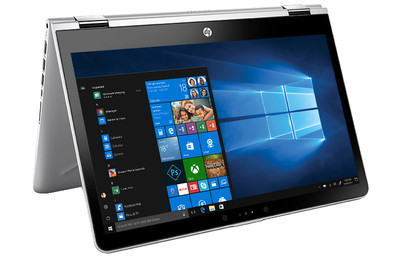
The HP Pavilion X360 14-ba191nd is a compact yet powerful 2-in-1 laptop that can also be used as a tablet. Thanks to the Intel Core i5 processor, you can edit photos in graphics programs. Do you work better with your hands than with a mouse and keyboard? Rotate the screen 360 degrees and use the touchscreen to adjust your work. You can view your work by putting this Pavilion X360 in tent position, so that the laptop stays upright. With the IPS panel, you don't need to necessarily sit in front of the screen to see the smallest detail of your work, thanks to the wide viewing angle. Thanks to the 128GB SSD drive, you can boot this laptop in about 15 seconds and you can always get started quickly.
Note: a laptop with an i5 or i7 processor and a thin casing may produce more noise than comparable laptops with a less powerful processor.
Screenshots are simulations. Subject to changes. Apps are sold separately. Availability may vary.
Ultrabook, Celeron, Celeron Inside, Core Inside, Intel, het Intel logo, Intel Atom, Intel Atom Inside, Intel Core, Intel Inside, the Intel Inside logo, Intel vPro, Itanium, Itanium Inside, Pentium, Pentium Inside, vPro Inside, Xeon, Xeon Phi, Xeon Inside, and Intel Optane are trademarks of Intel Corporation, or its subsidiaries in the United States and/or other countries.
5 stars
29
4 stars
24
3 stars
0
2 stars
0
1 star
0
Nice device! Nice and fast and nice and compact!
R Jaspers
17 December 2017
Automatically translated from Nederlands
I first bought a chromebook by mistake, but exchanged it the next day at Coolblue, excellent service and advice.
Wim Bakker
27 May 2018
Automatically translated from Nederlands
The model I purchased meets all my expectations. I mainly use it for my studies. In addition, it is fast enough for netflix, youtube, spotify and other streaming applications. In addition, I think this laptop looks good.
Dyon Sokarijo
8 July 2018
Automatically translated from Nederlands
