HP Spectre X360 13-ae001nd
Never available again
View alternatives in the sidebar
View alternatives in the sidebar
Product number | 795231 | |
|---|---|---|
Manufacturer code | 2PM49EA#ABH | |
Brand | HP | |
Processing of your defect | Carry-in warranty | |
Old product returned for free |
Screen size | 13,3 inches | |
|---|---|---|
Touchscreen | ||
Panel type | IPS panel | |
Sharpness | Full HD (1080p) | |
Resolution width | 1920 pixels | |
Resolution height | 1080 pixels | |
Screen reflection | Glossy | |
Adaptive Sync |
Processor | Intel Core i5 | |
|---|---|---|
Processor code name | Kaby Lake R | |
Processor cores | Quad-Core (4) | |
Clock speed | 1,6 GHz | |
Turbo speed | 3,4 GHz | |
Cache memory | 6 MB |
Internal RAM | 8 GB | |
|---|---|---|
Memory composition | 1x 8GB | |
Memory slot 1 | 8 GB | |
Total number of RAM slots | 1 | |
Maximum internal memory | 8 GB |
Total storage capacity | 256 GB | |
|---|---|---|
Storage type | SSD | |
SSD storage capacity | 256 GB | |
Hard drive type | M.2, NVMe, PCIe |
Video card | Intel UHD Graphics 620 | |
|---|---|---|
Type of video card | Shared |
Operating system | Windows | |
|---|---|---|
Windows OS version | Windows 10 Home | |
Operating system language | Dutch, English, Multiple languages can be configured |
Laptop model | 2-in-1 | |
|---|---|---|
Color | Silver | |
Material | Metal | |
Metal type | Aluminum | |
Height | 1,39 cm | |
Width | 30,7 cm | |
Depth | 21,8 cm | |
Weight | 1,32 kg |
Mobile data connection | No | |
|---|---|---|
WiFi standards | Wireless AC | |
Bluetooth | ||
Bluetooth version | 4.2 |
USB port | ||
|---|---|---|
Number of USB ports | 3 | |
Protocol Female USB-C port | DisplayPort Alternative Mode, USB | |
USB version Female USB-C port | 3.1 | |
Number of female standard USB-A ports | 1 | |
Female standard USB-A port version | 3.0 | |
Number of USB 3.0 Female USB-C ports | 0 | |
Number of USB 3.1 Female USB-C port | 2 | |
HDMI connector | ||
DisplayPort connector | ||
VGA connector | ||
Network connector | ||
Thunderbolt connector | ||
Headphone jack | ||
Memory card reader |
Keyboard layout | QWERTY | |
|---|---|---|
Physical keyboard layout | ANSI | |
Numeric keypad | ||
Spill-resistant | ||
Backlit keyboard | ||
Mechanical keyboard | ||
Programmable keys |
Built-in microphone | ||
|---|---|---|
Number of speakers | 4 | |
Sound reproduction | Stereo | |
Integrated computer speakers brand | Bang & Olufsen |
Built-in camera | ||
|---|---|---|
Image definition webcams | Full HD (1080p) |
Battery technology | Lithium-ion | |
|---|---|---|
Power connector input type (female) | Other brand/product specific |
Manufacturer's warranty |
|---|
TPM (Trusted platform module) | ||
|---|---|---|
Kensington lock | ||
Windows Hello | ||
Fingerprint identity sensor | ||
Infrared camera |
Extra installed software |
|---|
Screen size | 13,3 inches | |
|---|---|---|
Processor | Intel Core i5 | |
Internal RAM | 8 GB | |
Total storage capacity | 256 GB | |
Video card | Intel UHD Graphics 620 | |
Panel type | IPS panel | |
Touchscreen | ||
Windows OS version | Windows 10 Home |
According to our laptop expert
Boot your laptop in about 15 seconds, thanks to the SSD drive.
Control the laptop with your fingers, thanks to the touchscreen.
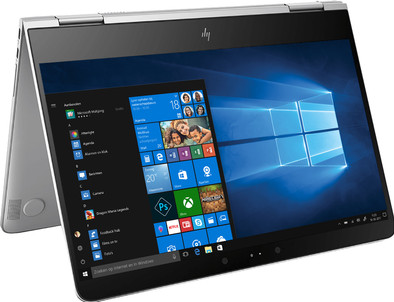
Fold the screen around the keyboard 360 degrees, and use the laptop in different positions.
The glossy touchscreen is susceptible to fingerprints.
The HP Specter X360 13-ae001nd is a compact and stylish laptop and tablet in one, that you take with you to work or school. Use it in different positions, as the screen can be flipped 360 degrees. This way, you can use it as a tablet, to create graphic artworks with a touch pen, and put it in the tent position to show your projects to your colleagues. Get started on a presentation in laptop mode and type into the late hours on the backlit keyboard. Thanks to the 256GB SSD, boot up the Specter in about 15 seconds, so immediately get started when you open it.
Note: a laptop with an i5 or i7 processor and a thin casing may produce more noise than comparable laptops with a less powerful processor.
Tried a few other convertibles first but didn't like it for various reasons. Surface Pro 2017 was good but keyboard and memory were disappointing. Could be exchanged (again) at Coolblue, great! Was in doubt between a macbook and specter but the touchscreen was very nice and macbook does not have this. Tried both in a store and keyboard macbook was disappointing (butterfly). The specter x360 is a very nice laptop and tablet, use it both at home and at work. Citrix receiver did not work well on Windows Edge but with Internet Explorer it works fine. Office package on it and OneNote, among others, is very good, notes can also be made with a surface stylus pen. The spectrum is nice and fast. Very nice keyboard. Full sound. Touchpad click is a bit hard but I mainly use a mouse so it doesn't bother me much. Mouse is also from HP, same color as laptop, bluetooth so no extra USB connector needed. The supplied sleeve is also nice with separate compartment for a stylus pen. Overall happy with the specter x360 (the latest model)
Hilma
23 January 2018
Automatically translated from Nederlands
Beautifully designed 2in1, thanks to the new generation processor an ideal combination between speed and ease of use. Wonderful keyboard. Windows Hello works beautifully, boot time of a few seconds!
Robin Maas
15 February 2018
Automatically translated from Nederlands
There seem to be many flaws in the series. The first one I had to return, because it couldn't shut down (automatically restarted itself after 2 sec). Returned the second one too, because as soon as the keyboard backlight came on, it gave off a really loud, high-pitched beep. The third is going well (didn't feel like returning either, because needed a laptop), although after a few weeks I notice that the screen sometimes flickers.
Wieke Peters
22 November 2018
Automatically translated from Nederlands
