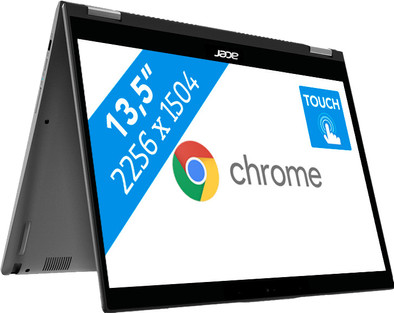
Acer Chromebook Spin 13 CP713-1WN-866Q
Never available again
View alternatives in the sidebar
View alternatives in the sidebar

Product number | 822505 | |
|---|---|---|
Manufacturer code | NX.EFJEH.010 | |
Brand | Acer | |
Processing of your defect | Via Coolblue | |
Old product returned for free |
Screen size | 13,5 inches | |
|---|---|---|
Touchscreen | ||
Panel type | IPS panel | |
Sharpness | Quad HD (1440p) | |
Resolution width | 2256 pixels | |
Resolution height | 1504 pixels | |
Refresh rate | 50 Hz | |
Screen reflection | Glossy | |
Adaptive Sync |
Processor | Intel Core i7 | |
|---|---|---|
Processor code name | Kaby Lake R | |
Processor cores | Quad-Core (4) | |
Clock speed | 1,8 GHz | |
Turbo speed | 4 GHz | |
Cache memory | 8 MB |
Internal RAM | 16 GB | |
|---|---|---|
Memory composition | 1x 16GB | |
Memory slot 1 | 16 GB | |
Total number of RAM slots | 1 |
Total storage capacity | 128 GB | |
|---|---|---|
Storage type | Flash | |
SSD storage capacity | 128 GB | |
Hard drive type | eMMC |
Video card | Intel UHD Graphics 620 | |
|---|---|---|
Type of video card | Shared |
Operating system | Google ChromeOS |
|---|
Laptop model | 2-in-1, Chromebook | |
|---|---|---|
Color | Gray | |
Material | Plastic | |
Height | 1,7 cm | |
Width | 30,95 cm | |
Depth | 24,58 cm | |
Weight | 1,5 kg | |
Operating system language | Multiple languages can be configured |
Mobile data connection | No | |
|---|---|---|
WiFi standards | Wireless AC | |
Bluetooth | ||
Bluetooth version | 4.2 |
USB port | ||
|---|---|---|
Number of USB ports | 3 | |
Type of USB port | Standard USB-A, USB-C | |
Protocol Female USB-C port | USB | |
USB version Female USB-C port | 3.0 | |
Number of female standard USB-A ports | 1 | |
Female standard USB-A port version | 3.0 | |
Number of USB 3.0 Female USB-C ports | 2 | |
HDMI connector | ||
DisplayPort connector | ||
VGA connector | ||
Network connector | ||
Thunderbolt connector | ||
Headphone jack | ||
Memory card reader |
Keyboard layout | QWERTY | |
|---|---|---|
Physical keyboard layout | ISO | |
Numeric keypad | ||
Spill-resistant | ||
Backlit keyboard | ||
Mechanical keyboard | ||
Programmable keys |
Built-in microphone | ||
|---|---|---|
Number of speakers | 2 | |
Sound reproduction | Stereo | |
Integrated computer speakers brand | Standard speakers |
Built-in camera | ||
|---|---|---|
Image definition webcams | HD Ready (720p) |
Battery technology | Lithium-ion | |
|---|---|---|
Battery life according to customers | Excellent | |
Power connector input type (female) | Other brand/product specific |
Manufacturer's warranty |
|---|
TPM (Trusted platform module) | ||
|---|---|---|
Kensington lock | ||
Windows Hello | ||
Fingerprint identity sensor |
Extra installed software |
|---|
Screen size | 13,5 inches | |
|---|---|---|
Processor | Intel Core i7 | |
Internal RAM | 16 GB | |
Total storage capacity | 128 GB | |
Video card | Intel UHD Graphics 620 | |
Panel type | IPS panel | |
Touchscreen |
According to our laptop expert
The QHD touchscreen gives you a sharper image than a Full HD screen.
Fold the touchscreen 360 degrees, and you can also use the laptop as a tablet .
Chromebooks are energy-efficient, so you can use your Chromebook for an entire workday without charging it.
Windows programs don't work on a Chromebook.
You can use the Acer Chromebook Spin 13 CP713-1WN-866Q in combination with your Google account in order to edit photos and videos via Adobe Premier Rush or keep up with your email wherever you want. The QHD touchscreen provides you with a sharp image when you're browsing or watching a movie. The included Wacom pen lets you easily navigate your Chromebook via the touchscreen. Because Chromebooks are energy efficient, you don't need to bring a charger when you're on the road for a day. You don't have to be afraid of viruses, because a Chromebook always features an up-to-date virus scanner. Simply log in to your Gmail account, which gives you access to your files via Google Drive, wherever you are.
Note: Windows programs don't work on a Chromebook. Want to use Microsoft Office? Buy Office 365 or download the Office app in the Google Play Store.
5 stars
4
4 stars
0
3 stars
0
2 stars
0
1 star
0
Went for the i7 after being fed up with the trouble I had with my Surfaces Pro (horror) and I'm not one that easily gives up. Private Windows pc builder so I've seen my share. In a nutshell, it works and is fast. Is it perfect? no. Can I recommend it? For sure!
John
14 July 2019
Automatically translated from Nederlands
My work is entirely via Crome OS and Google apps, so it's easy to fit in
Aart van den Berg
5 September 2019
Automatically translated from Nederlands
Nice Chromebook, which can also be used as a tablet.
Anouk van Hartingsveld
21 September 2019
Automatically translated from Nederlands