HP Chromebook 14-db0411nd

Never available again
View alternatives in the sidebar
View alternatives in the sidebar

Product number | 830629 | |
|---|---|---|
Manufacturer code | 6QF17EA#ABH | |
Brand | HP | |
Processing of your defect | Via Coolblue | |
Old product returned for free |
Screen size | 14 inches | |
|---|---|---|
Touchscreen | ||
Panel type | IPS panel | |
Sharpness | Full HD (1080p) | |
Resolution width | 1920 pixels | |
Resolution height | 1080 pixels | |
Refresh rate | 50 Hz | |
Screen reflection | Anti-glare | |
Adaptive Sync |
Processor | AMD A4 | |
|---|---|---|
Processor code name | AMD GX | |
Processor cores | Dual-Core (2) | |
Clock speed | 2,2 GHz | |
Turbo speed | 2,5 GHz | |
Cache memory | 1 MB |
Internal RAM | 4 GB | |
|---|---|---|
Memory composition | 1x 4GB | |
Memory slot 1 | 4 GB | |
Total number of RAM slots | 1 |
Total storage capacity | 32 GB | |
|---|---|---|
Storage type | Flash | |
SSD storage capacity | 32 GB | |
Hard drive type | eMMC |
Video card | AMD Radeon R3 | |
|---|---|---|
Type of video card | Shared |
Operating system | Google ChromeOS | |
|---|---|---|
Operating system language | Multiple languages can be configured |
Laptop model | Chromebook | |
|---|---|---|
Color | Gray | |
Material | Plastic | |
Height | 1,83 cm | |
Width | 33,7 cm | |
Depth | 22,69 cm | |
Weight | 1,54 kg |
Mobile data connection | No | |
|---|---|---|
WiFi standards | Wireless AC, Wireless B, Wireless G, Wireless N | |
Bluetooth | ||
Bluetooth version | 5.0 |
USB port | ||
|---|---|---|
Number of USB ports | 3 | |
Type of USB port | Standard USB-A, USB-C | |
Protocol Female USB-C port | USB | |
USB version Female USB-C port | 3.1 | |
Number of female standard USB-A ports | 1 | |
Female standard USB-A port version | 2.0 | |
Number of USB 3.1 Female USB-C port | 2 | |
HDMI connector | ||
DisplayPort connector | ||
VGA connector | ||
Network connector | ||
Thunderbolt connector | ||
Headphone jack | ||
Memory card reader |
Keyboard layout | QWERTY | |
|---|---|---|
Physical keyboard layout | ANSI | |
Numeric keypad | ||
Spill-resistant | ||
Backlit keyboard | ||
Mechanical keyboard | ||
Programmable keys |
Built-in microphone | ||
|---|---|---|
Number of speakers | 2 | |
Sound reproduction | Stereo | |
Integrated computer speakers brand | Standard speakers |
Built-in camera | ||
|---|---|---|
Image definition webcams | HD Ready (720p) |
Battery technology | Lithium-ion | |
|---|---|---|
Battery life according to customers | Excellent | |
Power connector input type (female) | Other brand/product specific |
Manufacturer's warranty |
|---|
TPM (Trusted platform module) | ||
|---|---|---|
Kensington lock | ||
Windows Hello | ||
Fingerprint identity sensor |
Extra installed software |
|---|
Screen size | 14 inches | |
|---|---|---|
Processor | AMD A4 | |
Internal RAM | 4 GB | |
Total storage capacity | 32 GB | |
Video card | AMD Radeon R3 | |
Panel type | IPS panel | |
Touchscreen |
According to our laptop expert
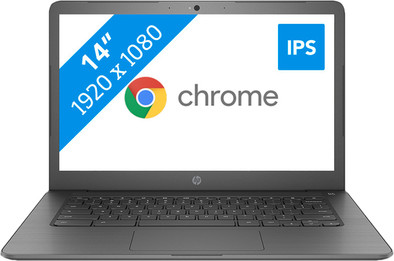
Watch series and films in high resolution thanks to the Full HD screen.
The anti-reflective IPS panel displays true-to-life colors from every angle and you won't be bothered by the reflections of the sun or a lamp on your screen.
The Chrome OS operating system is energy efficient, so you can use the Chromebook for a whole working day without charging it.
In Chrome OS, you often use different programs than in Windows, which may take some getting used to.
This Chromebook doesn't have a touchscreen, so you can't operate this model with your fingers.
With the 14-inch HP Chromebook 14-db0411nd, you use Chrome OS instead of Windows to write reports and watch movies and series. This model has a Full HD screen, so its images are sharper than most similar Chromebooks. Google's operating system is energy-efficient, meaning you can use the HP Chromebook to type reports for an entire day without having to charge it. You can install programs via the Google Play Store, like with mobile (Android) phones. Since a Chromebook works together with Google Drive, your files are stored in the cloud. This means you can access your files from multiple devices.
Note! Windows programs don't work on a Chromebook. Do you want to use Microsoft Office? If so, buy Office 365 or download the Office app in the Google Play Store.
5 stars
32
4 stars
11
3 stars
1
2 stars
0
1 star
0
I use it daily to watch videos and read emails
Mohammed
13 August 2019
Automatically translated from Nederlands
It's actually too soon for a review because I've only had it for a short time (almost 2 weeks). So far he is doing great. Personally, I think it's an ugly plastic thing, but it's all about the inside. It's a chromebook, so it works slightly differently than a regular laptop, but if you read up on it, watch videos on YouTube, you quickly get used to it. Keys such as Alt, Del, Home and End are not included, but this is all done with hotkeys. I think he has a nice screen and it's a relief that he doesn't have to be fed quickly. Now I've never had expensive laptops, it's outside my budget, so I'm all the more happy that you can buy such a nice device for this money. I thought it was quite exciting to go for a chromebook but I have absolutely no regrets. In fact, I use it even more than my regular laptop.
Will
13 August 2019
Automatically translated from Nederlands
Good price quality ratio
Irene Csik
13 August 2019
Automatically translated from Nederlands
