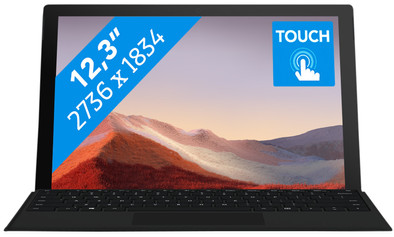
Microsoft Surface Pro 7 - i5 - 8GB - 256GB Black
Never available again
View alternatives in the sidebar
View alternatives in the sidebar
Product number | 839110 | |
|---|---|---|
Manufacturer code | PUV-00018 | |
Brand | Microsoft | |
Processing of your defect | Via Coolblue | |
Old product returned for free |
Screen size | 12,3 inches | |
|---|---|---|
Touchscreen | ||
Panel type | IPS panel | |
Sharpness | WQXGA | |
Resolution width | 2736 pixels | |
Resolution height | 1834 pixels | |
Refresh rate | 60 Hz | |
Screen reflection | Glossy | |
Adaptive Sync |
Processor | Intel Core i5 | |
|---|---|---|
Processor code name | Ice Lake | |
Processor cores | Quad-Core (4) | |
Clock speed | 1,1 GHz | |
Turbo speed | 3,7 GHz | |
Cache memory | 6 MB | |
Speed class laptops | Basic |
Internal RAM | 8 GB | |
|---|---|---|
Memory composition | 1x 8GB | |
Memory slot 1 | 8 GB | |
Total number of RAM slots | 1 |
Total storage capacity | 256 GB | |
|---|---|---|
Storage type | SSD | |
SSD storage capacity | 256 GB |
Video card | Intel Iris Plus Graphics | |
|---|---|---|
Type of video card | Shared |
Operating system | Windows | |
|---|---|---|
Windows OS version | Windows 10 Home | |
Operating system language | Multiple languages can be configured |
Recommended for use | Internet, email, and text processing, On the go, Photo editing, School |
|---|
Build quality laptops | Mid-range | |
|---|---|---|
Laptop model | 2-in-1 | |
Color | Black | |
Material | Metal | |
Metal type | Aluminum | |
Height | 0,85 cm | |
Width | 29,2 cm | |
Depth | 20,1 cm | |
Weight | 0,77 kg |
Mobile data connection | No | |
|---|---|---|
WiFi standards | Wireless AX | |
Bluetooth | ||
Bluetooth version | 5.0 |
USB port | ||
|---|---|---|
Number of USB ports | 2 | |
Type of USB port | Standard USB-A, USB-C | |
Protocol Female USB-C port | USB | |
USB version Female USB-C port | 3.1 | |
Number of female standard USB-A ports | 1 | |
Female standard USB-A port version | 3.1 | |
Number of USB 3.1 Female USB-C port | 1 | |
HDMI connector | ||
DisplayPort connector | ||
VGA connector | ||
Network connector | ||
Thunderbolt connector | ||
Headphone jack | ||
Memory card reader |
Keyboard layout | Not included | |
|---|---|---|
Numeric keypad | ||
Spill-resistant | ||
Backlit keyboard | ||
Mechanical keyboard | ||
Programmable keys |
Built-in microphone | ||
|---|---|---|
Number of speakers | 2 | |
Sound reproduction | Stereo | |
Integrated computer speakers brand | Standard speakers |
Built-in camera | ||
|---|---|---|
Image definition webcams | Full HD (1080p) |
Battery technology | Lithium-ion | |
|---|---|---|
Power connector input type (female) | Other brand/product specific |
Manufacturer's warranty | ||
|---|---|---|
Type of manufacturer's warranty | Manufacturer's carry-in warranty | |
Manufacturer's carry-in warranty | 2 years |
TPM (Trusted platform module) | ||
|---|---|---|
Kensington lock | ||
Windows Hello | ||
Fingerprint identity sensor | ||
Infrared camera | ||
Security class laptops | Basic |
Extra installed software |
|---|
Screen size | 12,3 inches | |
|---|---|---|
Processor | Intel Core i5 | |
Internal RAM | 8 GB | |
Total storage capacity | 256 GB | |
Video card | Intel Iris Plus Graphics | |
Recommended for use | Internet, email, and text processing, On the go, Photo editing, School | |
Panel type | IPS panel | |
Touchscreen |
According to our laptop expert
You can use the Surface Pro 7 as a laptop and tablet thanks to the touchscreen and the optional Type Cover.
With a weight less than 1kg, you can easily take the Surface Pro with you on the go.
As soon as the upgrade is available for your device, you can upgrade to Windows 11 for free.
Other models from the Pro 7 series have a more powerful processor, which you can also use to edit videos.
A type cover keyboard and touch pen aren't included by default.
Note: the type cover isn't included by default and has to be purchased separately.
The Microsoft Surface Pro 7 you no longer have to choose between a tablet and a laptop. With the touchscreen, you can take notes with your fingers during a work meeting or edit photos in Photoshop. Do you want to take extensive notes and aren't your fingers enough? If so, use the optional Type Cover. You can easily attach this magnetic keyboard to the Surface. This way, you can type texts like on a traditional laptop. With a weight of less than 1 kilogram, you can easily take the Surface with you to the next meeting. On the train back home, you can place it on the table and quickly log in with your own face via the webcam and Windows Hello. Afterwards, you can enjoy a Netflix movie on the high resolution PixelSense screen during your train journey.
5 stars
20
4 stars
12
3 stars
0
2 stars
0
1 star
0
Battery life
Speed
Design
Very good laptop, which actually meets all requirements. Fast, beautiful, solid, and the pen absolutely tops it off. It's really just a laptop, not a tablet. The tablet mode is there, but it just isn't. There are too few apps for the tablet mode, and the apps that do sometimes feel like they're put together a bit half-heartedly. The operating system isn't really designed to be used as a tablet, despite Microsoft's futile efforts to create a decent experience. Although it would technically be perfectly capable of this, you will notice very clear differences if you compare it with, for example, an iPad. The iPad was designed from the start to be controlled with touch controls. All the options are big enough that even someone with sausage fingers can handle them, and the whole experience is built around it. With Windows, the tablet mode is clearly glued on top. If you don't have a tablet, you can watch Netflix on it just fine, but for the convenience of a real tablet, you're wrong here.
The pen is very good. Similar to that of the iPad. I heard some bad stories about the technology, and how hard it would be to draw straight lines. I haven't experienced that yet. It is also very handy that you simply have the full version of Photoshop or Illustrator at hand. Of course, the problem arises again that Photoshop is not optimized for touch. But that's a small trade-off for the extra functionalities you get compared to the simplified iPad version. Because of the rubber tip of the pen, you don't need a matte screen protector to be able to draw normally (which you almost always have to do with the iPad).
So I would see the Surface Pro more as a laptop you can draw on, than as a tablet/laptop hybrid. As a laptop, it meets almost all requirements. There are some minor caveats that I would like to add. The battery life could have been a bit longer. My iPad easily lasts a day, even if I use it quite regularly. The Surface probably couldn't. It's not bad at all, but I expected a little more. Perhaps also a flawed comparison after I have explained in detail that the Surface is clearly not a real tablet, but given Microsoft does praise it that way, I also think it is a fair game to make the comparison.
Furthermore, you cannot easily place the laptop on your lap. The keyboard is of course a separate unit, and the Surface stays upright due to the hinge at the back. That works fine on a table, but on your lap it's a little less successful. You have to place it very high on your lap to keep the hinge from sliding off your knee. It's also just not comfortable. Lifting the keyboard, which normally always does with other laptops, is also a no-go with the surface. Then it lies on the ground.
I have mainly listed the negative points of the device here, but in the end I am just very happy with it. I use it myself for work (software development), and it does it really well. So I really use it as a laptop. The only time I would take the keyboard off would be when I want to take notes with the pen. The fact that you can, and that the pen feels so accurate, gives the Surface a big plus over other laptops.
Timothy
30 August 2020
Automatically translated from Nederlands
Works very well in a work environment
Paul Valk
3 February 2020
Automatically translated from Nederlands
With only pros, my experience can only be good! Top product.
Patawe
11 February 2021
Automatically translated from Nederlands