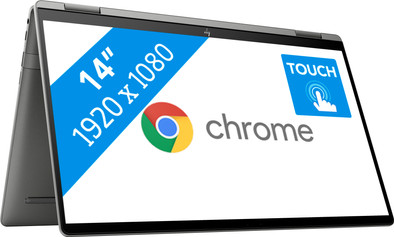
HP Chromebook x360 14c-cc0950nd
Never available again
View alternatives in the sidebar
View alternatives in the sidebar
If you purchase a Chromebook, you receive free 100GB Google Drive storage space for 1 year. View all advantages here.


Product number | 881188 | |
|---|---|---|
Manufacturer code | 437D7EA#ABH | |
Brand | HP | |
Processing of your defect | Via Coolblue | |
Old product returned for free |
Screen size | 14 inches | |
|---|---|---|
Screen quality: laptops | Basic | |
Touchscreen | ||
Panel type | IPS panel | |
Sharpness | Full HD (1080p) | |
Resolution width | 1920 pixels | |
Resolution height | 1080 pixels | |
Refresh rate | 60 Hz | |
Screen reflection | Glossy | |
Adaptive Sync | ||
Brightness | 250 cd/m2 |
Processor | Intel Core i5 | |
|---|---|---|
Processor number | 1165G7 | |
Processor code name | Tiger Lake U | |
Processor cores | Quad-Core (4) | |
Clock speed | 2,4 GHz | |
Turbo speed | 4,2 GHz | |
Cache memory | 8 MB | |
Speed class laptops | Basic | |
Intel Evo laptop |
Internal RAM | 8 GB | |
|---|---|---|
Memory composition | 1x 8GB | |
Memory slot 1 | 8 GB | |
Total number of RAM slots | 1 |
Total storage capacity | 256 GB | |
|---|---|---|
Storage type | SSD | |
SSD storage capacity | 256 GB |
Video card | Intel UHD Graphics | |
|---|---|---|
Type of video card | Shared |
Operating system | Google ChromeOS | |
|---|---|---|
Operating system language | Multiple languages can be configured |
Recommended for use | Internet, email, and text processing, School, Streaming movies and series |
|---|
Build quality laptops | Mid-range | |
|---|---|---|
Laptop model | 2-in-1 | |
Color | Gray | |
Material | Metal | |
Metal type | Aluminum | |
Height | 1,79 cm | |
Width | 32,15 cm | |
Depth | 20,6 cm | |
Weight | 1,66 kg |
Mobile data connection | No | |
|---|---|---|
Bluetooth | ||
Bluetooth version | 5.0 |
USB port | ||
|---|---|---|
Number of USB ports | 3 | |
Type of USB port | Standard USB-A, USB-C | |
Protocol Female USB-C port | DisplayPort Alternative Mode, USB, USB electricity | |
USB version Female USB-C port | 3.1 | |
Video output via USB-C possible | Yes | |
Number of female standard USB-A ports | 1 | |
Female standard USB-A port version | 3.0 | |
Number of USB 3.1 Female USB-C port | 2 | |
HDMI connector | ||
DisplayPort connector | ||
VGA connector | ||
Network connector | ||
Thunderbolt connector | ||
Headphone jack | ||
Memory card reader |
Keyboard layout | QWERTY | |
|---|---|---|
Physical keyboard layout | ANSI | |
Numeric keypad | ||
Spill-resistant | ||
Backlit keyboard | ||
Mechanical keyboard | ||
Programmable keys |
Built-in microphone | ||
|---|---|---|
Number of speakers | 2 | |
Sound reproduction | Stereo | |
Integrated computer speakers brand | Bang & Olufsen |
Built-in camera | ||
|---|---|---|
Image definition webcams | HD Ready (720p) |
Battery technology | Lithium polymer | |
|---|---|---|
Power connector input type (female) | USB Type C |
Manufacturer's warranty |
|---|
TPM (Trusted platform module) | ||
|---|---|---|
Kensington lock | ||
Windows Hello | ||
Fingerprint identity sensor | ||
Security class laptops | Mid-range |
Extra installed software | ||
|---|---|---|
ISV certification |
Screen size | 14 inches | |
|---|---|---|
Processor | Intel Core i5 | |
Internal RAM | 8 GB | |
Total storage capacity | 256 GB | |
Video card | Intel UHD Graphics | |
Recommended for use | Internet, email, and text processing, School, Streaming movies and series | |
Panel type | IPS panel | |
Screen quality: laptops | Basic |
According to our laptop expert
Flip the touchscreen 360 degrees and use the laptop as a tablet.
Thanks to the Intel Core i5 processor, you can work in multiple Chrome tabs or Android apps at the same time without hiccups.
This Chromebook lasts a working day without charging, boots up in seconds, and is less susceptible to viruses with integrated security.
Not all programs work on a Chromebook, only programs from the Chrome Web Store or Google Play Store.
The 14-inch screen is suitable for everyday tasks, but a small screen is less suitable for watching movies or using graphic applications.
On the HP Chromebook x360 14c-cc0950nd, you can multitask with demanding applications and games from the Google Play Store. You flip the touchscreen behind the keyboard and swipe through all of your applications with your fingers. This Chromebook has an Intel Core i5 processor and 8GB RAM. You can open dozens of tabs at the same time or work with demanding applications without your laptop slowing down or crashing. Thanks to the backlit keyboard, you can also easily find the right keys in the dark. This HP runs on the energy-efficient and secure Chrome OS. With this operating system, you download apps from the Google Play Store and work from the cloud with applications like Google Docs.
Note: Windows programs don't work on a Chromebook. Want to use Microsoft Office? Buy Office 365.
From the first hour I have so much fun with this Chromebook. I was nervous about switching from a Windows laptop, but I had already replaced my Office package with Google docs, sheets and slides and all my documents were already in the cloud, so there was really no reason not to switch. I use the laptop with a private and business Google account and switch smoothly between the two. I use the tablet function to quickly view my agenda or show slides. The speed is great, I can easily use it to edit photos and browse endlessly. The battery lasts so long that every few days I have to find where my charger is now because I haven't used it in a while.
Cleo
30 December 2022
Automatically translated from Nederlands
Compact, not difficult to handle. Finger scanner is great. Laptop is also fast and has a nice image
David
5 February 2023
Automatically translated from Nederlands
A Chromebook is handy for on the road, because it is light and works quickly when logging in in another environment.
Priority number one for me is: an adequate battery life. That is exactly where this device lets me down. After an hour and a quarter of work it is empty. Then I do nothing special, brightness of the screen set low. Now I was very spoiled with my previous Chromebook that lasted 8 hours (!), but that had to be replaced because there were no more updates.
Advice: if you always have a power outlet nearby, just buy it. But actually I would advise against it because the battery life is so poor.
RW
10 September 2024
Automatically translated from Nederlands


