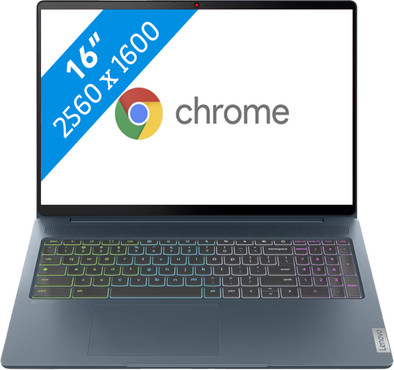
Lenovo IdeaPad 5 Chrome Gaming 16IAU7 82V8000QMH
Never available again
View alternatives in the sidebar
View alternatives in the sidebar
If you purchase a Chromebook, you receive free 100GB Google Drive storage space for 1 year. View all advantages here.


Product number | 920394 | |
|---|---|---|
Manufacturer code | 82V8000QMH | |
Brand | Lenovo | |
Processing of your defect | Via Coolblue | |
Old product returned for free |
Screen size | 16 inches | |
|---|---|---|
Touchscreen | ||
Panel type | IPS panel | |
Sharpness | WQXGA | |
Resolution width | 2560 pixels | |
Resolution height | 1600 pixels | |
Refresh rate | 120 Hz | |
Screen reflection | Anti-glare | |
Adaptive Sync | ||
Brightness | 350 cd/m2 |
Processor | Intel Core i5 | |
|---|---|---|
Processor number | 1235U | |
Processor generation | 12th gen | |
Processor code name | Alder Lake | |
Processor cores | Deca-Core (10) | |
Clock speed | 1,3 GHz | |
Turbo speed | 4,4 GHz | |
Cache memory | 12 MB | |
Speed class laptops | Basic | |
Intel Evo laptop |
Internal RAM | 8 GB | |
|---|---|---|
Memory composition | 1x 8GB | |
Memory slot 1 | 8 GB | |
Total number of RAM slots | 1 | |
Number of replaceable RAM slots | 0 | |
Number of free RAM slots | 0 |
Total storage capacity | 512 GB | |
|---|---|---|
Storage type | SSD | |
SSD storage capacity | 512 GB | |
Hard drive type | NVMe |
Video card | Intel Iris Xe Graphics | |
|---|---|---|
Type of video card | Shared |
Operating system | Google ChromeOS |
|---|
Recommended for use | Gaming, Photo editing, School |
|---|
Build quality laptops | Mid-range | |
|---|---|---|
Laptop model | Laptop | |
Color | Blue | |
Material | Metal, Plastic | |
Metal type | Aluminum | |
Height | 1,99 cm | |
Width | 35,65 cm | |
Depth | 25,3 cm | |
Weight | 1,82 kg | |
Operating system language | Multiple languages can be configured |
Mobile data connection | No | |
|---|---|---|
WiFi standards | Wireless A (WiFi 2), Wireless AC (WiFi 5), Wireless AX (WiFi 6), Wireless AXE (WiFi 6E), Wireless B (WiFi 1), Wireless G (WiFi 3), Wireless N (WiFi 4) | |
Bluetooth | ||
Bluetooth version | 5.1 |
USB port | ||
|---|---|---|
Number of USB ports | 4 | |
Type of USB port | Standard USB-A, USB-C | |
Protocol Female USB-C port | DisplayPort Alternative Mode, USB, USB electricity | |
USB version Female USB-C port | 3.1 | |
Video output via USB-C possible | No, Yes | |
Number of female standard USB-A ports | 2 | |
Female standard USB-A port version | 3.0 | |
Number of USB 3.1 Female USB-C port | 2 | |
HDMI connector | ||
DisplayPort connector | ||
VGA connector | ||
Network connector | ||
Thunderbolt connector | ||
Headphone jack | ||
Memory card reader |
Keyboard layout | QWERTY | |
|---|---|---|
Physical keyboard layout | ANSI | |
Numeric keypad | ||
Spill-resistant | ||
Backlit keyboard | ||
Mechanical keyboard | ||
Programmable keys |
Built-in microphone | ||
|---|---|---|
Number of speakers | 4 | |
Sound reproduction | Stereo | |
Integrated computer speakers brand | Waves |
Built-in camera | ||
|---|---|---|
Image definition webcams | Full HD (1080p) |
Battery technology | Lithium polymer | |
|---|---|---|
Power connector input type (female) | USB Type C |
Manufacturer's warranty |
|---|
TPM (Trusted platform module) | ||
|---|---|---|
Kensington lock | ||
Windows Hello | ||
Fingerprint identity sensor | ||
Security class laptops | Mid-range |
Extra installed software | ||
|---|---|---|
ISV certification |
Screen size | 16 inches | |
|---|---|---|
Processor | Intel Core i5 | |
Internal RAM | 8 GB | |
Total storage capacity | 512 GB | |
Video card | Intel Iris Xe Graphics | |
Recommended for use | Gaming, Photo editing, School | |
Panel type | IPS panel | |
Touchscreen |
According to our laptop expert
Thanks to the Intel Core i5 processor and 8GB RAM, you can multitask smoothly and easily perform demanding and graphic design tasks.
The WQXGA screen of this Chromebook is almost 2 times as sharp as a Full HD screen, so you see more details.
Fast-moving images look smooth on your screen thanks to the high 120Hz refresh rate, so you don't miss any detail of your movies and games.
You can't control this Chromebook with your fingers, because it doesn't have a touchscreen.
Not all programs work on a Chromebook, only programs from the Chrome Web Store or Google Play Store.
Note: not all Windows programs work on a Chromebook. Want to use Microsoft Office? Buy an Office 365 subscription to use the browser versions of Word, Excel, and PowerPoint.
With the 16-inch Lenovo IdeaPad 5 Chrome Gaming 16IAU7 82V8000QMH, you can play games and stream movies and series. With cloud gaming, you can play the latest games on your gaming Chromebook via the cloud. Thanks to the Intel Core i5 processor and 8GB RAM, this Lenovo is more powerful than the average Chromebook and you can easily multitask between several applications. The 120Hz screen displays fast-moving images smoothly, which is useful for fast shooters and racing games. In addition, the WQXGA screen of this laptop is almost 2 times as sharp as a Full HD screen, so you see more details. Do you like to game at night? No problem, thanks to the RGB backlit keyboard, you can also game in style in the dark.
5 stars
6
4 stars
1
3 stars
0
2 stars
0
1 star
0
The Lenovo IdeaPad 5 Chrome Gaming 16IAU7 82V8000QMH is a great Chromebook that lets you play great games, but also allows you to easily write your thesis or other reports. The laptop is a bit heavy.
Appearance and size This Chromebook has a very nice RGB backlit keyboard. I can choose different colors to show, such as white or red, but I went with my personal favorite: the rainbow colors. This laptop has a 16 inch WQXGA screen, on which I see a lot of details. Due to the larger size, this laptop is a bit on the heavy side, so I wouldn't take it with me as quickly.
Gaming I had a great time gaming on this Chromebook. With cloud gaming, I have played many different games through GeForce Now, such as League of Legends. This went smoothly and it almost seemed like I had the games locally on my laptop. In addition, I also played Minecraft Bedrock edition. I downloaded this game locally via the Play Store, this game also worked very smoothly. I could easily access servers and I had almost no hitches.
Use for work or study In addition to using this Chromebook for games, I've also worked in Office and Google applications. Although a Chromebook is fully equipped for Google, I also used Office apps very easily. I easily download Word, Excel and PowerPoint via the Play Store, but I have also worked via the online versions. With the online versions, I even came across features that the apps don't have.
Operating system and security A Chromebook runs on ChromeOS, an operating system other than Windows or macOS. I think ChromeOS works very well and it looks very neat and sleek. You can adjust everything to your own wishes via the settings. You open your local files via the explorer and you can easily work in different programs. You can only download programs via the Play Store. This ensures that you have less chance of viruses.
Battery life What really struck me is that the battery of this Chromebook lasts for a very long time. I have played several games, downloaded many apps and worked in many programs without draining the battery. So I can easily get through a working day without charging this laptop, which is very handy.
Deanne. Laptop specialist.
25 July 2023
Automatically translated from Nederlands
What a great product! Fast, lots of storage for offline use, large screen and 9 hours of battery life. Since October 18 with Chromebook Plus. I use it privately to edit photos and videos and it works really well. Now finally said goodbye to my Windows laptop.
Eric
20 October 2023
Automatically translated from Nederlands
Top quality.
Thea
14 May 2024
Automatically translated from Nederlands
