Microsoft Surface Laptop Go 3 i5 / 8GB / 256GB Platinum
Never available again
View alternatives in the sidebar
View alternatives in the sidebar
Product number | 935348 | |
|---|---|---|
Manufacturer code | XK1-00029 | |
Brand | Microsoft | |
Processing of your defect | Via Coolblue | |
Old product returned for free |
Screen size | 12,4 inches | |
|---|---|---|
Touchscreen | ||
Panel type | LCD | |
Sharpness | HD+ (900p) | |
Resolution width | 1536 pixels | |
Resolution height | 1024 pixels | |
Refresh rate | 60 Hz | |
Screen reflection | Glossy | |
Adaptive Sync |
Processor | Intel Core i5 | |
|---|---|---|
Processor number | 1235U | |
Processor generation | 12th gen | |
Processor code name | Alder Lake | |
Processor cores | Deca-Core (10) | |
Clock speed | 1,3 GHz | |
Turbo speed | 4,4 GHz | |
Cache memory | 12 MB | |
Speed class laptops | Basic | |
Intel Evo laptop |
Internal RAM | 8 GB | |
|---|---|---|
Memory composition | 1x 8GB | |
Memory slot 1 | 8 GB | |
Total number of RAM slots | 1 | |
Number of free RAM slots | 0 |
Total storage capacity | 256 GB | |
|---|---|---|
Storage type | SSD | |
SSD storage capacity | 256 GB | |
Hard drive type | NVMe |
Video card | Intel Iris Xe Graphics | |
|---|---|---|
Type of video card | Shared |
Operating system | Windows | |
|---|---|---|
Windows OS version | Windows 11 Home | |
Operating system language | Multiple languages can be configured |
Recommended for use | Internet, email, and text processing, On the go, School |
|---|
Build quality laptops | Mid-range | |
|---|---|---|
Laptop model | Laptop | |
Color | Silver | |
Material | Metal | |
Metal type | Aluminum | |
Height | 1,57 cm | |
Width | 27,8 cm | |
Depth | 20,6 cm | |
Weight | 1,13 kg |
Mobile data connection | No | |
|---|---|---|
WiFi standards | Wireless A (WiFi 2), Wireless AC (WiFi 5), Wireless AX (WiFi 6), Wireless B (WiFi 1), Wireless G (WiFi 3), Wireless N (WiFi 4) | |
Bluetooth | ||
Bluetooth version | 5.1 |
USB port | ||
|---|---|---|
Number of USB ports | 2 | |
Type of USB port | Standard USB-A, USB-C | |
Protocol Female USB-C port | DisplayPort Alternative Mode, USB, USB electricity | |
USB version Female USB-C port | 3.2 | |
Video output via USB-C possible | Yes | |
Number of female standard USB-A ports | 1 | |
Female standard USB-A port version | 3.1 | |
HDMI connector | ||
DisplayPort connector | ||
VGA connector | ||
Network connector | ||
Thunderbolt connector | ||
Headphone jack | ||
Memory card reader |
Keyboard layout | QWERTY | |
|---|---|---|
Physical keyboard layout | ANSI | |
Numeric keypad | ||
Spill-resistant | ||
Backlit keyboard | ||
Mechanical keyboard | ||
Programmable keys |
Built-in microphone | ||
|---|---|---|
Number of speakers | 4 | |
Sound reproduction | Stereo | |
Integrated computer speakers brand | Dolby Audio |
Built-in camera | ||
|---|---|---|
Image definition webcams | HD Ready (720p) |
Battery technology | Lithium-ion | |
|---|---|---|
Power connector input type (female) | USB Type C | |
Charger included |
Manufacturer's warranty |
|---|
TPM (Trusted platform module) | ||
|---|---|---|
TPM type | Firmware TPM | |
Kensington lock | ||
Windows Hello | ||
Fingerprint identity sensor | ||
Infrared camera | ||
Security class laptops | Basic |
Extra installed software | ||
|---|---|---|
ISV certification |
Screen size | 12,4 inches | |
|---|---|---|
Processor | Intel Core i5 | |
Internal RAM | 8 GB | |
Total storage capacity | 256 GB | |
Video card | Intel Iris Xe Graphics | |
Recommended for use | Internet, email, and text processing, On the go, School | |
Panel type | LCD | |
Touchscreen |
According to our laptop expert
On the touchscreen, you can swipe through your apps and quickly edit a note or email with your finger.
Thanks to the Intel Core i5 processor and 8GB RAM, you can edit photos.
With the Intel Iris Xe Graphics shared video card, your videos render faster than with other shared video cards.
If you edit videos, choose a laptop with at least an Intel Core i7 or AMD Ryzen 7 processor.
This laptop doesn't have keyboard backlight, so the keys are difficult to read in the dark.
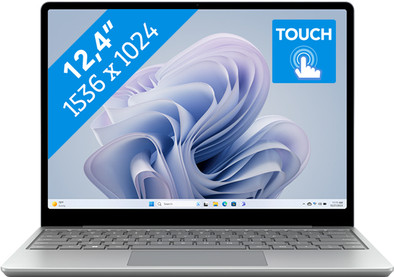
With the 12-inch Microsoft Surface Laptop Go 3 i5/8GB/256GB, you can edit photos and work with Office programs. On the touchscreen, you can quickly take notes and swipe through all your apps. That's useful when you're editing photos as well. With the Intel Core i5 processor and 8GB RAM, the laptop is powerful enough for that. In addition, the 3:2 aspect ratio is nice to read and write on because it provides a lot of space for text. Watch a movie or series from time to time or like to listen to music? Thanks to Dolby Audio Premium, you can enjoy purer sound than with regular laptop speakers. The 12-inch size makes the Microsoft Surface Laptop Go 3 compact and light. This means you can easily take the laptop with you in your bag and use it on the go.
Note: the Slim Surface Pen 2 isn't included by default and has to be purchased separately.
Receive an email with a personal voucher code for 1 free year of Norton 360 Deluxe antivirus 24 hours after purchase, worth € 94.99.
Battery life
Speed
Design
The small Microsoft Surface Laptop Go 3 is a laptop that is suitable for business users who often work on the road or do not have a fixed workplace. Thanks to the small 12.6-inch size, you can easily take the laptop with you and work on your business tasks on the go. I tested the laptop in a conference room and took it around the office. I also tested Adobe InDesign and made some designs via Canva. All this to properly test the ease of use and the hardware.
Small size and sturdy housing The main attraction of this laptop is its small size. Due to the 12.6 inch size, I knew that this laptop was made for people who travel a lot and want a powerful laptop for that. I quickly noticed that the small size had pros and cons. For example, I enjoyed walking quickly from location to location with a small laptop. With many meetings it is easier when I have a small laptop. The disadvantage is that the screen may feel a bit too small when I want to work a lot. I have slightly less overview on the 12-inch screen and the keyboard is just a bit too small for my somewhat large hands. The Enter and left Shift buttons in particular feel a bit too small for me. I think the sturdy housing is a big plus. The keys also feel sturdy, making this laptop ideal if you take a lot of reports or notes during meetings.
Powerful components for business use With an i5 processor and 8 GB of RAM, this laptop is suitable for multitasking and photo editing. That's why I opened both Canva and Adobe InDesign, to see where the limits were. Canva, which is a fairly lightweight online editing program, ran without any problems. That's why I opened the heavy version, Adobe InDesign. The Go 3 had no problems with this either, although the bottom did get a bit warm. Due to the small size, it is not surprising that ventilation is slightly less than with a 17-inch laptop. My tip is therefore to keep a close eye on the ventilation when you demand more from the processor.
Touch screen for easy use Like many other Surface laptops, the Go 3 also has a touchscreen. Due to its small size, the Go 3 is a perfect combination of a tablet and a laptop. The only thing I miss here is the tiltable screen. The Studio 2, for example, has this, making it much easier and faster to use the touchscreen. Despite that, it is a good addition, because you can quickly zoom in on small texts or something.
Giorgos
14 December 2023
Automatically translated from Nederlands
Excellent laptop with good ease of use. Charger very nice, no pin that can break off. Easy to use.
Martijn
30 December 2023
Automatically translated from Nederlands
Because he work smoothly
Julika
16 March 2024
Automatically translated from Nederlands


