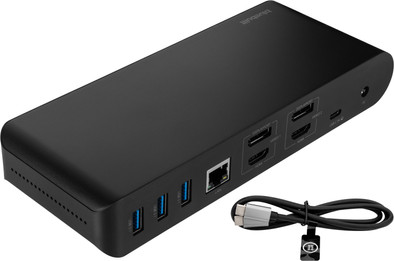
BlueBuilt DisplayLink Docking Station Pro with USB-C Black
Never available again
View alternatives in the sidebar
Choose the better dock with the cable that lasts longer
BlueBuilt DisplayLink 2025
Better model
View alternatives in the sidebar
Better model
Product number | 950309 | |
|---|---|---|
Manufacturer code | BBDS14IN1B | |
Brand | BlueBuilt | |
Processing of your defect | Via Coolblue | |
Old product returned for free |
Made for laptop models | Apple MacBook, Chromebook, Microsoft Surface, Windows laptop |
|---|
Laptop docking station suitable for | Connect 1 monitor, Connect 2 monitors and MacBook, Connect 2 monitors and a Chromebook, Connect 2 monitors and a Windows laptop | |
|---|---|---|
Extra functionalities docking station | Charge laptop via docking station, Charge laptop via own charger, Charge phone via docking station, Connect headphones, Connect wired network | |
Type of main connector | USB-C | |
Supported video technology on Docking Station | DisplayLink, MST, SST | |
Number of USB ports | 6 | |
USB function | Charge, Charging an external device, Data transfer, Device connection, Play media, Power source, Record audio | |
Type of USB port | Standard USB-A, USB-C | |
Number of female standard USB-A ports | 4 | |
Female standard USB-A port version | 3.1 | |
Power standard USB-A port | 7,5 W | |
Number of USB-C ports | 2 | |
Protocol Female USB-C port | USB, USB electricity | |
USB version Female USB-C port | 3.1 | |
Number of USB 3.1 Female USB-C port | 2 | |
Power USB-C port | 100 W | |
Fast charging USB-C port | ||
Total available video outputs | 2x DisplayPort, 2x HDMI | |
Number of HDMI connectors | 2 | |
Female HDMI Type A port version | 2.0 | |
Number of Ethernet ports | 1 | |
Ethernet speed | Gigabit Ethernet (1000Mbps) | |
Type of DisplayPort connector | standard DisplayPort | |
Number of Female Standard DisplayPort 1.4 ports | 2 | |
Version Female Standard DisplayPort port | 1.4 | |
Number of headphone jacks | 1 | |
Type of headphone connection | 3.5mm (TRRS) | |
Memory card reader | ||
Memory card | SD | |
Number of connectable monitors | 2 | |
Maximum image resolution 1 monitor | 4K (3840x2160) | |
Maximum refresh rate 1 monitor | 60 Hz | |
Maximum image resolution 2 monitors | 4K (3840x2160) | |
Maximum refresh rate of 2 monitors | 60 Hz |
Color | Black | |
|---|---|---|
Height | 2,08 cm | |
Width | 8,28 cm | |
Depth | 34 cm | |
Weight | 445 g |
Extra functionalities docking station | Charge laptop via docking station, Charge laptop via own charger, Charge phone via docking station, Connect headphones, Connect wired network | |
|---|---|---|
Type of main connector | USB-C | |
Total available video outputs | 2x DisplayPort, 2x HDMI | |
Number of connectable monitors | 2 | |
Type of USB port | Standard USB-A, USB-C |
According to our dock for laptops expert
With this dock, you can connect 2 extra 4K monitors to your laptop via DisplayPort or HDMI.
You can charge your laptop or MacBook with this dock if your laptop supports Power Delivery.
You can work with accessories like a keyboard and an ergonomic mouse, which you can connect via the USB-A ports.
You have to install DisplayLink software before you can use this docking station.
This docking station is unsuitable for gaming on your extra screen.
Note: the docking station works best if you install the DisplayLink driver before use. You can easily download it from the DisplayLink website.
You can easily expand your workplace with the BlueBuilt DisplayLink Docking Station Pro with USB-C. With this docking station, you can connect up to 2 monitors via DisplayPort or HDMI. You can get a maximum resolution of 4K at 60Hz. This allows you to create more space for all your windows. You also have enough USB ports for peripherals and memory cards. You can easily and quickly connect your mouse, keyboard, and USB flash drive. Does your laptop support Power Delivery? You can charge your laptop with this BlueBuilt Pro dock. This way, you don't have to look for a socket. Via the Ethernet port, you can also connect a cable for a stable wired internet connection. The BlueBuilt DisplayLink Docking Station with USB-C works on all Windows laptops and MacBook models with a USB-C port that transmit a video signal. This is how you check if your laptop has a suitable USB-C port.
Price-quality ratio
Durability
Super docking station! I have a macbook pro myself and had first bought another one for less than 30 euros. As expected it was poor quality and I could not connect 2 monitors. After research and advice from coolblue we ended up with this one. A bit on the expensive side but good quality with easy installation. I would recommend it. However, you do not get an installation booklet but by email, not a problem for me but something to keep in mind.
Marco
27 November 2024
Automatically translated from Nederlands
Works as I wanted. Laptop closed and still able to work like a desktop.
Fred
27 December 2024
Automatically translated from Nederlands
Bought this to use with a new MacBook Air and all works as it should. It allows me to get a MacBook at a reasonable price and get all the ports I need that otherwise would need a much more expensive MacBook Pro at twice the price. Small downside is the need for DisplayLink SW and whilst this is an industry standard SW, it at least allows this dock to be device agnostic. There's more expensive docks out there but if you just want a few extra standard ports for you laptop, this is a good choice. Well Done CoolBlue!
Oliver
6 February 2025