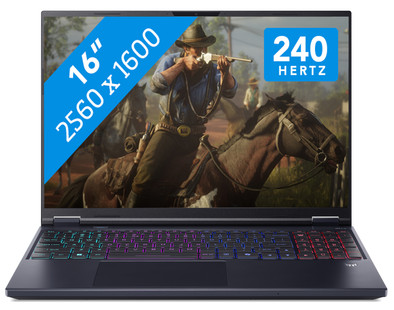
Acer Predator Helios Neo 16 AI PHN16-73-927F
Never available again
View alternatives in the sidebar
View alternatives in the sidebar
You've purchased an NVIDIA product that includes the game CONTROL Resonant for free. The promotion runs from 26 August 2026 to 29 September 2026. You can request the promotion until 27 October 2026. To receive your game, you have to follow a few steps. You can read what you have to do here.

If you purchase of a laptop or desktop, you receive 1 year of Norton 360 Deluxe for free. One day after purchase, you'll receive an email with a personal voucher code. Go to the promotional Terms and Conditions for more information.

Product number | 962529 | |
|---|---|---|
Manufacturer code | NH.QX3EH.002 | |
Brand | Acer | |
Processing of your defect | Via Coolblue | |
Old product returned for free |
Screen size | 16 inches | |
|---|---|---|
Screen quality: laptops | High-end | |
Touchscreen | ||
Panel type | IPS panel | |
Sharpness | WQXGA | |
Resolution width | 2560 pixels | |
Resolution height | 1600 pixels | |
Refresh rate | 240 Hz | |
Aspect ratio | 16:10 | |
Screen reflection | Anti-glare | |
Color space | DCI-P3 | |
Adaptive Sync | ||
Type of adaptive sync | G-Sync | |
Brightness | 500 cd/m2 | |
Blue light filter | ||
HDR support |
Processor | Intel Core Ultra 9 | |
|---|---|---|
Processor number | 275HX | |
Processor generation | Series 2 | |
Processor code name | Arrow Lake | |
Processor cores | Tetracosa-Core (24) | |
Threads | 24 | |
Clock speed | 2,1 GHz | |
Turbo speed | 5,4 GHz | |
Cache memory | 40 MB | |
Speed class laptops | Best | |
Intel Evo laptop |
Neural Processing Unit (NPU) | Intel AI Boost | |
|---|---|---|
TOPs | 13 | |
Microsoft Copilot+ PC | No |
Internal RAM | 32 GB | |
|---|---|---|
Memory composition | 2x 16GB | |
Memory slot 1 | 16 GB | |
Memory slot 2 | 16 GB | |
Total number of RAM slots | 2 | |
Maximum internal memory | 64 GB | |
RAM type (DDR type) | DDR5 | |
Memory speed | 6400 MHz | |
Number of replaceable RAM slots | 2 | |
Number of free RAM slots | 0 | |
Total graphics power | 115 W | |
RAM expandable up to | 64 GB |
Total storage capacity | 1 TB | |
|---|---|---|
Storage type | SSD | |
SSD storage capacity | 1 TB | |
Hard drive type | NVMe | |
Number of replaceable storage slots | 2 | |
Number of free storage slots | 1 | |
Internal storage expandable up to | 4 GB |
Video card | NVIDIA GeForce RTX 5070 | |
|---|---|---|
Video card brand | NVIDIA | |
Type of video card | Dedicated | |
Video card RAM | 8 GB |
Operating system | Windows | |
|---|---|---|
Windows OS version | Windows 11 Home | |
Operating system language | Multiple languages can be configured |
Recommended for use | Gaming, Music production and DJing, Photo editing, Render 3D models, Software development, Video editing |
|---|
Build quality laptops | Mid-range | |
|---|---|---|
Laptop model | Laptop | |
Color | Black | |
Material | Metal, Plastic | |
Metal type | Aluminum | |
Material top of laptop | Metal | |
Material keyboard casing laptop | Metal | |
Material bottom of laptop | Plastic | |
Height | 2,39 cm | |
Width | 35,6 cm | |
Depth | 28,5 cm | |
Weight | 2,7 kg |
Mobile data connection | No | |
|---|---|---|
WiFi standards | Wireless A (WiFi 2), Wireless AC (WiFi 5), Wireless AX (WiFi 6), Wireless AXE (WiFi 6E), Wireless B (WiFi 1), Wireless G (WiFi 3), Wireless N (WiFi 4) | |
Bluetooth | ||
Bluetooth version | 5.4 |
USB port | ||
|---|---|---|
Number of USB ports | 5 | |
Type of USB port | Standard USB-A, USB-C | |
Protocol Female USB-C port | DisplayPort Alternative Mode, USB, USB electricity | |
USB version Female USB-C port | 3.2 | |
Video output via USB-C possible | Yes | |
Number of female standard USB-A ports | 3 | |
Female standard USB-A port version | 3.2 | |
HDMI connector | ||
Number of HDMI connectors | 1 | |
Female HDMI Type A port version | 2.1 | |
DisplayPort connector | ||
VGA connector | ||
Network connector | ||
Number of Ethernet ports | 1 | |
Thunderbolt connector | ||
Headphone jack | ||
Memory card reader |
Keyboard layout | QWERTY | |
|---|---|---|
Physical keyboard layout | ANSI | |
Numeric keypad | ||
Spill-resistant | ||
Backlit keyboard | ||
Color keyboard lighting | RGB | |
Mechanical keyboard | ||
Programmable keys | ||
Copilot test |
Built-in microphone | ||
|---|---|---|
Number of speakers | 2 | |
Sound reproduction | Stereo | |
Integrated computer speakers brand | DTS Studio Sound |
Built-in camera | ||
|---|---|---|
Image definition webcams | Full HD (1080p) | |
Camera slider |
Battery capacity laptop | 90 Wh | |
|---|---|---|
Battery technology | Lithium-ion | |
Power connector input type (female) | Other brand/product specific | |
Laptop wattage | 230 W | |
Charger included | ||
Charging cable included | ||
Power charger | 230 W |
Manufacturer's warranty |
|---|
TPM (Trusted platform module) | ||
|---|---|---|
TPM type | Firmware TPM | |
Kensington lock | ||
Windows Hello | ||
Fingerprint identity sensor | ||
Infrared camera | ||
Security class laptops | Basic | |
Built-in privacy screen |
Extra installed software | ||
|---|---|---|
ISV certification |
Recommended for use
Gaming, Music production and DJing, Photo editing, Render 3D models, Software development, Video editingOur digital expert will help you, but it can sometimes make mistakes, like humans do.
According to our laptop expert
With the RTX 5070 video card, you can play demanding games smoothly in Full HD with DLSS support enabled.
You can edit large video files, stream professional content on Twitch, and work on 3D designs with the Intel Core Ultra 9 processor.
With 32GB of RAM, you can stream your gameplay in 4K and run the most demanding programs.
You need an RTX 5070 Ti video card if you want to play demanding games without DLSS support, or if you want to play light and medium demanding games in Quad HD.
The screen isn’t big enough if you want a good overview of your game.
Recommended for use
Gaming, Music production and DJing, Photo editing, Render 3D models, Software development, Video editing5 stars
3
4 stars
2
3 stars
1
2 stars
0
1 star
1
The Acer Predator Helios Neo 16 AI PHN16 is a powerful 16-inch gaming laptop, allowing me to smoothly play medium- and high-end games in Full HD and Quad HD. I play most games without stuttering at a minimum of 60 frames per second. I also play games in Quad HD with DLSS support enabled. The laptop also has a cool gaming look with a 4-zone RGB backlit keyboard and a docking station on the back.
Powerful NVIDIA RTX 5070 graphics card The Acer Predator Helios Neo 16 has an NVIDIA RTX 5070 graphics card. This allows me to play all games in Full HD or Quad HD with DLSS support enabled. I play Indiana Jones at 80 to 100 frames per second in Quad HD with DLSS enabled. Clair Obscur is another game with richly detailed graphics, even reaching over 100 frames per second in Quad HD. The only game the graphics card struggles with is Microsoft Flight Simulator. I have to play this game in Full HD with DLSS support enabled. With these settings, I get more than 60 frames per second.
Sharp images with a high refresh rate On the 16-inch Quad HD display, I see sharp images and vivid details. I especially notice this in colorful games like Clair Obscur and Microsoft Flight Simulator. For example, I can see the Rotterdam skyline in every detail. This is thanks to the 100 percent coverage within the DCI-P3 color profile. I also see detail in dark games, such as S.T.A.L.K.E.R. 2. Furthermore, the laptop has a refresh rate of up to 240 Hz. This allows me to play shooters like Doom: The Dark Ages and Gears of War Reloaded with smooth images. In Full HD, I play Doom at about 100 frames per second. Gears of War even reaches more than 140 frames per second in Quad HD.
Sturdy chassis with a cool RGB gaming look The laptop feels sturdy thanks to the metal chassis. Besides providing good protection, it also helps with cooling. I feel heat while gaming, but it's not because the graphics card and processor exceed 60 degrees Celsius. I manage the fans via PredatorSense. They make a lot of noise, but it doesn't bother me while gaming. The laptop also has a cool gaming look thanks to the 4-zone RGB backlit keyboard. I use PredatorSense to set different patterns or a color per zone. I personally prefer wave lighting because it allows me to see all the colors. The Predator Helios Neo also has a built-in dock on the back. I use it to connect the charger, which I consider a nice advantage. It keeps my desk tidy and prevents cables from getting in the way. The downside is the weight; the laptop feels heavy.
Giorgos. Laptop specialist.
4 September 2025
Automatically translated from Nederlands
This laptop has a beautiful, robust design, and is a bit heavier than a typical laptop, which is why it's a gaming laptop. You can also customize the backlighting on the keyboard and the back of the screen, adjusting the colors and movements. It also offers various scenarios that you can adjust to your needs, for gaming, quiet spaces, and everyday use. The laptop will then adapt to your needs, particularly the GPU and CPU usage.
This laptop boots very quickly, but a minor drawback is the loud and annoying startup sound. You can disable this in the included applications.
Above all, the laptop performs very well for its intended use and is highly recommended for gamers who want to be mobile and fast for gaming.
hcmaiky85
18 December 2025
Automatically translated from Nederlands
It's a gaming laptop. So I have it for gaming. And it performs more than excellently. It could certainly be better, but the graphics, sound, and speed are all excellent. Cyberpunk, DOOM Eternal—it runs like a dream. It's not the most expensive of the expensive, so there are undoubtedly games this machine isn't suitable for, but for a "regular" gamer, it's truly a top-notch device.
I give the battery life five stars, but keep in mind that this isn't an office machine you'll want to run all day on battery power. I almost always use AC power; the battery is for the exceptions.
Arnout
5 November 2025
Automatically translated from Nederlands
