Acer Chromebook 15 CB515-1H-C1VS
Never available again
View alternatives in the sidebar
View alternatives in the sidebar

Product number | 793925 | |
|---|---|---|
Manufacturer code | NX.GP0EH.003 | |
Brand | Acer | |
Processing of your defect | Carry-in warranty | |
Old product returned for free |
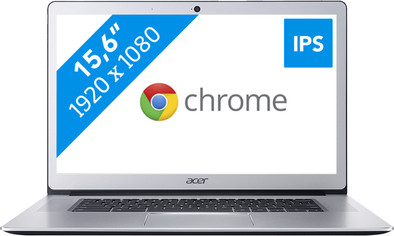
Screen size | 15,6 inches | |
|---|---|---|
Touchscreen | ||
Panel type | IPS panel | |
Sharpness | Full HD (1080p) | |
Resolution width | 1920 pixels | |
Resolution height | 1080 pixels | |
Refresh rate | 50 Hz | |
Screen reflection | Anti-glare | |
Adaptive Sync |
Processor | Intel Celeron | |
|---|---|---|
Processor code name | Apollo Lake | |
Processor cores | Dual-Core (2) | |
Clock speed | 1,1 GHz | |
Turbo speed | 2,4 GHz | |
Cache memory | 2 MB |
Internal RAM | 4 GB | |
|---|---|---|
Memory composition | 1x 4GB | |
Memory slot 1 | 4 GB | |
Total number of RAM slots | 1 | |
Maximum internal memory | 4 GB |
Total storage capacity | 32 GB | |
|---|---|---|
Storage type | Flash | |
SSD storage capacity | 32 GB | |
Hard drive type | SATA |
Video card | Intel HD Graphics 500 | |
|---|---|---|
Type of video card | Shared |
Operating system | Google ChromeOS | |
|---|---|---|
Operating system language | Dutch, English, German, Multiple languages can be configured |
Laptop model | Chromebook | |
|---|---|---|
Color | Silver | |
Material | Metal | |
Metal type | Aluminum | |
Height | 1,8 cm | |
Width | 37,8 cm | |
Depth | 26,6 cm | |
Weight | 1,8 kg |
Mobile data connection | No | |
|---|---|---|
WiFi standards | Wireless AC | |
Bluetooth | ||
Bluetooth version | 4.0 |
USB port | ||
|---|---|---|
Number of USB ports | 4 | |
Type of USB port | Standard USB-A, USB-C | |
Protocol Female USB-C port | USB | |
USB version Female USB-C port | 3.0, 3.1 | |
Number of female standard USB-A ports | 2 | |
Female standard USB-A port version | 3.0 | |
Number of USB 2.0 Female USB-C ports | 0 | |
Number of USB 3.0 Female USB-C ports | 1 | |
Number of USB 3.1 Female USB-C port | 1 | |
HDMI connector | ||
DisplayPort connector | ||
VGA connector | ||
Network connector | ||
Thunderbolt connector | ||
Headphone jack | ||
Memory card reader |
Keyboard layout | QWERTY | |
|---|---|---|
Physical keyboard layout | ANSI | |
Numeric keypad | ||
Spill-resistant | ||
Backlit keyboard | ||
Mechanical keyboard | ||
Programmable keys |
Built-in microphone | ||
|---|---|---|
Number of speakers | 2 | |
Sound reproduction | Stereo | |
Integrated computer speakers brand | Standard speakers |
Built-in camera | ||
|---|---|---|
Image definition webcams | HD Ready (720p) |
Battery technology | Lithium polymer | |
|---|---|---|
Power connector input type (female) | Standard, USB Type C |
Manufacturer's warranty |
|---|
TPM (Trusted platform module) | ||
|---|---|---|
Kensington lock | ||
Windows Hello | ||
Fingerprint identity sensor |
Extra installed software |
|---|
Screen size | 15,6 inches | |
|---|---|---|
Processor | Intel Celeron | |
Internal RAM | 4 GB | |
Total storage capacity | 32 GB | |
Video card | Intel HD Graphics 500 | |
Panel type | IPS panel | |
Touchscreen |
According to our laptop expert
Thanks to the aluminum casing, this Chromebook can take a hit.
Watch movies and series in high resolution on the Full HD screen.
Chromebooks are energy efficient, so you can use your Chromebook for an entire workday without charging it.
Windows programs don't work on a Chromebook.
This Chromebook doesn't have a touchscreen, so you can't operate this model with your fingers.
The Acer Chromebook 15 CB515-1H-C1VS is a laptop you can quickly use anywhere. You use the Chromebook in combination with your Gmail account, so you can get started in no time. This 15.6-inch Acer Chromebook is energy efficient, so you can work on your thesis all day without having to charge the laptop. Store files in the cloud with your Google account. That means you don't need much extra storage space. After a long day of studying, you load the Netflix app and watch a few shows on the IPS panel, which gives you a good view from wide viewing angles.
Note: Windows programs don't work on a Chromebook. Want to use Microsoft Office? Buy Office 365 or download the Office app in the Google Play Store.
The device starts up quickly, has a nice design, is easy to use and contains only what I really need.
Jeffrey Verburg
20 December 2017
Automatically translated from Nederlands
In addition to google chrome, there is the playstore from which you can download various apps and possibly synchronize with your android smartphone. In addition, you have the chrome webstore with an extensive theme park and a lot of add-ons... just google it and you can even get other browsers via an add-on (eg internet explorer with the msn page). Really many possibilities, I'm still discovering them!
Annet
9 April 2018
Automatically translated from Nederlands
There isn't much to say about Chromebooks. You buy a google browser (Chrome) with hardware around it.
You really should be able to do everything online, because there are virtually no offline options with Chromebooks (although they are increasing). But let's be clear: Chromebooks are for being online and doing everything online.
That is why you should look more at other things with a Chromebook: Screen quality, Battery, CPU, memory. 4GB is enough for 80% of what I do. But a nice big and sharp screen IPS panel (1920x1080) is really so much better than any other 1368x768 panel.
This model plays youtube at 4K without stuttering, 8K does not work. Play three movies from Netflix on 1 battery? Impressive!
M Maas
2 January 2018
Automatically translated from Nederlands
