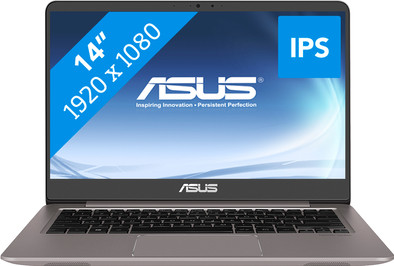
Asus ZenBook UX410UA-GV354T
Never available again
View alternatives in the sidebar
View alternatives in the sidebar
Product number | 803778 | |
|---|---|---|
Manufacturer code | 90NB0DL3-M07980 | |
Brand | ASUS | |
Processing of your defect | Carry-in warranty | |
Old product returned for free |
Screen size | 14 inches | |
|---|---|---|
Touchscreen | ||
Panel type | IPS panel | |
Sharpness | Full HD (1080p) | |
Resolution width | 1920 pixels | |
Resolution height | 1080 pixels | |
Screen reflection | Anti-glare |
Processor | Intel Core i5 | |
|---|---|---|
Processor code name | Kaby Lake R | |
Processor cores | Quad-Core (4) | |
Clock speed | 1,6 GHz | |
Turbo speed | 3,4 GHz | |
Cache memory | 6 MB |
Internal RAM | 8 GB | |
|---|---|---|
Memory composition | 1x 8GB | |
Maximum internal memory | 16 GB |
Total storage capacity | 256 GB | |
|---|---|---|
Storage type | SSD | |
SSD storage capacity | 256 GB | |
Hard drive type | M.2 |
Video card | Intel UHD Graphics 620 | |
|---|---|---|
Type of video card | Shared |
Operating system | Windows | |
|---|---|---|
Windows OS version | Windows 10 Home | |
Operating system language | Dutch, English, Multiple languages can be configured |
Laptop model | Laptop | |
|---|---|---|
Color | Gray | |
Material | Metal | |
Metal type | Aluminum | |
Height | 1,9 cm | |
Width | 32,3 cm | |
Depth | 22,3 cm | |
Weight | 1,4 kg |
Mobile data connection | No | |
|---|---|---|
WiFi standards | Wireless AC | |
Bluetooth | ||
Bluetooth version | 4.2 |
USB port | ||
|---|---|---|
Number of USB ports | 4 | |
HDMI connector | ||
DisplayPort connector | ||
VGA connector | ||
Network connector | ||
Thunderbolt connector | ||
Headphone jack | ||
Memory card reader |
Keyboard layout | QWERTY | |
|---|---|---|
Physical keyboard layout | ANSI | |
Numeric keypad | ||
Spill-resistant | ||
Backlit keyboard | ||
Mechanical keyboard | ||
Programmable keys |
Built-in microphone | ||
|---|---|---|
Number of speakers | 2 | |
Sound reproduction | Stereo | |
Integrated computer speakers brand | Standard speakers |
Built-in camera | ||
|---|---|---|
Image definition webcams | HD Ready (720p) |
Battery technology | Lithium-ion | |
|---|---|---|
Power connector input type (female) | Other brand/product specific |
Manufacturer's warranty |
|---|
TPM (Trusted platform module) | ||
|---|---|---|
Kensington lock | ||
Windows Hello | ||
Fingerprint identity sensor |
Screen size | 14 inches | |
|---|---|---|
Processor | Intel Core i5 | |
Internal RAM | 8 GB | |
Total storage capacity | 256 GB | |
Video card | Intel UHD Graphics 620 | |
Panel type | IPS panel | |
Touchscreen | ||
Windows OS version | Windows 10 Home |
According to our laptop expert
With 1.4kg, this laptop is lighter than comparable laptops, which means you can easily bring it along.
The use of a 13-inch laptop casing makes this laptop more compact than 14-inch laptops, while offering relatively more screen space.
The 100% sRGB color space cover ensures that the colors are more realistic and it allows you to edit your photos more accurately.
Doesn't have a DVD player to play CDs and DVDs.
The Asus ZenBook UX410UA-GV354T is a compact laptop, which you can easily bring along to edit some photos. The 14-inch screen is fitted in a 13-inch casing, which means you've got relatively more screen space compared to other laptops. You'll be able to view your artworks in real-life colors, since the screen has 100% sRGB coverage. The aluminum design means the ZenBook is tough enough to take a bit of a beating. Take it with you any place you want without worry, as the 1.4kg weight makes this easy too. Use it when you're on the go to check your email on the train, or continue with your Photoshop project, which this Asus can handle without any problems.
Note: this laptop has an empty 2.5-inch HDD bay. This allows you to easily add an extra hard drive by opening up the laptop.
Done with older laptops between 15 and 17 inches for years. However, we have now opted for a more compact laptop that is easy to carry. Fits easily in a 20 liter backpack. Fast laptop, can do several things at the same time. Good for streaming, listening to music and office activities. I don't do much gaming and photo editing, so I haven't tried it yet.
Lotte Albers
19 March 2018
Automatically translated from Nederlands
My macbook pro from 2011 gave up the ghost after 7 years and I started looking for a price-friendly alternative to quickly edit photos.
After working with this laptop for a little over a week, I am very satisfied for the time being. The laptop boots quickly and for the time being has no trouble running photoshop and lightroom at the same time, although I don't perform extremely heavy editing now either.
The colors of the screen are really beautiful and that was also my main conviction to buy this device. Only the maximum screen illumination could have been slightly brighter, but that is negligible
What I found very annoying was that the screen kept adjusting the brightness according to the images I was viewing (suddenly dark screen with black images, light screen with lighter images), even though I had disabled this option via my keyboard - which was very annoying for photo editing. After some googling I did get it resolved via the Intel Graphics settings, but I don't call that really user-friendly. I would never have found this without google.
Once you've adjusted the settings to your liking, this seems to me to be a very solid, relatively fast and beautifully designed laptop that is suitable for photo editing. And he also saves a few hundreds of euros with similar Mac devices. Let's hope it lasts just as long...
Lucas Bernaerts
8 May 2018
Automatically translated from Nederlands
Very suitable for e-mailing, watching series and surfing the internet (especially with the matte IPS screen). But the strong I5 8th generation CPU lacks a narrow video card, for example the mx150, for the perfect performance.
Nikita B
5 April 2018
Automatically translated from Nederlands