Acer Chromebook Spin 11 CP311-1H-C973

Never available again
View alternatives in the sidebar
View alternatives in the sidebar

Product number | 813753 | |
|---|---|---|
Manufacturer code | NX.GV2EH.003 | |
Brand | Acer | |
Processing of your defect | Via Coolblue | |
Old product returned for free |
Screen size | 11,6 inches | |
|---|---|---|
Touchscreen | ||
Panel type | IPS panel | |
Sharpness | WXGA | |
Resolution width | 1366 pixels | |
Resolution height | 768 pixels | |
Refresh rate | 50 Hz | |
Screen reflection | Glossy | |
Adaptive Sync |
Processor | Intel Celeron | |
|---|---|---|
Processor code name | Apollo Lake | |
Processor cores | Quad-Core (4) | |
Clock speed | 1,1 GHz | |
Turbo speed | 2,2 GHz | |
Cache memory | 2 MB |
Internal RAM | 4 GB | |
|---|---|---|
Memory composition | 1x 4GB | |
Memory slot 1 | 4 GB | |
Total number of RAM slots | 1 | |
Maximum internal memory | 4 GB |
Total storage capacity | 64 GB | |
|---|---|---|
Storage type | Flash | |
SSD storage capacity | 64 GB | |
Hard drive type | eMMC |
Video card | Intel HD Graphics 500 | |
|---|---|---|
Type of video card | Shared |
Operating system | Google ChromeOS | |
|---|---|---|
Operating system language | Dutch, English, Multiple languages can be configured |
Laptop model | 2-in-1, Chromebook | |
|---|---|---|
Color | Silver | |
Material | Plastic | |
Height | 1,9 cm | |
Width | 29,6 cm | |
Depth | 20,6 cm | |
Weight | 1,25 kg |
Mobile data connection | No | |
|---|---|---|
WiFi standards | Wireless AC | |
Bluetooth | ||
Bluetooth version | 4.0 |
USB port | ||
|---|---|---|
Number of USB ports | 4 | |
Type of USB port | Standard USB-A, USB-C | |
Protocol Female USB-C port | DisplayPort Alternative Mode, USB | |
USB version Female USB-C port | 3.0 | |
Number of female standard USB-A ports | 2 | |
Female standard USB-A port version | 3.0 | |
Number of USB 3.0 Female USB-C ports | 2 | |
HDMI connector | ||
DisplayPort connector | ||
VGA connector | ||
Network connector | ||
Thunderbolt connector | ||
Headphone jack | ||
Memory card reader |
Keyboard layout | QWERTY | |
|---|---|---|
Physical keyboard layout | ANSI | |
Numeric keypad | ||
Spill-resistant | ||
Backlit keyboard | ||
Mechanical keyboard | ||
Programmable keys |
Built-in microphone | ||
|---|---|---|
Number of speakers | 2 | |
Sound reproduction | Stereo | |
Integrated computer speakers brand | Standard speakers |
Built-in camera | ||
|---|---|---|
Image definition webcams | HD Ready (720p) |
Battery technology | Lithium-ion | |
|---|---|---|
Battery life according to customers | Good | |
Power connector input type (female) | Other brand/product specific |
Manufacturer's warranty |
|---|
TPM (Trusted platform module) | ||
|---|---|---|
Kensington lock | ||
Windows Hello | ||
Fingerprint identity sensor |
Extra installed software |
|---|
Screen size | 11,6 inches | |
|---|---|---|
Processor | Intel Celeron | |
Internal RAM | 4 GB | |
Total storage capacity | 64 GB | |
Video card | Intel HD Graphics 500 | |
Panel type | IPS panel | |
Touchscreen |
According to our laptop expert
Fold the touchscreen 360 degrees and use the laptop as a tablet.
This Chromebook weighs 1.25 kilograms, which means you can take it with you more easily compared to other laptops.
The IPS panel displays true-to-life colors from any viewing angle.
Not all programs work on a Chromebook, only programs from the Chrome Web Store or Google Play Store.
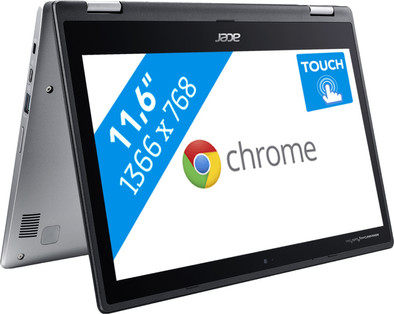
The Acer Chromebook Spin 11 CP311-1H-C973 is a 11.6-inch laptop and tablet in one, which is easy to carry and suitable for tasks such as text processing, surfing the Internet, and emailing. This 2-in-1 device runs on Chrome OS, which means you can log in with your Google account and edit files via Google Drive. Thanks to the 360-degree tiltable screen, you can use the Chromebook in multiple positions. Use it as a tablet, and swipe through your apps on the multi-touch screen. Put it in the tent position to show a presentation to your colleagues or customers, and type the annual report on the keyboard in the laptop position. The Chromebook is energy-efficient, so you can use it the entire day without having to search for a socket.
Note: You can't run Windows programs on a Chromebook. Do you want to use Microsoft Office? Buy Office 365 or download the Office app.
It is an excellent chrome book, of course brought back at lightning speed by CB. The negatives are mentioned, an illuminated keyboard is a pity and is missed. It is also a nice chrome book and many apps from the playstore run fine, many also in a large window.
Of course, the chrome web store is also available, you can use all these apps. This chromebook starts up immediately, open it and work.
You can leave it quietly in sleep mode, it hardly costs any energy. I need to charge it less than my phone. With a few actions you can also do this on this PC! linux are installed, which in turn can provide more (free) apps. It's not windows, so no viruses, but with some searching you can find 95% of the windows equivalents. Free and so much faster.
The SD card option completes the picture, all movies/music runs fine (well no DVDs of course, you have to convert them or connect a USB) If you are looking for a small light chrome book, look no further. Buy this one. The price is ok also in relation to other provider.
geert jan blauw
5 March 2019
Automatically translated from Nederlands
Nice device!
H Vroegop
25 August 2018
Automatically translated from Nederlands
Great Chromebook. Fast and lightweight. It takes some getting used to to work with Chrome and Google Docs, but that gets boring quickly.
David
22 October 2018
Automatically translated from Nederlands
