Asus Chromebook C434TA-AI0043

Never available again
View alternatives in the sidebar
View alternatives in the sidebar

Product number | 827069 | |
|---|---|---|
Manufacturer code | 90NX0231-M00450 | |
Brand | ASUS | |
Processing of your defect | Via Coolblue | |
Old product returned for free |
Screen size | 14 inches | |
|---|---|---|
Touchscreen | ||
Panel type | TN panel | |
Sharpness | Full HD (1080p) | |
Resolution width | 1920 pixels | |
Resolution height | 1080 pixels | |
Refresh rate | 50 Hz | |
Screen reflection | Glossy | |
Adaptive Sync |
Processor | Intel Core m3 | |
|---|---|---|
Processor code name | Amber Lake Y | |
Processor cores | Dual-Core (2) | |
Clock speed | 1,1 GHz | |
Turbo speed | 3,4 GHz | |
Cache memory | 4 MB |
Internal RAM | 4 GB | |
|---|---|---|
Memory composition | 1x 4GB | |
Memory slot 1 | 4 GB | |
Total number of RAM slots | 1 |
Total storage capacity | 32 GB | |
|---|---|---|
Storage type | Flash | |
SSD storage capacity | 32 GB | |
Hard drive type | eMMC |
Video card | Intel HD Graphics 615 | |
|---|---|---|
Type of video card | Shared |
Operating system | Google ChromeOS | |
|---|---|---|
Operating system language | Multiple languages can be configured |
Laptop model | 2-in-1, Chromebook | |
|---|---|---|
Color | Silver | |
Material | Metal, Plastic | |
Metal type | Aluminum | |
Height | 1,57 cm | |
Width | 32,1 cm | |
Depth | 20,2 cm | |
Weight | 1,45 kg |
Mobile data connection | No | |
|---|---|---|
WiFi standards | Wireless AC | |
Bluetooth | ||
Bluetooth version | 4.0 |
USB port | ||
|---|---|---|
Number of USB ports | 3 | |
Type of USB port | Standard USB-A, USB-C | |
Protocol Female USB-C port | DisplayPort Alternative Mode, USB | |
USB version Female USB-C port | 3.0 | |
Number of female standard USB-A ports | 1 | |
Female standard USB-A port version | 3.0 | |
Number of USB 3.0 Female USB-C ports | 2 | |
HDMI connector | ||
DisplayPort connector | ||
VGA connector | ||
Network connector | ||
Thunderbolt connector | ||
Headphone jack | ||
Memory card reader |
Keyboard layout | QWERTY | |
|---|---|---|
Physical keyboard layout | ANSI | |
Numeric keypad | ||
Spill-resistant | ||
Backlit keyboard | ||
Mechanical keyboard | ||
Programmable keys |
Built-in microphone | ||
|---|---|---|
Number of speakers | 2 | |
Sound reproduction | Stereo | |
Integrated computer speakers brand | Standard speakers |
Built-in camera | ||
|---|---|---|
Image definition webcams | HD Ready (720p) |
Battery technology | Lithium-ion | |
|---|---|---|
Power connector input type (female) | USB Type C |
Manufacturer's warranty |
|---|
TPM (Trusted platform module) | ||
|---|---|---|
Kensington lock | ||
Windows Hello | ||
Fingerprint identity sensor |
Extra installed software |
|---|
Screen size | 14 inches | |
|---|---|---|
Processor | Intel Core m3 | |
Internal RAM | 4 GB | |
Total storage capacity | 32 GB | |
Video card | Intel HD Graphics 615 | |
Panel type | TN panel | |
Touchscreen |
According to our laptop expert
This Chromebook only weighs 1.45 kilograms, making it easier to take with you than other laptops.
You can use this Chromebook as a tablet via the touchscreen.
Chrome OS is less susceptible to viruses.
Not all programs work on a Chromebook, only programs from the Chrome Web Store or Google Play Store.
Multitasking is slow with 4GB RAM, so choose a Chromebook with at least a 8GB RAM if you want to work in multiple tabs at the same time.
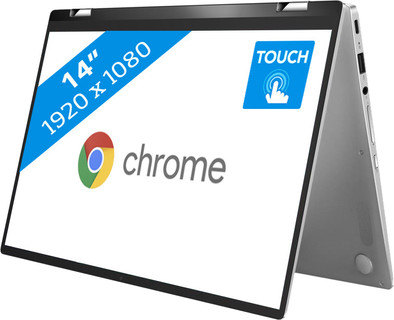
The Asus Chromebook C434TA-AI0043 is a 14-inch laptop with a 360-degree foldable touchscreen. You can use it as a laptop for work or fold the screen into tablet position to watch a Netflix series on the train. The Asus is equipped with a touchscreen, so you can swipe through your files and photos with your fingers. The laptop runs on Chrome OS. This means that you can store your files in the cloud and use apps such as Google Docs and Spreadsheets. You can access the same files wherever you log in with your Google account. Would you rather use Office? You can also install apps such as Office 365 in the Play Store.Since you install programs directly from the Play Store, you're better protected against viruses than with a Windows laptop.
Note: Windows programs don't work on a Chromebook. Want to use Microsoft Office? Buy Office 365.
Setting up with your gmail account is easy and fast. You can get started right away. To further set everything to your own liking is another story, but that could also be due to my ignorance. It's all just that little bit different from Windows. This laptop does what you can expect it to do. Quickly check the internet or your email, watch YouTupe or watch a movie is no problem. Because I don't use it much anymore, the laptop is very suitable for me. It is a laptop that you quickly grab and take with you. The battery life is also very good, as is the keyboard. Learning a number of key combinations by heart is handy, it works very nicely. The lighting of the keyboard when it starts to get dark is not really good. In addition to this computer, I also keep my Windows laptop on, but that will be different for everyone. All in all it's a nice thing and I'm very happy with it.
Marcel Molenaar
20 May 2019
Automatically translated from Nederlands
He really likes this ASA C434, the laptop is fast, has a beautiful design and is very solidly built. It is a nice combination between laptop and tablet, partly due to access to the Android app store. Keep in mind that not all apps are available (yet). For example, the Netflix app cannot be used, but you can of course watch Netflix via the chrome browser. Other popular apps such as facebook, youtube, linkedin, nu.nl all look good and are easy to use via screen or keyboard. All in all I am very satisfied with this premium Chromebook. No more Windows for me.
Marco van Hooren
12 May 2019
Automatically translated from Nederlands
Lasts a long time and is easy to handle when you have to type something or want to chill, you can easily switch from laptop to tablet. Sound is hard to hear through the speakers on some sites.
Marjolein
14 May 2020
Automatically translated from Nederlands
