ASUS Zenbook S 14 OLED Copilot+PC UX5406SA-PV029W
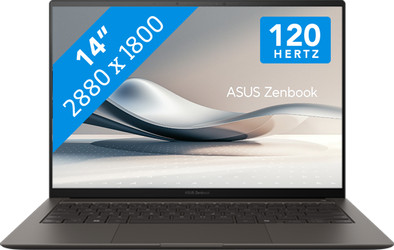
Never available again
View alternatives in the sidebar
View alternatives in the sidebar
Purchased a participating ASUS laptop between 1 June 2026 and 31 December 2026? You're eligible for 1 free year of extra warranty. Read more about the promotion and how to request the free extra year of warranty in the promotional Terms and Conditions (PDF).

If you purchase of a laptop or desktop, you receive 1 year of Norton 360 Deluxe for free. One day after purchase, you'll receive an email with a personal voucher code. Go to the promotional Terms and Conditions for more information.

Product number | 952013 | |
|---|---|---|
Manufacturer code | 90NB14F1-M001U0 | |
Brand | ASUS | |
Processing of your defect | Via Coolblue | |
Old product returned for free |
Screen size | 14 inches | |
|---|---|---|
Screen quality: laptops | High-end | |
Touchscreen | ||
Panel type | OLED | |
Sharpness | 3K | |
Resolution width | 2880 pixels | |
Resolution height | 1800 pixels | |
Refresh rate | 120 Hz | |
Screen reflection | Glossy | |
Color space | DCI-P3 | |
Brightness | 550 cd/m2 | |
HDR support | ||
Type of HDR | DisplayHDR 500 True Black |
Processor | Intel Core Ultra 7 | |
|---|---|---|
Processor number | 258V | |
Processor generation | Ultra Series 2 | |
Processor code name | Lunar Lake | |
Processor cores | Octa-Core (8) | |
Clock speed | 2,2 GHz | |
Turbo speed | 4,8 GHz | |
Cache memory | 12 MB | |
Speed class laptops | Good | |
Intel Evo laptop |
Neural Processing Unit (NPU) | Intel AI Boost | |
|---|---|---|
TOPs | 47 |
Memory composition | 1x 32GB | |
|---|---|---|
Memory slot 1 | 32 GB | |
Total number of RAM slots | 1 | |
RAM type (DDR type) | DDR5 | |
Number of replaceable RAM slots | 0 | |
Number of free RAM slots | 0 |
Total storage capacity | 1 TB | |
|---|---|---|
Storage type | SSD | |
SSD storage capacity | 1000 GB | |
Hard drive type | M.2 | |
Number of replaceable storage slots | 0 | |
Number of free storage slots | 0 |
Video card | Intel Arc Graphics | |
|---|---|---|
Video card brand | Intel | |
Type of video card | Hybrid |
Operating system | Windows | |
|---|---|---|
Windows OS version | Windows 11 Home | |
Operating system language | Multiple languages can be configured |
Recommended for use | School |
|---|
Build quality laptops | High-end | |
|---|---|---|
Laptop model | Laptop | |
Color | Gray | |
Material | Metal | |
Metal type | Aluminum | |
Material top of laptop | Metal | |
Material keyboard casing laptop | Metal | |
Material bottom of laptop | Metal | |
Height | 1,29 cm | |
Width | 31,03 cm | |
Weight | 1,2 kg | |
Type of military test | MIL-STD-810H | |
Passed military test |
Mobile data connection | No | |
|---|---|---|
WiFi standards | Wireless A (WiFi 2), Wireless AC (WiFi 5), Wireless AX (WiFi 6), Wireless AXE (WiFi 6E), Wireless B (WiFi 1), Wireless BE (WiFi 7), Wireless G (WiFi 3), Wireless N (WiFi 4) | |
Bluetooth | ||
Bluetooth version | 5.4 |
USB port | ||
|---|---|---|
Number of USB ports | 3 | |
Type of USB port | Standard USB-A, USB-C | |
Protocol Female USB-C port | DisplayPort Alternative Mode, Thunderbolt Alternative Mode, USB, USB electricity | |
USB version Female USB-C port | 4.0 | |
Video output via USB-C possible | Yes | |
Number of female standard USB-A ports | 1 | |
Female standard USB-A port version | 3.1 | |
HDMI connector | ||
Number of HDMI connectors | 1 | |
Female HDMI Type A port version | 2.1 | |
DisplayPort connector | ||
VGA connector | ||
Network connector | ||
Thunderbolt connector | ||
Headphone jack |
Keyboard layout | QWERTY | |
|---|---|---|
Physical keyboard layout | ANSI | |
Color keyboard lighting | White | |
Copilot test |
Built-in microphone | ||
|---|---|---|
Sound reproduction | Stereo | |
Integrated computer speakers brand | Harman Kardon |
Image definition webcams | Full HD (1080p) | |
|---|---|---|
Camera slider |
Battery capacity laptop | 72 Wh | |
|---|---|---|
Battery technology | Lithium-ion | |
Power connector input type (female) | Other brand/product specific | |
Laptop wattage | 65 W | |
Charger included | ||
Power charger | 65 W |
Manufacturer's warranty |
|---|
TPM type | Firmware TPM | |
|---|---|---|
Kensington lock | ||
Windows Hello | ||
Security class laptops | Basic | |
Built-in privacy screen |
Extra installed software | ||
|---|---|---|
ISV certification |
Screen size | 14 inches | |
|---|---|---|
Processor | Intel Core Ultra 7 | |
Total storage capacity | 1 TB | |
Video card | Intel Arc Graphics | |
Recommended for use | School | |
Panel type | OLED | |
Screen quality: laptops | High-end | |
Touchscreen |
According to our laptop expert
Realistic colors: enjoy realistic, richer colors thanks to the OLED display.
Handle demanding tasks with AI: edit photos or videos, perform demanding tasks with AI, and enjoy a long battery life.
Plenty of storage space: with 1TB of storage space, you can store lots of photos, videos, and other files.
Not for the heaviest tasks: your laptop slows down when you work in the most demanding programs. You’ll need a more powerful processor for that.
More bothered by reflections: you'll notice glare, smudges, and fingerprints more quickly on the glossy screen.
Battery life
Speed
Design
The ASUS Zenbook S14 is a sturdy and powerful laptop that allows me to edit images at lightning speed. While editing, I see all colors vividly on the screen thanks to the OLED panel. However, I do experience reflections a bit more easily due to the glossy screen.
First impression What immediately strikes me is that this ASUS Zenbook has a modern design. The top of the laptop is ceramic, and the rest of the laptop is made of Ceraluminium. As a result, it is very sturdy, and I worry little about bumps or scratches. I also don't easily see fingerprints on the casing. Thanks to the small 14-inch size and the low weight of 1.2 kilograms, I can easily slip the laptop into my bag. This laptop comes with a charger, which allows me to charge the laptop to 50 percent in half an hour using fast charging. I also charge my phone and earbuds with it, as the charger has a USB-C connection. Powerful AI processor and colorful display This ASUS Zenbook S14 features a powerful Intel Core Ultra 9 Series 3 processor and 32 gigabytes of RAM. As a result, I work smoothly in demanding editing programs and quickly edit large video files. I also use AI while editing, as this Panther Lake processor has an NPU. This allows the laptop to process AI tasks even faster. During editing, I see all colors vividly on the screen thanks to the OLED panel. For instance, I see deep black tones vividly and more contrast between colors. This allows me to choose the right filters for my photos and videos more precisely. The screen does have some glare, so sometimes I have to reposition the laptop if I am bothered by light reflections. Thanks to the 16:10 aspect ratio, I see more text on the screen and can keep an overview of my windows more easily.
Keyboard and touchpad The backlit keyboard of this laptop is very bright. I can see the keyboard lighting clearly even in bright sunlight. I can easily adjust the brightness of the keyboard lighting via the function key. The touchpad of this laptop is also very pleasant to use. Thanks to ASUS Smart Gestures, I can adjust various settings in a single motion. I adjust the volume via the left side of the touchpad. I adjust the screen brightness via the right side. When watching a video, I can easily rewind or fast-forward using the top of the touchpad.
Deanne. Laptop specialist.
20 July 2026
Automatically translated from Nederlands
What immediately struck me about this laptop is how light and thin it is. I can easily take it with me everywhere, which makes it perfect for on the go or at work. Despite its compact size, it feels sturdy.
The screen is a real big plus. Thanks to the OLED panel, colors look super bright and vibrant, and black is truly deep black. Whether you are working or watching a series, it just looks beautiful.
The laptop is also nice and fast to use. Programs open quickly, and you can easily do multiple things at the same time without it slowing down. What I also like: it hardly gets warm and stays quiet.
The casing is made of Ceraluminum. This is a special material that combines aluminum with ceramic properties. It feels slightly different from normal metal—a bit rougher—but that actually gives you better grip. It also seems more scratch-resistant, which is handy if you take it with you often.
The battery lasts a long time. I can easily work on it for a whole day without charging in between. A minor downside is the touchpad. It is positioned quite close to the keyboard, causing me to sometimes accidentally move the cursor while typing. The charger also feels a bit simple.
Stijn
19 April 2026
Automatically translated from Nederlands
I chose this ASUS Zenbook S14 and I am extremely pleased with it. The first thing that stands out is the exterior. The casing features a ‘Ceraluminum’ layer that feels almost like stone. It provides excellent grip and stays completely free of fingerprints.
The performance of the Ultra 9 chip is very good. I can run heavy programs without any issues while a stream is running in the background, without the device getting hot. The battery life is also a positive surprise; going a day without a charger is suddenly no longer a problem.
The OLED screen makes watching movies and series a fantastic experience compared to my previous IPS laptop. The colors are beautiful and pop off the screen.
The only thing I had to get used to was the keyboard, which flexes a bit less because the laptop is so extremely thin.
But that doesn't outweigh the convenience of a thin and light laptop and the luxurious appearance. For anyone looking for a high-end all-rounder that fits easily into a small bag, this is highly recommended.
rkuijpers
22 April 2026
Automatically translated from Nederlands


