Acer Aspire Go 15 AG15-72P-5037
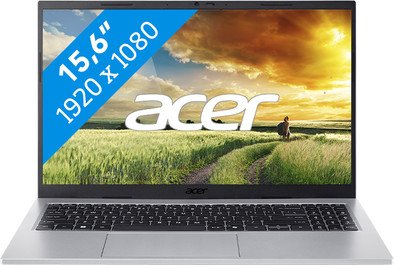
Never available again
View alternatives in the sidebar
View alternatives in the sidebar
If you purchase of a laptop or desktop, you receive 1 year of Norton 360 Deluxe for free. One day after purchase, you'll receive an email with a personal voucher code. Go to the promotional Terms and Conditions for more information.

Product number | 969874 | |
|---|---|---|
Manufacturer code | NX.JRREH.002 | |
Brand | Acer | |
Processing of your defect | Via Coolblue | |
Old product returned for free |
Screen size | 15,6 inches | |
|---|---|---|
Screen quality: laptops | Mid-range | |
Touchscreen | ||
Panel type | IPS panel | |
Sharpness | Full HD (1080p) | |
Resolution width | 1920 pixels | |
Resolution height | 1080 pixels | |
Refresh rate | 60 Hz | |
Aspect ratio | 16:9 | |
Screen reflection | Anti-glare | |
Adaptive Sync | ||
Brightness | 300 cd/m2 | |
Blue light filter | ||
HDR support |
Processor | Intel Core 5 | |
|---|---|---|
Processor number | 120U | |
Processor generation | Series 1 | |
Processor code name | Raptor Lake | |
Processor cores | Deca-Core (10) | |
Clock speed | 1,4 GHz | |
Turbo speed | 5 GHz | |
Cache memory | 12 MB | |
Speed class laptops | Good | |
Intel Evo laptop |
Internal RAM | 16 GB | |
|---|---|---|
Memory composition | 2x 8GB | |
Memory slot 1 | 8 GB | |
Memory slot 2 | 8 GB | |
Total number of RAM slots | 2 | |
Maximum internal memory | 32 GB | |
RAM type (DDR type) | DDR5 | |
Memory speed | 3200 MHz | |
Number of replaceable RAM slots | 2 | |
Number of free RAM slots | 0 | |
RAM expandable up to | 32 GB |
Total storage capacity | 512 GB | |
|---|---|---|
Storage type | SSD | |
SSD storage capacity | 512 GB | |
Hard drive type | NVMe | |
Number of replaceable storage slots | 1 | |
Number of free storage slots | 0 | |
Internal storage expandable up to | 1000 GB |
Video card | Intel Graphics | |
|---|---|---|
Video card brand | Intel | |
Type of video card | Shared |
Operating system | Windows | |
|---|---|---|
Windows OS version | Windows 11 Home | |
Operating system language | Multiple languages can be configured |
Recommended for use | Internet, email, and text processing, Photo editing, School, Spreadsheets and presentations, Streaming movies and series |
|---|
Build quality laptops | Basic | |
|---|---|---|
Laptop model | Laptop | |
Color | Silver | |
Material | Plastic | |
Material top of laptop | Plastic | |
Material keyboard casing laptop | Plastic | |
Material bottom of laptop | Plastic | |
Height | 1,79 cm | |
Width | 35,77 cm | |
Depth | 23,44 cm | |
Weight | 1,53 kg |
Mobile data connection | No | |
|---|---|---|
WiFi standards | Wireless A (WiFi 2), Wireless AC (WiFi 5), Wireless AX (WiFi 6), Wireless B (WiFi 1), Wireless G (WiFi 3), Wireless N (WiFi 4) | |
Bluetooth | ||
Bluetooth version | 5.2 |
USB port | ||
|---|---|---|
Number of USB ports | 4 | |
Type of USB port | Standard USB-A, USB-C | |
Protocol Female USB-C port | DisplayPort Alternative Mode, USB, USB electricity | |
USB version Female USB-C port | 3.1 | |
Video output via USB-C possible | Yes | |
Number of female standard USB-A ports | 2 | |
Female standard USB-A port version | 3.1 | |
Number of USB 3.1 Female USB-C port | 2 | |
HDMI connector | ||
Number of HDMI connectors | 1 | |
Female HDMI Type A port version | 2.1 | |
VGA connector | ||
Network connector | ||
Thunderbolt connector | ||
Headphone jack | ||
Memory card reader |
Keyboard layout | QWERTY | |
|---|---|---|
Physical keyboard layout | ANSI | |
Numeric keypad | ||
Spill-resistant | ||
Backlit keyboard | ||
Mechanical keyboard | ||
Programmable keys | ||
Copilot test |
Built-in microphone | ||
|---|---|---|
Number of speakers | 2 | |
Sound reproduction | Stereo | |
Integrated computer speakers brand | Standard speakers |
Built-in camera | ||
|---|---|---|
Image definition webcams | Full HD (1080p) | |
Camera slider |
Battery capacity laptop | 53 Wh | |
|---|---|---|
Battery technology | Lithium-ion | |
Power connector input type (female) | USB Type C | |
Laptop wattage | 65 W | |
Charger included | ||
Charging cable included | ||
Power charger | 65 W |
Manufacturer's warranty |
|---|
TPM (Trusted platform module) | ||
|---|---|---|
TPM type | Firmware TPM | |
Kensington lock | ||
Windows Hello | ||
Fingerprint identity sensor | ||
Security class laptops | Basic | |
Built-in privacy screen |
Extra installed software | ||
|---|---|---|
ISV certification |
Recommended for use
Internet, email, and text processing, Photo editing, School, Spreadsheets and presentations, Streaming movies and seriesOur digital expert will help you, but it can sometimes make mistakes, like humans do.
According to our laptop expert
For light tasks: you can smoothly handle light tasks like photo editing and word processing thanks to the Intel Core 5 processor.
Sharp and vivid image: colors and details look sharp and vivid on the screen thanks to the mid-range display quality.
Enter numbers quickly: on the numeric keypad, you can quickly enter numbers and formulas.
Not suitable for demanding tasks: your laptop will stutter sooner when you perform demanding tasks because you need a more powerful processor for that.
Not the sharpest screen: choose a high-end display quality if you want to see all details on the screen in razor-sharp, realistic quality.
Recommended for use
Internet, email, and text processing, Photo editing, School, Spreadsheets and presentations, Streaming movies and seriesSo far, I am pleasantly surprised by this laptop. This is my first Acer; after having to throw away two more expensive laptops from other brands within 3.5 weeks, I have now opted for a different brand. This laptop does what it is supposed to do; the keyboard is very nice and easy to type on. The installation went very smoothly; McAfee was easy to remove. The speed is very good for normal computer use. The maximum noise level is lower than I am used to, and the battery drains faster than the manufacturer indicates, but the other positive aspects of this laptop compensate for these downsides. I cannot provide a review regarding the durability of this laptop, as I have only been using it for a week.
Jolanda
25 May 2026
Automatically translated from Nederlands
Good laptop
Menno den Buurman
27 July 2026
Automatically translated from Nederlands
Haven't used it much yet. Installation and switching from the old to the new went smoothly, with the exception of uninstalling McAfee. This takes about half the time. The "normal" uninstallation is inherently unsuccessful. Same experience with previous installations. You first have to download a program; running it takes 45 minutes. Installing McAfee supposedly takes a few minutes. Coolblue, why do you install this software on your PC?
GaitUt Swolle
20 February 2026
Automatically translated from Nederlands
