
Written by Jan
Edited on
18 November 2024
·
13:59
How do you access the BIOS via Windows 10?
The BIOS is also known as UEFI. Every laptop or computer has one. That's useful if you want to change the boot sequence of your hard drives. But what's the easiest way to get there? We'll show you below.
Step 1
-
Click on the Start button at the bottom left of your screen.
-
Then select the Settings, which you can recognize by the gearwheel icon.
-
Select Update & Security.
-
Select Recovery in the left menu.
-
Click on the Restart now button under the header Advanced startup.
Step 2
-
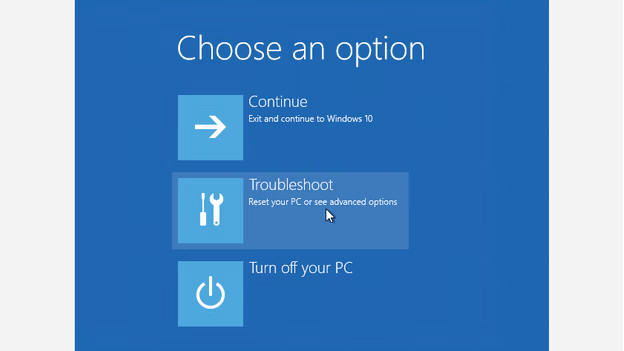
Windows will restart with a blue screen, with the text Choose an option at the top.
-
Select Troubleshoot.
-
Select Advanced options.
-
Click UEFI Firmware Settings.
-
Click Restart.
Windows will restart again, but this time you'll end up in your laptop or computer's BIOS. Well done!
Article by Jan
Laptop Expert.
