Written by Evany
Edited on
26 May 2023
·
15:02
How do you share your iPhone calendar with others?
You can easily share your calendar with your family or colleagues. That's useful if you want to plan something together. Keep in mind that is about the calendar app that's on your iPhone by default, so not the Google Calendar app or the calendar in the Microsoft Outlook app. In this article, we'll explain how you can share your iPhone calendar with others.
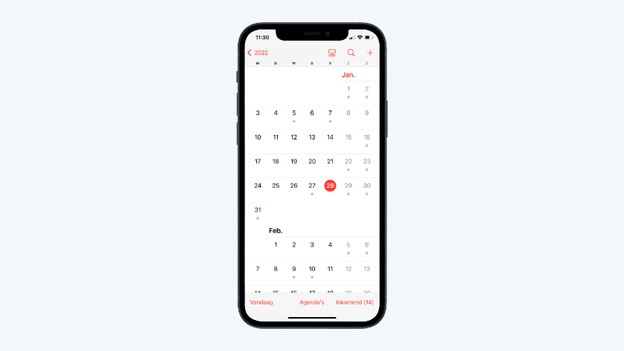
Share your iPhone calendar with others
If you share your calendar with somebody else, that person will see all your appointments and they can also plan appointments themselves. The other user must also have an iCloud account.
- Step 1. Enable Calendar in iCloud
- Step 2. Share your calendar in the Calendar app
Step 1: enable Calendar in iCloud
Before you share your calendar, you have to add your calendar to iCloud. You can do that in no time.
- Go to 'Settings' and tap your name at the top.
- Choose iCloud.
- Turn the slider green after 'Calendar'.
Tap your name
Choose iCloud
Set the slider to green


Step 2: share your calendar in the Calendar app
Your calendar is now part of iCloud. Go to the Calendar app and follow the steps below.
- Tap 'Calendars' at the bottom.
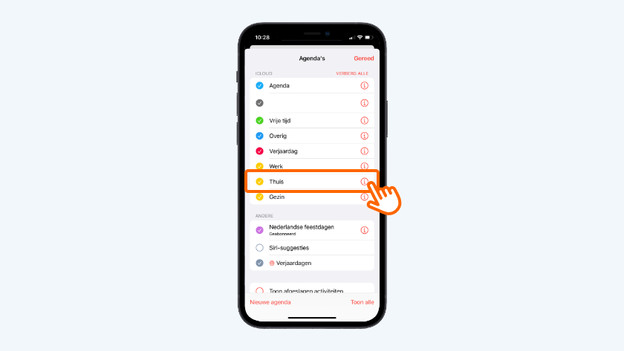
- You'll now see all your calendars. Tap the 'i' icon after the agenda you want to share. For example, the 'Home' calendar.
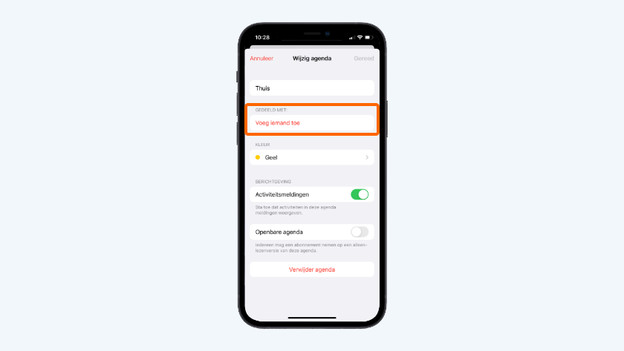
- Tap 'Share with another user' underneath 'Shared with'.
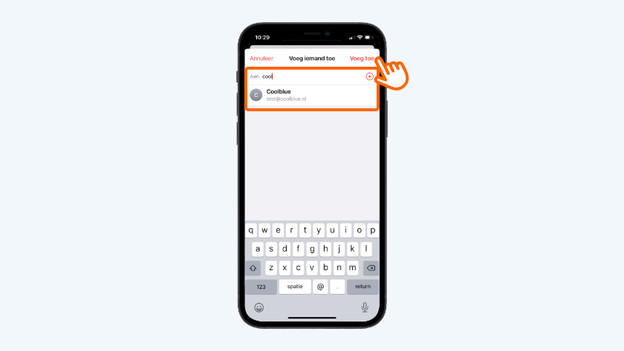
- Type the email address of the person you want to share the calendar with after 'To:'. You can also add multiple people. Done? Tap 'Add'.
- The person you shared the calendar with gets a notification automatically.
Tap 'Calendars' at the bottom
Tap 'Home' for example
Tap 'Add another user'
Tap 'Add' when you're done