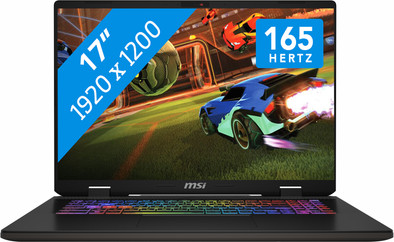
MSI Sword 17 HX B14VFKG-081NL
Never available again
View alternatives in the sidebar
View alternatives in the sidebar
If you purchase of a laptop or desktop, you receive 1 year of Norton 360 Deluxe for free. One day after purchase, you'll receive an email with a personal voucher code. Go to the promotional Terms and Conditions for more information.

Product number | 947347 | |
|---|---|---|
Manufacturer code | 9S7-17T214-081 | |
Brand | MSI | |
Processing of your defect | Via Coolblue | |
Old product returned for free |
Screen size | 17 inches | |
|---|---|---|
Screen quality: laptops | Mid-range | |
Touchscreen | ||
Panel type | IPS panel | |
Sharpness | Full HD (1080p) | |
Resolution width | 1920 pixels | |
Resolution height | 1200 pixels | |
Refresh rate | 165 Hz | |
Aspect ratio | 16:9 | |
Screen reflection | Anti-glare | |
Adaptive Sync | ||
Brightness | 300 cd/m2 | |
Blue light filter | ||
HDR support |
Processor | Intel Core i7 | |
|---|---|---|
Processor number | 14650HX | |
Processor generation | 14th gen | |
Processor code name | Raptor Lake | |
Processor cores | Hexadeca-Core (16) | |
Threads | 24 | |
Clock speed | 5,2 GHz | |
Turbo speed | 5,2 GHz | |
Cache memory | 30 MB | |
Speed class laptops | Very good | |
Intel Evo laptop |
Internal RAM | 16 GB | |
|---|---|---|
Memory composition | 2x 8GB | |
Memory slot 1 | 8 GB | |
Memory slot 2 | 8 GB | |
Total number of RAM slots | 2 | |
Maximum internal memory | 64 GB | |
RAM type (DDR type) | DDR5 | |
Memory speed | 5600 MHz | |
Number of replaceable RAM slots | 2 | |
Number of free RAM slots | 0 | |
Total graphics power | 115 W | |
RAM expandable up to | 64 GB |
Total storage capacity | 1 TB | |
|---|---|---|
Storage type | SSD | |
SSD storage capacity | 1 TB | |
Hard drive type | M.2, NVMe | |
Number of replaceable storage slots | 1 | |
Number of free storage slots | 1 |
Video card | NVIDIA GeForce RTX 4060 | |
|---|---|---|
Video card brand | NVIDIA | |
Type of video card | Dedicated | |
Video card RAM | 8 GB |
Operating system | Windows | |
|---|---|---|
Windows OS version | Windows 11 Home | |
Operating system language | Multiple languages can be configured |
Recommended for use | Gaming, Music production and DJing, Photo editing, Render 3D models, Video editing |
|---|
Build quality laptops | Basic | |
|---|---|---|
Laptop model | Laptop | |
Color | Gray | |
Material | Metal, Plastic | |
Metal type | Aluminum | |
Material top of laptop | Plastic | |
Material keyboard casing laptop | Plastic | |
Material bottom of laptop | Plastic | |
Height | 2,73 cm | |
Width | 38,32 cm | |
Depth | 27,99 cm | |
Weight | 2,6 kg |
Mobile data connection | No | |
|---|---|---|
WiFi standards | Wireless A (WiFi 2), Wireless AC (WiFi 5), Wireless AX (WiFi 6), Wireless AXE (WiFi 6E), Wireless B (WiFi 1), Wireless G (WiFi 3), Wireless N (WiFi 4) | |
Bluetooth | ||
Bluetooth version | 5.3 |
USB port | ||
|---|---|---|
Number of USB ports | 4 | |
Type of USB port | Standard USB-A, USB-C | |
Protocol Female USB-C port | DisplayPort Alternative Mode, USB, USB electricity | |
USB version Female USB-C port | 3.1 | |
Video output via USB-C possible | Yes | |
Number of female standard USB-A ports | 3 | |
Female standard USB-A port version | 3.0 | |
Number of USB 3.1 Female USB-C port | 1 | |
HDMI connector | ||
Number of HDMI connectors | 1 | |
Female HDMI Type A port version | 2.1 | |
DisplayPort connector | ||
VGA connector | ||
Network connector | ||
Number of Ethernet ports | 1 | |
Thunderbolt connector | ||
Headphone jack | ||
Memory card reader |
Keyboard layout | QWERTY | |
|---|---|---|
Physical keyboard layout | ANSI | |
Numeric keypad | ||
Spill-resistant | ||
Backlit keyboard | ||
Color keyboard lighting | Multicolor | |
Mechanical keyboard | ||
Programmable keys |
Built-in microphone | ||
|---|---|---|
Number of speakers | 2 | |
Sound reproduction | Stereo | |
Integrated computer speakers brand | DTS Studio Sound |
Built-in camera | ||
|---|---|---|
Image definition webcams | HD Ready (720p) | |
Camera slider |
Battery capacity laptop | 90 Wh | |
|---|---|---|
Battery technology | Lithium polymer | |
Power connector input type (female) | Other brand/product specific | |
Laptop wattage | 200 W | |
Charger included | ||
Charging cable included | ||
Power charger | 200 W |
Manufacturer's warranty |
|---|
TPM (Trusted platform module) | ||
|---|---|---|
TPM type | Firmware TPM | |
Kensington lock | ||
Windows Hello | ||
Fingerprint identity sensor | ||
Security class laptops | Basic | |
Built-in privacy screen |
Extra installed software | ||
|---|---|---|
ISV certification |
Recommended for use
Gaming, Music production and DJing, Photo editing, Render 3D models, Video editingOur digital expert will help you, but it can sometimes make mistakes, like humans do.
According to our laptop expert
With the RTX 4060 video card, you can play medium demanding games smoothly in Full HD.
You can edit videos and stream your gameplay on Twitch with the Intel Core i7 processor.
With 1 terabyte of storage, you can keep about 20 modern games and several programs in one place.
You need an RTX 4070 video card if you want to play demanding games.
For professional streaming, 3D editing, or game design, you need an i9, Ryzen 9, or Ultra 9 processor.
Recommended for use
Gaming, Music production and DJing, Photo editing, Render 3D models, Video editingThe MSI Sword series is the mid-range gaming laptops, with which you can smoothly play medium-heavy games. Think for example of Hogwarts Legacy and Jedi Masters. The model I tested had an NVIDIA GeForce RTX 4060 video card, with a 14th generation Intel Core i7 processor and 16 gigabytes of DDR5 RAM memory. I played a number of open world games and simulation games, in which I focused on increasing the frame rate to 100+. In addition, I edited some small videos to test the combination of the video card and processor. In this review you can read my findings.
Video card suitable for medium-heavy games The NVIDIA GeForce RTX 4060 video card makes this laptop suitable for medium-heavy games, which I tested at 1,080p and 1,440p. With Star Wars Jedi Masters I was really amazed. The graphics looked razor-sharp on the WXGA screen and the colors came out very well. For the test, I increased the frame rate to 120 fps, which went without any problems. I didn't experience any lag or stuttering for a single second in 1,080p high. Hogwarts Legacy also ran without any problems, so I tried it at 1,440p. At 1,440p high, I saw some stuttering, but overall I played the game very smoothly. In addition to the heavy games, I also played Cities Skylines in 4K. Because this is a light game, this went very smoothly without many large buildings and structures on the map. After a while of building, the laptop got heavier, but it shows that the RTX 4060 is more than suitable for gaming in a high resolution.
Powerful processor and RAM combination Thanks to the 14th generation Intel Core i7 processor and the 16 gigabytes of DDR5 RAM memory, I found this laptop suitable for a test with video editing. Everything ran smoothly and on the sharp screen I had little trouble adjusting small details. The 4000 series has more power for editing lighting effects. I also saw this in the shadows and reflections, which looked much better. Just like with the games, the same rule applies here.
Sleek gaming design with fast fans The design has an advantage and a disadvantage. The advantage is the sturdy metal and plastic design in combination with the RGB keyboard lighting. This matches nicely with each other and the WASD (ZQSD in Belgium) buttons are made transparent for an extra gaming effect. The weight is a disadvantage. The laptop feels very heavy and at 2.6 kilograms is quite heavy in a backpack. The biggest advantage I think is the shortcut for the fans. I turned on this boost while playing Hogwarts Legacy and the laptop stayed well cooled.
Giorgos. Laptop specialist.
23 September 2024
Automatically translated from Nederlands
Well, what's my experience... I have to say, installing it wasn't a problem. The hassle surrounding Windows is generally well-known (I assume, that constant hassle of trying to make even more money by throwing in those stupid ads. Office, yes, you can subscribe). But okay, quickly installed and up and running. Now I was only interested in using the BlueStack emulator (to play Android games on my laptop or PC). That can sometimes be quite demanding on a PC/laptop. That all worked well. But before I could start a game, the battery was already dead... well, that might be because it apparently wasn't full yet... I thought. So I let it fully charge and started a game the next day... within an hour, the battery was dead again... very poor in my opinion. According to the rules, it should be able to handle medium-demand games well without the whole system having to work too hard and therefore consuming more energy. I also noticed that there was quite a bit of heat rising from the sides. In short, a cooler wouldn't be a bad idea; they're not very expensive, but there's a small drawback. Back to the battery... I'm using it the other way around now; when I play, the battery is connected to the mains, and when I turn the laptop off, it's disconnected. That's a major drawback in my opinion. After all, good replacement batteries aren't exactly cheap. They really need to figure out a solution. Otherwise, it's a good laptop for the price. It still has a good screen despite not being 4K, and it's fast if I want to do something else quickly. But then again, I don't have a lot of programs on the laptop; that's what I use my PC for. But again, aside from the battery, it's a nice laptop for the money. And you notice it when you've had a 17.3-inch and then switch to a 17-inch like this... the difference seems smaller than it actually is. It took some getting used to.
Shur
6 August 2025
Automatically translated from Nederlands
I haven't had the laptop for very long, so I can't say much about long-term use yet. But overall, it's a great laptop. It's relatively quiet while gaming, and games like BG3 look fantastic.
The biggest drawbacks, in my experience, are: -Fingerprints show up extremely quickly on the laptop, and they're not easy to wipe off with a cloth.
-The laptop is quite tall/thick, which means your wrist rests a bit on the bottom edge. But I think this is especially important for the sensitive among us with sensory challenges.
Rianne
17 October 2025
Automatically translated from Nederlands
