HP Chromebook 15.6 15a-nb0910nd
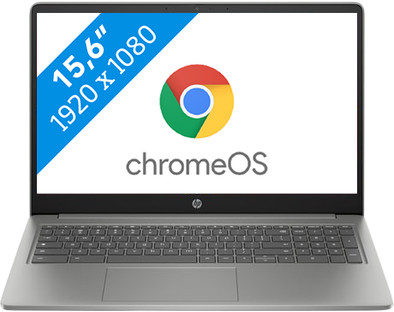
Never available again
View alternatives in the sidebar
View alternatives in the sidebar
If you purchase a Chromebook, you receive free 100GB Google Drive storage space for 1 year. View all advantages here.


Product number | 958078 | |
|---|---|---|
Manufacturer code | B6RQ6EA#ABH | |
Brand | HP | |
Processing of your defect | Via Coolblue | |
Old product returned for free |
Screen size | 15,6 inches | |
|---|---|---|
Screen quality: laptops | Mid-range | |
Touchscreen | ||
Panel type | IPS panel | |
Sharpness | Full HD (1080p) | |
Resolution width | 1920 pixels | |
Resolution height | 1080 pixels | |
Refresh rate | 60 Hz | |
Aspect ratio | 16:9 | |
Screen reflection | Anti-glare | |
Color space | NTSC | |
Percentage color coverage NTSC | 45 % | |
Adaptive Sync | ||
Brightness | 300 cd/m2 | |
Blue light filter | ||
HDR support |
Processor | Intel N | |
|---|---|---|
Processor number | N100 | |
Processor generation | N Series | |
Processor code name | Alder Lake | |
Processor cores | Quad-Core (4) | |
Clock speed | 0,1 GHz | |
Turbo speed | 3,4 GHz | |
Cache memory | 6 MB | |
Speed class laptops | Stand | |
Intel Evo laptop |
Internal RAM | 4 GB | |
|---|---|---|
Memory composition | 1x 4GB | |
Memory slot 1 | 4 GB | |
Total number of RAM slots | 1 | |
Maximum internal memory | 4 GB | |
RAM type (DDR type) | DDR5 | |
Number of replaceable RAM slots | 0 | |
Number of free RAM slots | 0 |
Total storage capacity | 128 GB | |
|---|---|---|
Storage type | Flash | |
SSD storage capacity | 128 GB | |
Hard drive type | eMMC | |
Number of replaceable storage slots | 0 | |
Number of free storage slots | 0 |
Video card | Intel UHD Graphics | |
|---|---|---|
Video card brand | Intel | |
Type of video card | Shared |
Operating system | Google ChromeOS | |
|---|---|---|
Operating system language | Multiple languages can be configured |
Recommended for use | Internet, email, and text processing, Streaming movies and series |
|---|
Build quality laptops | Basic | |
|---|---|---|
Laptop model | Laptop | |
Color | Silver | |
Material | Plastic | |
Material keyboard casing laptop | Plastic | |
Height | 1,98 cm | |
Width | 36,26 cm | |
Depth | 24,15 cm | |
Weight | 1,73 kg |
Mobile data connection | No | |
|---|---|---|
WiFi standards | Wireless A (WiFi 2), Wireless AC (WiFi 5), Wireless AX (WiFi 6), Wireless B (WiFi 1), Wireless G (WiFi 3), Wireless N (WiFi 4) | |
Bluetooth | ||
Bluetooth version | 5.3 |
USB port | ||
|---|---|---|
Number of USB ports | 3 | |
Type of USB port | Standard USB-A, USB-C | |
Protocol Female USB-C port | DisplayPort Alternative Mode, USB, USB electricity | |
USB version Female USB-C port | 3.0 | |
Video output via USB-C possible | Yes | |
Number of female standard USB-A ports | 1 | |
Female standard USB-A port version | 3.0 | |
Number of USB 3.0 Female USB-C ports | 2 | |
HDMI connector | ||
DisplayPort connector | ||
VGA connector | ||
Network connector | ||
Thunderbolt connector | ||
Headphone jack | ||
Memory card reader |
Keyboard layout | QWERTY | |
|---|---|---|
Physical keyboard layout | ANSI | |
Numeric keypad | ||
Spill-resistant | ||
Backlit keyboard | ||
Mechanical keyboard | ||
Programmable keys | ||
Copilot test |
Built-in microphone | ||
|---|---|---|
Number of speakers | 2 | |
Sound reproduction | Stereo | |
Integrated computer speakers brand | Standard speakers |
Built-in camera | ||
|---|---|---|
Image definition webcams | HD Ready (720p) | |
Camera slider |
Battery capacity laptop | 47 Wh | |
|---|---|---|
Battery technology | Lithium polymer | |
Power connector input type (female) | USB Type C | |
Laptop wattage | 45 W | |
Charger included | ||
Charging cable included | ||
Power charger | 45 W |
Manufacturer's warranty | ||
|---|---|---|
Pickup and return warranty from the manufacturer | 2 years |
TPM (Trusted platform module) | ||
|---|---|---|
Kensington lock | ||
Windows Hello | ||
Fingerprint identity sensor | ||
Security class laptops | Mid-range | |
Built-in privacy screen |
Extra installed software | ||
|---|---|---|
ISV certification |
Our digital expert will help you, but it can sometimes make mistakes, like humans do.
According to our laptop expert
For everyday tasks: you can handle everyday tasks and smoothly create text documents, spreadsheets, or presentations thanks to the Intel N processor.
Less bothered by reflections: you have less trouble with reflections, incoming light, and greasy fingerprints thanks to the anti-glare screen.
Enter numbers quickly: on the numeric keypad, you can quickly enter numbers and formulas.
Not for heavier tasks: your Chromebook will slow down sooner when you run more demanding tasks. You'll need a more powerful processor for that.
Less smooth multitasking: with 4GB of RAM, your Chromebook slows down quickly when you work in multiple apps or tabs.


