Written by Rowan
Edited on
25 September 2026
·
11:13
How do you choose a MacBook for school?
The Apple MacBook is a popular choice among students. That's not surprising, because there's a suitable Apple MacBook for all studies. Which one best suits your study depends on the programs you use. On this page, we'll tell you more about how to choose the best Apple MacBook for your studies.
Which MacBook suits your studies?
| Field of study | MacBook model | Processor | RAM | Storage capacity |
|---|---|---|---|---|
| High school | MacBook Neo | At least Apple A18 Pro | At least 8GB | At least 256GB |
| Vocational studies | MacBook Neo | Minimaal Apple A18 Pro | Minimaal 8 GB | Minimaal 256 GB |
| Education and pedagogy | MacBook Neo | Minimaal Apple A18 Pro | Minimaal 8 GB | Minimaal 256 GB |
| Social studies and economics | MacBook Air | At least Apple M5 | At least 16GB | Minimaal 256 GB |
| Medicine and health | MacBook Air | Minimaal Apple M5 | Minimaal 16 GB | At least 512GB |
| Media and graphic design | MacBook Pro | At least Apple M5 Pro | Minimaal 16 GB | Minimaal 512 GB |
| Engineering and exact sciences | MacBook Pro | Minimaal Apple M5 Pro | At least 24GB | Minimaal 512 GB |
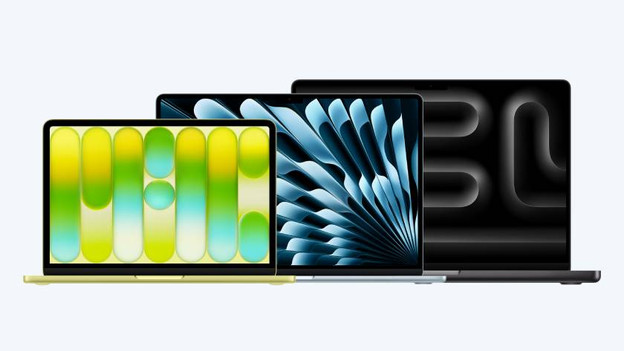
Voorwaarden en wensen
Are you going to study? It's important to have a suitable MacBook. Which one you choose depends on your field of study, the conditions from school, and your personal wishes. A 13-inch MacBook is convenient in your school bag, for example. Do you edit detailed files? A larger screen is nicer. Remember that the RAM and storage of a MacBook aren't expandable. When in doubt, always choose more.
Note: this is general advice. We recommend that you always follow the advice of your studies. This way, you're sure that you're making the right choice.
Student MacBook for light tasks

High school
In high school, you're taught different subjects. You're mostly busy doing homework, writing reports, and creating presentations. Choose a MacBook model with at least an A18 Pro chip. You don't need much RAM, 8GB is enough. Do you store many files in iCloud? That means a 256GB storage capacity is more than enough.

Vocational studies
Are you attending a vocational study in areas like wellness, hospitality, sports, or services? You'll be using your laptop mainly for support, like taking notes. A MacBook model with at least an A18 Pro chip is powerful enough for this. Often, 8GB RAM and a 256GB storage capacity are also enough.

Education and pedagogy
Are you studying in the field of education, like Pabo, Educational Science, or Pedagogy? You'll need a laptop on which you can smoothly make all your internship reports and projects. Choose a model with at least an A18 Pro chip and 8GB RAM. Check how many books and files you'll have to store locally. Go for at least 256GB storage.
Student MacBook for medium demanding tasks

Social studies and economics
Are you studying Marketing and Communication, Public Administration, Law, or HRM? You'll need a MacBook that's suitable for writing reports and doing research. That's why we recommend a model with at least an M5 chip. Often, 16GB RAM is enough. We advise you get at least 256GB of storage so you can store all your files and results locally.

Medicine and health
Are you attending a medical study, like Medicine, Physiotherapy, or Psychology? You'll be working in online learning environments, doing research, and writing reports, for example. Choose a MacBook model with at least an M5 chip and 16GB RAM so you can smoothly work with software. Choose a MacBook with at least 512GB storage, so you can store files and theory locally.
Student MacBook for demanding tasks

Media and graphic design
Are you attending a creative study, like Photography, Graphic Design, or Film Production? Go for a MacBook model with at least an M5 chip. Do you want to work with 8K video editing? Go for the M5 Pro. Choose at least 16GB RAM so all your creations render quickly. Do you want to store files locally? Go for at least 512GB storage.

Engineering and exact sciences
Are you attending a technical study, like Computer Science, Engineering, or Architecture? You'll need a powerful laptop. You get a lot of design-oriented subjects and work in demanding software. That's why we advise a MacBook Pro with at least an M5 Pro chip and 24GB RAM. Choose the M5 Max chip if you create large 3D designs or develop apps. Choose at least a 512GB storage capacity.
Article by Rowan
Apple Expert.